




Что такое порт MIPI DSI на Raspberry Pi и как он используется?
2025-11-28
11:50
Введение
В встроенных системах и промышленных дисплеях важны эффективные, компактные и высокоразрешительные интерфейсы. Процессорный интерфейс мобильной промышленности серийный интерфейс дисплея (MIPI DSI- это один из таких интерфейсов, который позволяет прямое подключение ЖК- или OLED-панелей к хост-процессору, такому как Платформа Raspberry Pi— при минимизации проводки, снижении энергопотребления и сохранении качества изображения. В этой статье объясняется, как порт MIPI DSI работает на Raspberry Pi, типичные приложения, шаги подключения, конфигурация программного обеспечения, общие проблемы и как специализированный производитель дисплея Кади Дисплей Поддерживает интеграцию.
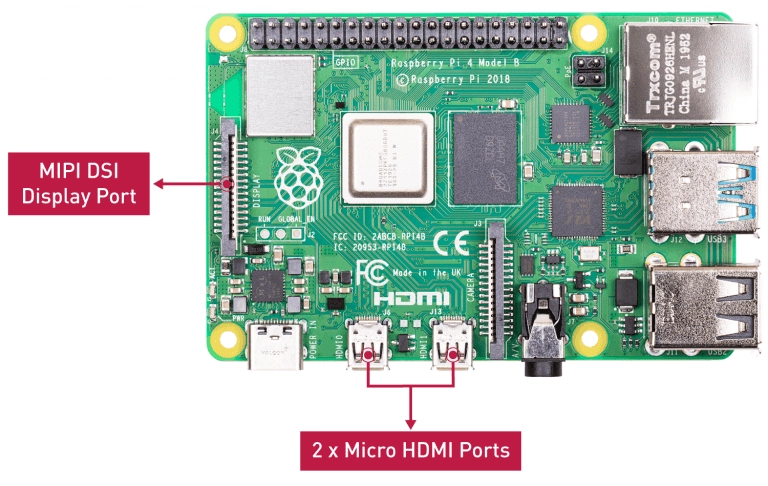
Как работает порт MIPI DSI на Raspberry Pi?
Порт MIPI DSI является высокоскоростным серийным интерфейсом. На Raspberry Pi он использует одну часовую полосу плюс несколько полос данных (обычно 4) для передачи видеокадров и пакетов команд / управления с графического процессора на IC драйвера дисплея. Данные передаются через гибкий плоский кабель (FFC) или аналогичный разъем, а интерфейс поддерживает два режима: низкую мощность (LP) для команд и высокую скорость (HS) для фактического потока видео.
На моделях Raspberry Pi (от Pi 1 до Pi 4) используется 15-разрядный разъем DSI с маркировкой DSI1. Новый Pi 5 расширяет гибкость использования и управления полосами DSI. В отличие от интерфейсов «plug-and-play», таких как HDMI, порт DSI требует точного аппаратного подключения, правильных рельсов питания для панели / фонового освещения и правильных накладок дерева устройств и драйверов для поддержки программного обеспечения.
Какие типичные приложения для порта Raspberry Pi MIPI DSI?
Этот интерфейс идеально подходит для компактных встроенных дисплеев, где пространство, мощность и форм-фактор имеют значение. Примеры включают:
Официальные сенсорные дисплеи Raspberry Pi или совместимые панели.
Промышленные встроенные системы, использующие Raspberry Pi в качестве контроллеров HMI (человеко-машинный интерфейс).
Пользовательские модули LCD / OLED, адаптированные для киосков, устройств IoT или портативного прибора.
Носимые устройства, портативные консоли или решения для приборной панели, где важно высокое разрешение и эффективная передача данных.
Kadi Display, как производитель и поставщик ЖК/OLED модулей (охватывающих промышленные, медицинские и встроенные рынки), предлагает совместимые с MIPI DSI панели, предназначенные для беспрепятственной интеграции с Raspberry Pi и аналогичными хост-платами.
Как MIPI DSI дисплей подключен к Raspberry Pi?
Подключение аппаратного обеспечения требует тщательного внимания:
FFC (плоский гибкий кабель) должен быть выравниван и закреплен к разъему DSI Pi - проводящие контакты должны точно соответствовать.
Панель дисплея часто нуждается в отдельных линиях питания (для фонового освещения, платы драйвера), подключенных через GPIO или специальную силовую рельсу.
Поскольку разъемы различаются между производителями панелей, может потребоваться адаптерная плата для адаптации кабеля FPC экрана к порту DSI Pi.
Установки и монтажное оборудование должны закреплять панель и избегать механического напряжения на разъеме FFC.
Kadi Display предлагает интегрированные комплекты и адаптерные решения, облегчающие механическую и электрическую интеграцию в системы Raspberry Pi.
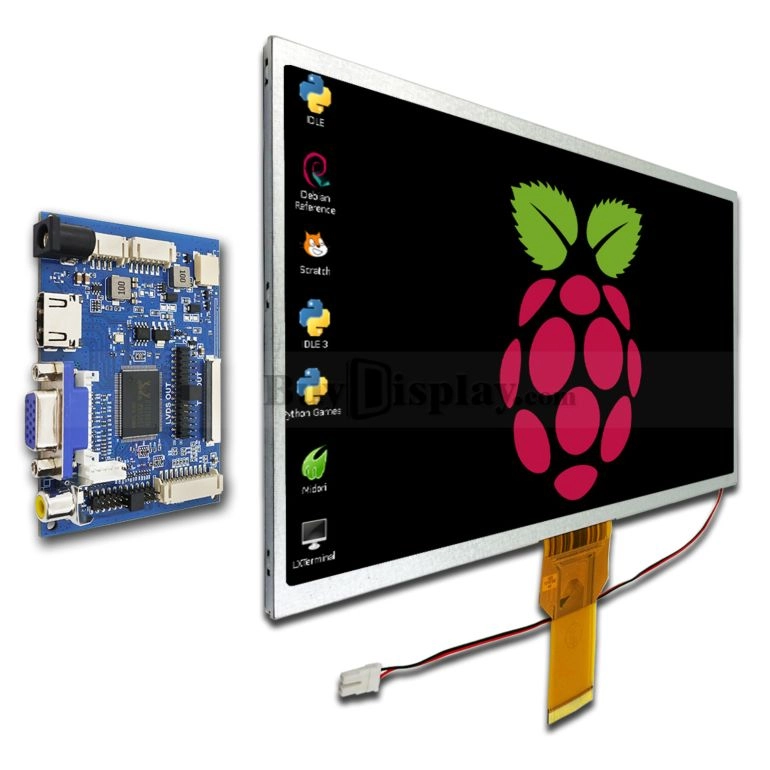
Почему конфигурация программного обеспечения имеет решающее значение для использования порта MIPI DSI?
В отличие от HDMI, которая обычно автоматически определяет разрешение и время, MIPI DSI требует явной конфигурации. Ядро Linux, работающее на Raspberry Pi, нуждается в правильных накладках дерева устройств (DTO), указывающих разрешение, параметры времени, количество полос, детали IC драйвера и другие параметры панели. Если дерево устройства не настроено должным образом, панель может оставаться пустой или показать артефакты. В некоторых случаях требуемый драйвер дисплея или драйвер моста (например, для преобразования из одного интерфейса в DSI) должен быть скомпилирован и загружен.
Кроме того, управление подсветкой, сенсорный вход (если применимо) и другие функции панели должны быть калибрированы с помощью программного обеспечения и настроены в рамках ОС. Kadi Display поддерживает клиентов через интеграцию драйверов и руководство программным обеспечением для беспрепятственного развертывания.
Какие проблемы распространены при использовании MIPI DSI на Raspberry Pi?
К числу общих проблем относятся:
Отсутствие отображения изображения из-за неправильно выравниваемого лентового кабеля или свободного разъема.
Неправильное питание панели/фонового освещения.
Отсутствие или неправильное перекрытие дерева устройства, приводящее к неподдерживаемой конфигурации времени или полосы.
Несовместимость драйвера или отсутствие драйвера моста/чипа.
Функции сенсорного экрана не работают, потому что сенсорный контроллер I2C или SPI не настроен.
Различия между производителями дисплеев, требующими адаптерных плат или перепроектирования.
Инженерная поддержка Kadi Display помогает клиентам преодолеть эти проблемы, опираясь на опыт производства в промышленных / медицинских дисплеях.
Как MIPI DSI и другие дисплейные интерфейсы Raspberry Pi сравниваются?
Raspberry Pi поддерживает несколько дисплейных интерфейсов: HDMI, DPI (параллельный) и MIPI DSI. У каждого есть компромиссы:
HDMI: Универсальный, легкий в принятии, но более громоздкий кабель, большее потребление энергии и может не подходить для очень компактных встроенных конструкций.
DPI (Параллельный RGB): Использует больше шпильков GPIO, большой проводный узел; менее эффективный для мощности или компактности.
MIPI DSIМинимальная проводка, высокая скорость передачи данных, эффективная иерархия, идеальная для компактных встроенных дисплеев. Это оптимальный выбор для интеграции с высоким разрешением и низкой мощностью в встроенные системы.
Для проектов, требующих элегантных форм-факторов, промышленных характеристик или низкого энергопотребления, MIPI DSI выделяется. Kadi Display предлагает панели (TFT-LCD, AMOLED) и аксессуары, адаптированные к DSI, HDMI и другим интерфейсам, обеспечивая гибкость в различных приложениях.
Может ли MIPI DSI поддерживать сенсорные экраны на Raspberry Pi?
Да, многие панели DSI включают емкостные или сопротивляющие сенсорные накладки. Сенсорный контроллер обычно общается через I2C или SPI. Для полной интерактивности необходима правильная конфигурация сенсорного драйвера вместе с драйвером дисплея. Комплекты Kadi Display часто объединяют сенсорные входные модули, платы драйверов и соответствующие разъемы, предлагая «единые» решения для дисплея для промышленных или встроенных дизайнеров.
Каковы последние тенденции в технологии дисплея MIPI DSI?
Недавние достижения включают:
4-полосные и 8-полосные соединения DSI, поддерживающие разрешения 4K в компактных встроенных системах.
Гибкие и складные OLED-панели с использованием интерфейсов DSI для носимых устройств.
Поддержка HDR, панели с более высокой яркостью и тенденции к ультраузким рамкам в промышленных дисплеях
Улучшенные режимы энергосбережения в стандарте MIPI для снижения потребления в режиме ожидания.
Улучшенные программные рамки и накладки ядра для облегчения интеграции на Raspberry Pi и других SBC.
В рамках своей производственной базы Kadi Display инвестирует в передовые технологии и индивидуальные дисплейные модули, позволяющие OEM-производителям, интеграторам промышленных систем и медицинским дизайнерам с уверенностью использовать новейшие стандарты интерфейса.
Экспертный взгляд от Kadi Display
«MIPI DSI является преобразованием в интеграции дисплея - он позволяет компактным, высокопроизводительным решениям, одновременно снижая сложность кабелей и потребление электроэнергии. В Kadi Display мы сосредоточены на производстве панелей, которые сочетают точную инженерию с беспрепятственной интеграцией, поддерживаемой полной технической поддержкой. Этот подход позволяет OEM-производителям, интеграторам промышленных систем и конструкторам встроенных систем продвигать свою продукцию вперед».
Резюме и практические советы
Порт MIPI DSI на Raspberry Pi является ключевым фактором для интеграции дисплея с высоким разрешением и низкой мощностью в встроенные и промышленные системы. Чтобы добиться успеха: обеспечить точное подключение аппаратного обеспечения, стабильное и правильное питание и надежную конфигурацию программного обеспечения, включая надлежащие накладки деревьев устройств или драйверы. При выборе модулей дисплея выберите надежного поставщика / производителя, предлагающего комплекты механических адаптеров, платы драйверов и поддержку интеграции.
Выбор панелей от производителя дисплея, такого как Kadi Display, обеспечивает доступ к стандартизированным промышленным и медицинским модулям дисплея (TFT-LCD, AMOLED, сенсорный), поддерживаемым системами качества (ISO9001, ISO13485, IATF16949) и прямой поставкой на завод из Шэньчжэня.
Часто задаваемые вопросы
1. Что такое порт MIPI DSI на Raspberry Pi?
Это высокоскоростный серийный интерфейс, который соединяет ЖК/OLED-панели непосредственно с графическим процессором Raspberry Pi для эффективной передачи видеоданных.
2. Почему не MIPI DSI плаг-энд-плей как HDMI?
Потому что для этого требуются конкретные драйверы панелей, накладки дерева устройств и правильное выравнивание аппаратного обеспечения и питание.
3. Можно ли использовать сенсорные экраны с MIPI DSI на Raspberry Pi?
Да, сенсорная функция работает, когда контроллер сенсорного экрана (обычно I2C или SPI) правильно настроен рядом с драйвером дисплея.
4. Что делать, если не появляется изображение после подключения панели к DSI?
Проверьте выравнивание лентового кабеля, питание дисплея/подсветки, настройки накладки дерева устройства и совместимость драйвера панели.
5. Предоставляет ли Kadi Display модули, совместимые с MIPI DSI для Raspberry Pi?
Да — Kadi Display производит промышленные и встроенные модули дисплея (TFT-LCD, AMOLED, сенсорные панели) с вариантами интерфейса, включая DSI, что делает их подходящими для Raspberry Pi и других SBC.
Партнер с Kadi Display для индивидуальных решений MIPI DSI
Являясь ведущим производителем, поставщиком и заводом, специализирующимся на промышленных и медицинских дисплеях, Kadi Display приглашает OEM-производителей, системных интеграторов и поставщиков дисплеев сотрудничать в разработке индивидуальных панелей MIPI DSI для проектов Raspberry Pi. Используйте наш 20-летний опыт, сертифицированное ISO производство и настройку без MOQ, включая модули IPS/AMOLED с высокой яркостью, сенсорные интеграции и адаптерные платы, чтобы ускорить время выхода на рынок и повысить надежность продукта.
Свяжитесь с командой продаж Kadi Display сегодня в sales@sz-kadi.com или 86-13662585086 для бесплатной консультации, листа данных и цитаты.
Предыдущий
ЖК-алфавитный суп: понимание типов технологии ЖК
Следующая
Ключевые различия между IPS и OLED-дисплеями объяснены
Оставить комментарий

Последние блоги и новости
Блог и новости
-
 TN против IPS2024-7-9
 -
 TN против IPS2024-7-9