




Écran tactile officiel Raspberry Pi vs écran industriel Raspberry Pi
2026-06-02
16:02
Écran tactile officiel Raspberry Pi vs écran industriel Raspberry Pi :
Lequel choisir ?
Comparaison pratique des projets Raspberry Pi IHM, bornes interactives, systèmes de contrôle embarqués, affichage dynamique et écrans tactiles industriels robustes
Par l'équipe technique de Kadi Display | www.kadidisplay.com
La vraie question : s’agit-il d’un écran de projet ou d’un écran de produit ?
L'écran tactile officiel Raspberry Pi est l'un des moyens les plus simples d'ajouter une interface graphique à un Raspberry Pi. Compact et compatible avec Raspberry Pi OS, il est conçu pour des projets interactifs tels que les tablettes, les tableaux de bord, les systèmes d'apprentissage et les petits panneaux embarqués. L'écran tactile Raspberry Pi 2 est actuellement disponible en versions 5 et 7 pouces. Il utilise un écran LCD TFT 720 × 1280, prend en charge le tactile capacitif à cinq points, possède une surface antireflet et se connecte uniquement via l'alimentation du connecteur GPIO et une nappe DSI. Pour les prototypes, les instruments de laboratoire, les kits pédagogiques et les tableaux de bord d'intérieur, cette simplicité est un atout précieux.
Un écran industriel pour Raspberry Pi répond à une question différente. Il ne s'agit pas simplement d'un écran compatible avec un Raspberry Pi. C'est un système d'affichage conçu pour l'intégration en boîtier, un fonctionnement continu (24 h/24 et 7 j/7), des câbles plus longs, une luminosité supérieure, un collage optique, une vitre de protection plus épaisse, des exigences tactiles industrielles, un fonctionnement sur une large plage de températures, des panneaux avant étanches et, parfois, une interface tactile HDMI et USB ou MIPI DSI personnalisée. De ce fait, la comparaison porte moins sur le choix d'une marque que sur les risques liés au déploiement.
Cet article s'appuie sur quatre critères de décision : l'environnement, l'interface, l'intégration mécanique et la durée de vie. L'objectif n'est pas de désigner une option comme étant universellement meilleure, mais d'aider les ingénieurs à déterminer quand l'écran tactile officiel Raspberry Pi est suffisant et quand un écran Raspberry Pi industriel s'avère plus sûr.
Spécifications de base : ce que l’écran officiel offre réellement
L'écran tactile officiel Raspberry Pi Touch Display 2 offre aux développeurs un point de référence clair. Sa fiche produit le décrit comme un écran tactile vertical pour les projets interactifs Raspberry Pi, disponible en versions 5 et 7 pouces. Ses principales caractéristiques comprennent un format RGB 24 bits, une résolution de 720 × 1280, un écran LCD TFT transmissif normalement noir, une dalle tactile capacitive multipoint et une surface antireflet. La fiche technique indique une luminosité de rétroéclairage de 500 cd/m², un temps de réponse tactile typique de 35 ms, un angle de vision de 80° pour le modèle 5 pouces et de 85° pour le modèle 7 pouces, ainsi qu'une plage de températures de fonctionnement de -20 °C à +70 °C.
Ces chiffres sont excellents pour un accessoire officiel Raspberry Pi. Un écran de 500 nits offre une luminosité supérieure à celle de nombreux petits écrans HDMI grand public et convient parfaitement aux bureaux, salles de classe, panneaux de contrôle intérieurs, tableaux de bord muraux et à de nombreuses pièces semi-éclairées. Sa surface antireflet le rend également plus pratique qu'un module brillant bas de gamme. La prise en charge logicielle officielle constitue un autre atout majeur : Raspberry Pi OS fournit des pilotes pour écran tactile et un clavier virtuel, simplifiant ainsi le développement pour les applications courantes.
La limitation réside dans le fait que l'écran officiel reste un accessoire embarqué standard, et non un panneau IHM industriel robuste. Il n'est pas commercialisé comme un module frontal certifié IP, un écran de protection antivandalisme, un moniteur extérieur lisible en plein soleil, une interface d'atelier résistante à l'huile, ni une IHM de production étanche. Pour une utilisation en intérieur contrôlée, cela peut ne pas avoir d'importance. En revanche, pour les projets IHM industriels basés sur Raspberry Pi, c'est souvent le cas.
Que change-t-il lorsque l'écran devient industriel ?
La conception d'un écran industriel pour Raspberry Pi est pensée en fonction de son environnement de travail. Au lieu de se demander : « Affichera-t-il un bureau Raspberry Pi ? », l'ingénieur se demande : « L'opérateur pourra-t-il toujours lire les alarmes après deux ans dans un environnement chaud ? », « L'écran tactile est-il utilisable avec des gants ? », « L'interface utilisateur sera-t-elle illisible en plein soleil ? » et « La vitre avant résistera-t-elle aux produits de nettoyage et aux chocs occasionnels ? »
Les solutions industrielles se distinguent généralement sur six points. Premièrement, la luminosité peut varier de 300 à 500 nits pour les écrans d'intérieur à plus de 800, 1 000, 1 500 voire 2 000 nits pour les équipements haute luminosité ou d'extérieur. Kadi Display indique que nombre de ses produits… écrans à haute luminosité La luminosité peut dépasser 800 cd/m², certaines atteignant même 2 500 cd/m². Deuxièmement, le collage optique permet de supprimer l'espace d'air entre les couches, réduisant ainsi la réflexion, améliorant la réactivité tactile et empêchant la pénétration de poussière ou d'humidité. Troisièmement, le verre de protection peut être personnalisé en termes d'épaisseur, de forme des bords, d'impression d'une bordure noire, de revêtement AG/AR/AF et de fixation mécanique.
Quatrièmement, les options d'interface sont plus nombreuses. écrans industriels Raspberry Pi DSI-MIPI est utilisé pour les conceptions embarquées compactes, tandis que d'autres privilégient HDMI pour une compatibilité universelle et USB ou I2C pour le tactile. Cinquièmement, l'intégration mécanique est plus flexible : modules à cadre ouvert, boîtiers métalliques, joints d'étanchéité de la façade, supports de montage et câbles FPC personnalisés peuvent être disponibles. Sixièmement, le cycle de vie du produit et le support fournisseur peuvent être gérés dans le cadre d'un projet OEM plutôt que comme un simple achat d'accessoire pour makers.
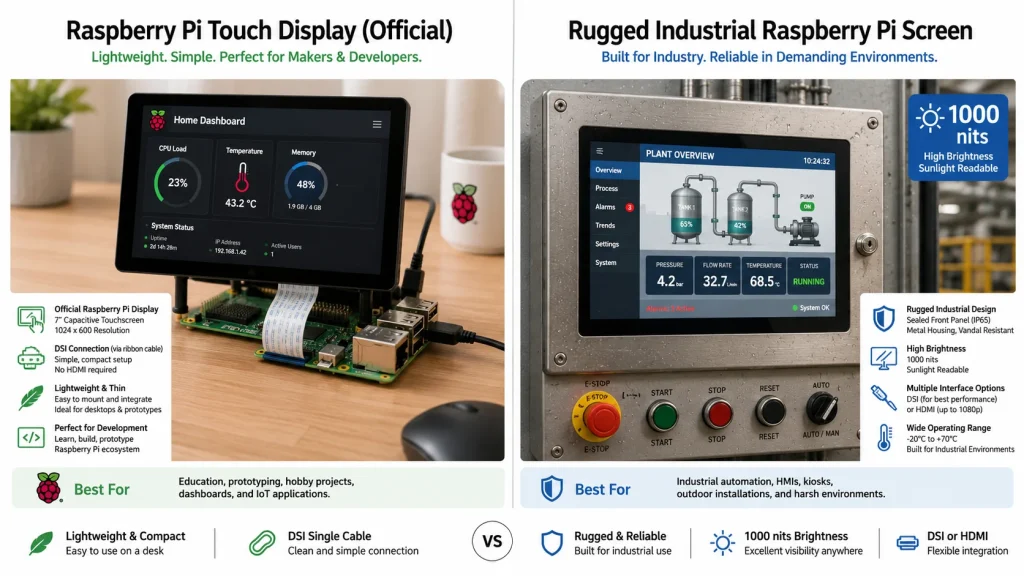
Écran tactile officiel Raspberry Pi vs écran industriel Raspberry Pi — Comparaison pratique
Choix de l'interface : la praticité du DSI contre la flexibilité du HDMI
L'écran officiel Raspberry Pi utilise le connecteur DSI, ce qui simplifie l'installation et évite d'utiliser un port HDMI. Pour un écran unique dans un appareil compact, c'est un avantage certain. La connexion est également bien documentée : alimentation par GPIO et câble plat vers le port DSI. Cependant, le DSI présente une limitation importante pour les personnalisations. Il n'est pas aussi universellement compatible « plug-and-play » que l'HDMI, et les écrans DSI personnalisés nécessitent souvent un brochage, une configuration des voies, des données de synchronisation et une superposition de l'arbre de périphériques adaptés.
Affichage de Kadi’ s Guide DSI pour Raspberry Pi Il est à noter que Raspberry Pi propose des interfaces d'affichage HDMI, DPI et MIPI DSI, mais il est également précisé que le DSI n'est généralement pas aussi simple à utiliser que le HDMI et peut nécessiter une configuration précise du protocole, du brochage et des pilotes. C'est pourquoi certains projets industriels privilégient une connexion HDMI tactile USB : le câble est plus volumineux, mais l'affichage se comporte davantage comme un moniteur standard, ce qui facilite le remplacement, l'extension, les tests et l'intégration avec différentes plateformes SBC telles que Raspberry Pi, Jetson ou les contrôleurs x86.
Pour les petits produits embarqués, le DSI peut être la solution la plus propre. Moniteurs tactiles industrielsPour les interventions sur site, les longs câbles ou les plateformes de contrôle mixtes, l'HDMI est souvent privilégié. L'interface idéale est celle qui correspond au modèle de maintenance, et non pas seulement à la phase de prototypage.
Luminosité : 500 nits, c’est bien, mais pas toujours suffisant.
La luminosité est la principale raison pour laquelle les utilisateurs passent d'un écran tactile officiel Raspberry Pi à un écran industriel Raspberry Pi. Un écran de 500 nits offre un confort d'utilisation optimal en intérieur et surpasse de nombreux écrans bas de gamme de 250 à 300 nits. Il convient parfaitement à un bureau d'entrepôt, un chariot d'instruments, un thermostat mural, un tableau de bord domotique ou une borne interactive. En revanche, les écrans industriels lisibles en plein soleil sont soumis à des conditions optiques beaucoup plus difficiles.
Un écran installé dans une borne de recharge pour véhicules électriques, un terminal de billetterie extérieur, une porte de quai d'usine, une cabine de véhicule ou un système de contrôle de serre peut être exposé à la lumière directe ou indirecte du soleil. Dans ces conditions, l'affichage doit non seulement faire face à l'éclairage ambiant, mais aussi aux reflets du ciel et de la lumière solaire sur la vitre de protection. Les écrans industriels résolvent ce problème grâce à une luminosité accrue, un collage optique et un traitement de surface. Un écran industriel de 1 000 nits, collé optiquement, offre une meilleure lisibilité qu'un écran plus lumineux mais brillant, car il réduit la lumière réfléchie à la source.
Pour une interface homme-machine (IHM) industrielle Raspberry Pi, les niveaux de luminosité pratiques sont simples : 300 à 500 nits pour les environnements intérieurs à luminosité contrôlée, 700 à 1 000 nits pour les applications intérieures ou semi-extérieures lumineuses, et 1 500 à 2 000 nits pour une exposition directe au soleil ou des installations extérieures difficiles. L’écran officiel Raspberry Pi se situe principalement dans le premier niveau et à la limite inférieure du second.
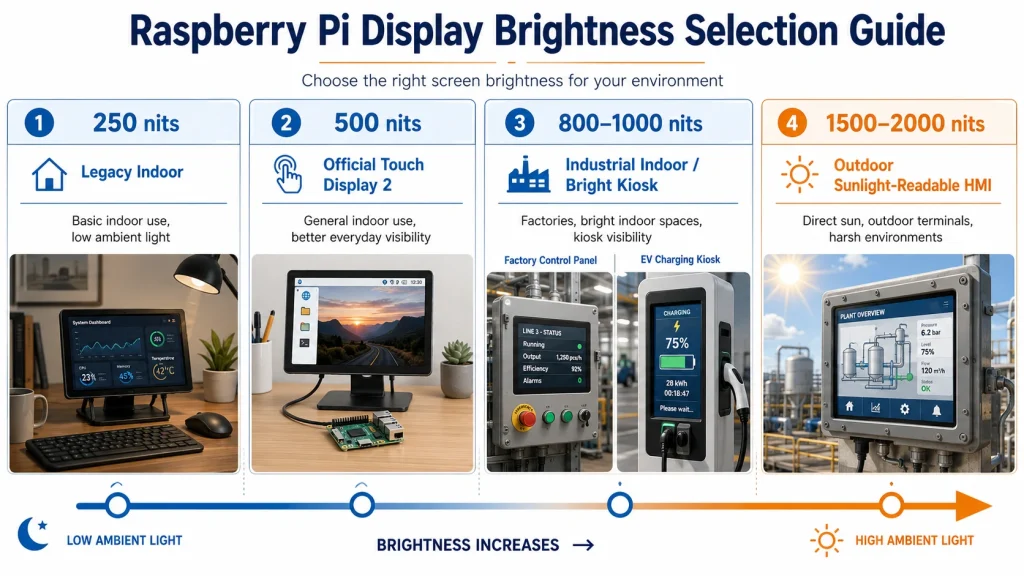
Matrice d'adéquation aux cas d'utilisation
Performances tactiles : le toucher du doigt n’est pas identique au toucher industriel
L'écran tactile officiel Raspberry Pi prend en charge le multitouch capacitif et fonctionne parfaitement avec Raspberry Pi OS. Pour une utilisation normale dans un environnement intérieur sec, il répond parfaitement aux besoins de la plupart des utilisateurs. En revanche, une utilisation tactile industrielle peut engendrer divers problèmes : doigts mouillés, gants épais, poussière conductrice, résidus de produits de nettoyage, interférences électromagnétiques des moteurs, problèmes de mise à la terre, longs câbles USB, cadres métalliques et vitre de protection plus épaisse.
Les écrans PCAP industriels sont souvent paramétrés au niveau du micrologiciel du contrôleur. Le fournisseur peut ajuster la sensibilité, le filtrage du bruit, la détection de la paume, le mode gants ou la protection contre l'eau en fonction de l'application. Une interface homme-machine (IHM) pour l'agroalimentaire et un écran pour véhicule minier n'ont pas les mêmes exigences en matière de comportement tactile. L'une peut privilégier la résistance au nettoyage ; l'autre, l'utilisation avec des gants et la stabilité aux vibrations.
Cela ne signifie pas que l'affichage officiel est de faible qualité. Cela signifie qu'il est optimisé pour un environnement Raspberry Pi connu, et non pour tous les panneaux frontaux industriels possibles. Lorsque l'écran tactile fait partie d'une interface critique pour la sécurité ou d'une ligne de production, son réglage mérite une spécification dédiée.
Intégration mécanique : le coût caché d’un écran bon marché
Un écran qui semble peu coûteux sur la nomenclature peut s'avérer onéreux lors de la conception du boîtier. L'écran tactile officiel Raspberry Pi est compact et parfaitement adapté aux boîtiers amateurs et aux supports personnalisés, mais les machines industrielles nécessitent généralement des trous de fixation précis, une étanchéité frontale, une compression du joint, un système anti-traction des câbles, une protection des bords de la vitre de protection et des tolérances d'assemblage reproductibles.
Les écrans industriels pour Raspberry Pi peuvent être livrés sous forme de modules à cadre ouvert, d'écrans à montage sur panneau ou d'assemblages personnalisés. Un fournisseur peut ajuster les dimensions de la vitre de protection, la zone d'impression, la quantité d'adhésif, la longueur du circuit imprimé flexible, l'orientation des connecteurs et la conception du boîtier. Ces détails sont souvent négligés lors de la phase de prototypage, mais ils déterminent si le produit peut être assemblé de manière fiable par un opérateur plutôt que par l'ingénieur qui l'a conçu.
La règle est simple : si l’écran est destiné à un usage unique, un écran standard peut suffire. En revanche, s’il est intégré à une centaine d’armoires, de bornes interactives ou de machines, un écran industriel peut s’avérer plus économique qu’on ne le dépense.
Fiabilité et durée de vie : le succès d'un prototype ne garantit pas son succès sur le terrain.
Les projets Raspberry Pi font souvent leurs preuves rapidement. Un prototype démarre, l'interface tactile fonctionne, le tableau de bord est clair et le client apprécie la démonstration. La question cruciale est de savoir ce qui se passe après des milliers d'heures d'utilisation. Le vieillissement du rétroéclairage, les contraintes exercées sur les connecteurs, l'accumulation de chaleur, les vibrations, l'humidité, la poussière, les mouvements des câbles et les mises à jour logicielles deviennent autant de facteurs qui influencent la fiabilité.
La documentation officielle de l'ancien écran tactile indique une durée de vie du rétroéclairage de 20 000 heures, une température de fonctionnement de -20 °C à +70 °C et une luminosité moyenne de 250 cd/m². La fiche produit plus récente de l'écran tactile 2 mentionne une luminosité de 500 cd/m² et une température de fonctionnement de -20 °C à +70 °C. Ce sont des valeurs tout à fait acceptables pour un accessoire Raspberry Pi. Cependant, les projets d'affichage industriels peuvent nécessiter une durée de vie du rétroéclairage de 30 000 à 50 000 heures, un collage optique, des options de luminosité plus étendues et un support fournisseur pour le remplacement des panneaux ou une production à long terme.
Pour un poste de laboratoire isolé, le remplacement sur site est acceptable. Pour un réseau de bornes interactives publiques ou un système d'automatisation industrielle, il ne l'est pas. Choisissez l'écran en tenant compte non seulement de son prix actuel, mais aussi du coût du diagnostic et du remplacement ultérieur des unités défectueuses.
Liste de contrôle pour la décision — Quel écran Raspberry Pi choisir ?
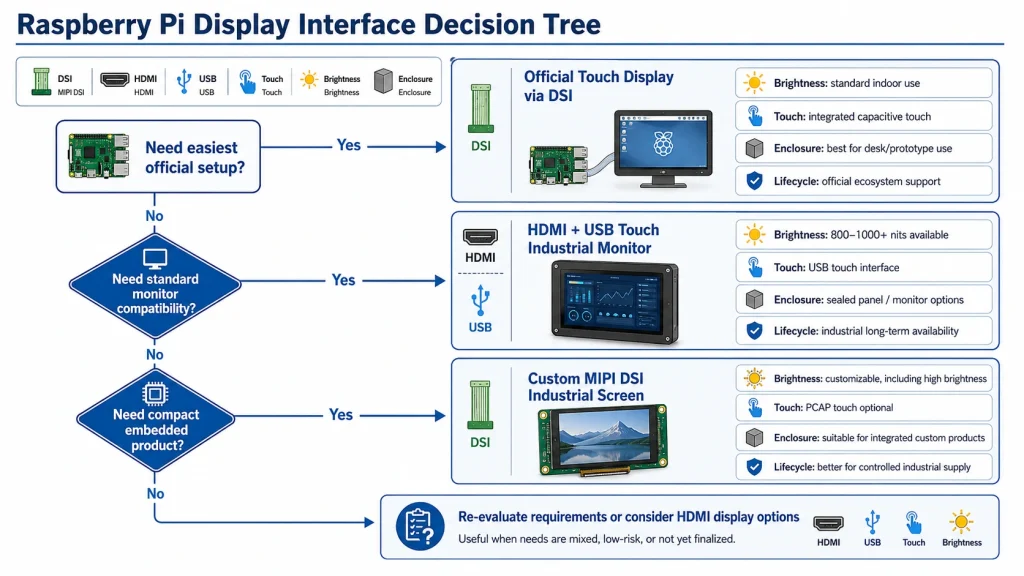
Recommandation finale — Choisissez en fonction du risque, et non de la taille de l’écran
Optez pour l'écran tactile officiel Raspberry Pi si votre projet est destiné à une utilisation en intérieur, est compact, économique, piloté par logiciel et proche de l'écosystème Raspberry Pi. Il convient parfaitement aux prototypes, aux dispositifs éducatifs, aux tableaux de bord domotiques, aux panneaux de laboratoire et aux produits embarqués légers où une luminosité de 500 nits, la compatibilité avec les logiciels propriétaires et un câblage DSI simple sont plus importants qu'une personnalisation robuste.
Optez pour un écran industriel Raspberry Pi lorsque l'affichage est intégré à une machine, une borne interactive ou un produit destiné à la vente. Si l'application requiert une luminosité supérieure, un collage optique, une vitre de protection personnalisée, une étanchéité frontale, une compatibilité tactile avec les gants, une compatibilité HDMI, un fonctionnement sur une large plage de températures ou une longue durée de vie, le choix d'un écran industriel n'est pas un surdimensionnement, mais une maîtrise des risques.
Le meilleur comparatif d'écrans pour Raspberry Pi ne se fait donc pas entre produits officiels et tiers, mais plutôt entre accessoires de projet et composants du produit. Dès lors que l'écran doit résister aux conditions réelles d'utilisation, à la lumière du soleil, aux boîtiers et aux cycles de maintenance, un écran tactile industriel pour Raspberry Pi s'avère être le choix le plus professionnel.
Notes de source
Page produit de l'écran tactile Raspberry Pi 2 : https://www.raspberrypi.com/products/touch-display-2/
Présentation du produit Raspberry Pi Touch Display 2 : https://pip.raspberrypi.com/documents/RP-009106-MM-touch-display-2-product-brief.pdf
Documentation relative à l'écran tactile Raspberry Pi : https://www.raspberrypi.com/documentation/accessories/display.html
Catégorie d'écrans Kadi Display pour Raspberry Pi : https://www.kadidisplay.com/product_category/displays-for-raspberry-pi/
Guide de l'écran Kadi Display MIPI DSI pour Raspberry Pi : https://www.kadidisplay.com/blog-news/how-to-connect-a-mipi-dsi-lcd-display-to-a-raspberry-pi/
Guide des connecteurs Kadi Display HDMI vs DSI pour Raspberry Pi : https://www.kadidisplay.com/blog-news/hdmi-micro-hdmi-vs-dsi-raspberry-pi-4-display-connectors/
Page produit Kadi Display haute luminosité DSI-MIPI : https://www.kadidisplay.com/products/10-1-inch-wide-temperature-and-high-brightness-lcd-screen-4/
Clause de non-responsabilité
Cet article est une ébauche technique et SEO destinée à la planification de sa publication. Raspberry Pi est une marque déposée de Raspberry Pi Ltd. Les noms de produits et les marques commerciales appartiennent à leurs propriétaires respectifs. Les spécifications citées sur les pages produits publiques et les fiches produits peuvent être modifiées ; veuillez vérifier les fiches techniques, les déclarations de conformité, la disponibilité, les limites de fonctionnement et les conditions de garantie auprès du fabricant ou du fournisseur d'origine avant la mise en production de la conception finale. Les recommandations relatives aux écrans industriels sont données à titre indicatif et doivent être validées en fonction du boîtier, de la lumière ambiante, des conditions thermiques, de l'alimentation, de la pile logicielle et des exigences réglementaires propres à chaque projet.
Précédent
Présentoirs industriels sur mesure ou présentoirs standard : lequel est le meilleur pour les projets B2B ?
Suivant
Comment choisir un écran MIPI DSI haute luminosité pour les applications industrielles Raspberry Pi
Laisser un commentaire

Derniers blogs et nouvelles
- Industrial LCD EOL: What Happens from Pre-Announcement to Replacement Mass Production?
- Electronic Component Obsolescence Management for Industrial Displays: An OEM Guide
- How to Develop a Production Ready Custom Display Assembly TFT Module Touch Cover Glass FPC Bonding and Mounting
- 15 Pin vs 22 Pin Raspberry Pi DSI Connectors Cable Pinout and Compatibility
- Native MIPI DSI vs LVDS or HDMI Bridge: An OEM Display Architecture Decision Guide

