



BLOG & NOUVELLES
Accueil
-
Blog & Actualités
-
Guide de sélection LCD de 7 pouces: 800×480 à FHD | Affichage DSI RVB/LVDS/MIPI | Kadi

Le choix d'un écran de 7 pouces ne se limite pas à la taille diagonale. Dans les projets réels, le « bon » choix dépend compatibilité de l'interface, résolution/densité de l'interface utilisateuret la rapidité de l'intégration (module uniquement, tactile ou carte plug-and-play). Si vous recherchez un Affichage MIPI de 7 poucesVous voulez probablement moins de câbles, une résolution plus élevée et une configuration intégrée propre, mais vous devez également éviter les risques de pilote / chronométrage qui peuvent retarder votre calendrier.
Dans ce guide, nous suivrons un processus pratique utilisé par les équipes intégrées : choisir l'interface → choisir la résolution/le type de panneau → choisir le facteur de forme → confirmer le support de la plateforme (Raspberry Pi/Toradex)À la fin, vous aurez une direction claire et une liste de contrôle pour obtenir une recommandation rapide de notre équipe.
Les écrans de 7 pouces sont largement adoptés parce qu'ils équilibrent la lisibilité et l'intégration mécanique. Ils sont assez grands pour des boutons tactiles confortables et des polices claires, mais assez compacts pour s'adapter aux instruments portables et aux boîtiers serrés. Les applications courantes incluent:
HMI et panneaux de commande industriels
Terminaux portatifs et outils de terrain
Instrumentation et équipement d'essai
Dispositifs médicaux / de laboratoire
Terminaux intelligents et démonstrations d'interface utilisateur intégrée
Chez Kadi Display, nous nous concentrons fortement sur le 7 pouces, offrant de vastes combinaisons d'interface et de résolution ainsi que de multiples niveaux d'intégration: TFT-LCD, TFT Touchet Carte TFT Touch HDMICela est important parce que de nombreux retards ne se produisent pas parce que le panneau est faux, mais parce que le facteur de forme d’intégration ne correspond pas à votre calendrier de projet.
| 800×480 | 1024 × 600 | 1280×768 | 1280 × 800 | 1920 × 1080 | 800×1280 | 1080 × 1920 | 1200×1920 | |
| RVB | √ | √ | ||||||
| LVDS | √ | √ | √ | √ | ||||
| MIPI | √ | √ | √ | √ | ||||
| EDP | √ |
Votre choix d'interface détermine la complexité du routage, le risque d'EMI et la charge de travail du logiciel. Commencez ici d'abord.
Le RVB est souvent choisi pour les conceptions d'entrée de gamme où le coût est sensible et la résolution est modérée. C’est simple, mais il nécessite plus de signaux et un routage prudent, mieux lorsque la distance entre le SoC et l’écran est courte.
Meilleur pour : 800×480 UI, HMI simple, routage court
Options de Kadi:
7 et 8243; 800×480 TN RVB
7 et 8243; 800×480 IPS RVB
7″ 1024×600 RVB
LVDS est une option solide lorsque votre appareil fait face à du bruit, à un routage de câbles plus long ou à des environnements industriels. Il améliore généralement l'intégrité du signal par rapport au RVB parallèle dans les installations difficiles.
Meilleur pour : armoires industrielles, routage plus long, stabilité
Options de Kadi:
7 et 8243; 800×480 IPS LVDS
7″ 1024 × 600 LVDS
Un Affichage MIPI de 7 pouces en utilisant MIPI DSI est idéal pour les systèmes embarqués compacts et l'interface utilisateur premium. MIPI DSI réduit le câblage et prend en charge des résolutions plus élevées, mais le succès dépend du timing correct du panneau et du support de la plate-forme, en particulier pour les projets Raspberry Pi et Toradex.
Meilleur pour : SoC modernes, design de câble compact, résolutions supérieures
Options de Kadi:
7″ 1024x600 MIPI
7 et 8243; 800×1280 MIPI DSI
7 et 8243; 1200×1920 MIPI DSI (En cellule)
7″ 1080×1920 (FHD) MIPI DSI (AMOLED)
Une fois que la direction de l'interface est claire, choisissez la résolution en fonction de la densité de l'interface utilisateur et des exigences de visualisation.
TN est rentable pour les interfaces de base et les angles de vision contrôlés.
IPS offre de meilleurs angles de vision et couleur cohérence, recommandé pour les produits orientés vers l'utilisateur.
1024×600 est souvent le choix le plus sûr pour les interfaces HMI industrielles car il équilibre la clarté et le coût tout en offrant des interfaces flexibles.
Si vous avez besoin de performances tactiles et de surfaces frontales solides, ce produit de référence présente une construction prête à l'industrie avec liaison optique.
Lien interne : https://www.kadidisplay.com/products/7-1024600-tft-lcd-display-module-with-backlight-driver-and-ctp-fix30-socket/
Cette résolution est populaire pour les mises en page verticales, les appareils portatifs et les interfaces utilisateur qui bénéficient d'un contenu plus haut et d'une typographie plus serrée.
Si vous voulez une structure plus mince et une expérience tactile intégrée, 1200×1920 In-cell est un excellent choix premium.
Lien interne : https://www.kadidisplay.com/products/7-hdmi-display-module-12001920with-incell-ctp-2300nits/
L'AMOLED est idéal pour les noirs profonds, le contraste élevé et l'impact visuel de qualité supérieure - couramment utilisé lorsque l'apparence du produit et la qualité de l'interface utilisateur sont des différenciateurs clés.
Lien interne :https://www.kadidisplay.com/products/7-0-inch-10801920-on-cell-amoled-moudle/

Même avec la bonne spécification du panneau, le mauvais facteur de forme peut ralentir votre lancement. Kadi soutient trois voies pratiques :
Meilleur lorsque vous avez une équipe matérielle et mécanique forte et que vous voulez un contrôle total.
Meilleur lorsque le toucher est nécessaire et que vous voulez un assemblage plus standardisé pour la production en masse.
Idéal pour une validation rapide et des démonstrations auprès des parties prenantes. Les kits HDMI réduisent généralement le temps d'ingénierie nécessaire pour montrer une interface utilisateur fonctionnelle.
Pour MIPI DSI, le matériel peut être simple tandis que le logiciel peut être le risque caché. C'est pourquoi Kadi fournit Solutions DSI MIPI pour Raspberry Pi et Toradexy compris support du pilote/du timing.
Pour les options Raspberry Pi DSI, vous pouvez parcourir notre catégorie ici:
Lien interne : Affichages pour Raspberry Pi (DSI-MIPI)
Modèle de plateforme (module Raspberry Pi / Toradex)
Résolution cible et orientation (paysage/portrait)
Exigence tactile (aucun / capacitif / In-cell)
Limites de la cible de luminosité et de l'objectif de couverture
Quantité et calendrier du projet
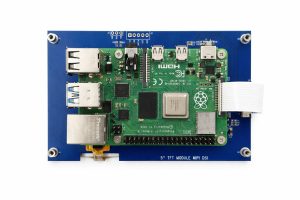
Kadi Display est un spécialiste de l'affichage de 7 pouces avec une large gamme à travers Carte HDMI TFT-LCD / TFT Touch / TFT Touchcouvrant RGB/LVDS et Affichage MIPI de 7 pouces des options allant de 800×480 de niveau d'entrée à In-cell et AMOLED premium. Si vous avez des questions, contactez-nous à tout moment - notre équipe peut vous recommander la solution la plus adaptée et fournir le bon paquet de pilotes pour les projets Raspberry Pi ou Toradex.


