




Schermo per Raspberry Pi per applicazioni nautiche e automobilistiche.
2026-06-10
14:07
Schermo per Raspberry Pi per applicazioni nautiche e automobilistiche.
Perché luminosità, potenza e montaggio sono importanti
A cura del team tecnico di Kadi Display | www.kadidisplay.com
Perché i display Raspberry Pi per imbarcazioni e veicoli sono diversi
Lo schermo di un Raspberry Pi, progettato per funzionare su una scrivania, non è automaticamente pronto per essere utilizzato sulla plancia di comando di una barca, nella cabina di un carrello elevatore, sul cruscotto di un autobus, su un trattore agricolo o su un veicolo di assistenza sul campo. In laboratorio, il display si trova in un ambiente con luce ambientale costante, riceve un'alimentazione stabile da un adattatore e raramente subisce vibrazioni. Nelle applicazioni nautiche e veicolari, lo schermo è esposto alla luce solare da angolazioni variabili, a disturbi elettrici a 12V, a sbalzi di temperatura, all'umidità, agli urti, alla tensione dei cavi e all'utilizzo da parte di utenti che potrebbero indossare i guanti. Il display diventa parte integrante di una macchina operativa, non un accessorio per hobbisti.
Ecco perché il processo di selezione dovrebbe iniziare con tre domande di ingegneria: quanto deve essere luminoso lo schermo, come riceverà un'alimentazione stabile e come verrà montato in modo che resista al movimento? Un display Raspberry Pi a basso costo può essere utile per cruscotti interni e prototipi semplici, ma un HMI affidabile per applicazioni marine o veicolari normalmente richiede un monitor touchscreen industriale, un design di ingresso a 12 V, una retroilluminazione leggibile alla luce del sole e un piano di montaggio meccanico. Per i progetti Raspberry Pi che utilizzano HDMI, Kadi Display Display industriale HDMI da 12,1 pollici con luminosità di 1280-800 nit e leggibile alla luce del sole. rappresenta un punto di partenza più adatto rispetto a un monitor per computer desktop, poiché combina un pannello IPS WXGA, un'elevata luminosità, un ingresso HDMI e l'integrazione dell'alimentazione a 12V.
L'obiettivo non è rendere costoso ogni progetto basato su Raspberry Pi. L'obiettivo è piuttosto quello di concentrare i costi dove è possibile prevenire guasti sul campo. Nelle applicazioni nautiche e veicolari, il display più economico è spesso quello che non necessita di essere sostituito dopo la comparsa di problemi di vibrazioni, riflessi o instabilità di alimentazione durante la prima stagione di utilizzo.
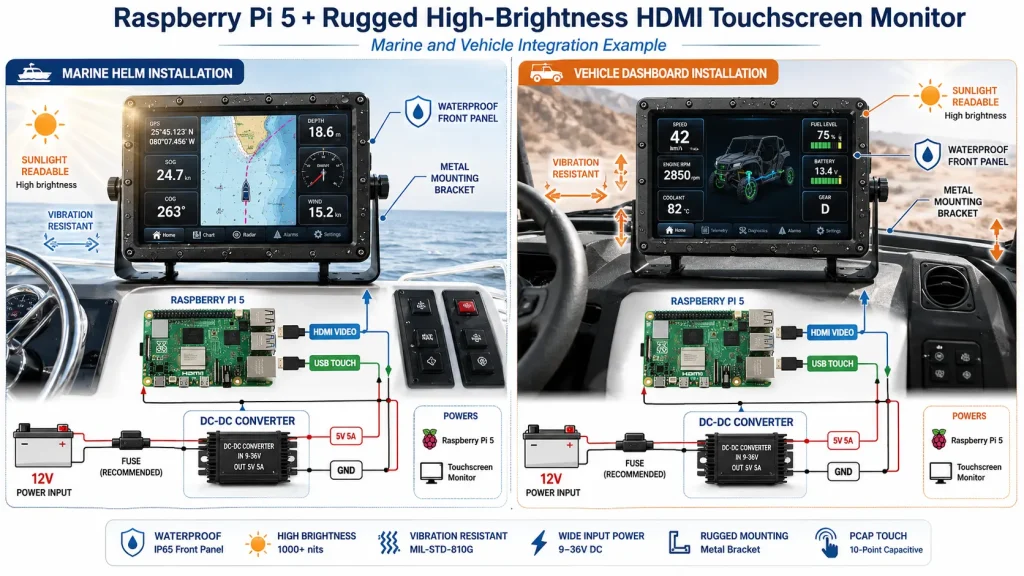
Luminosità: perché 250 nit non sono sufficienti sull'acqua o sulla strada.
La luminosità è la prima differenza visibile tra un monitor Raspberry Pi per uso domestico e un display industriale. Il Raspberry Pi Monitor ufficiale è adatto all'uso su scrivania, mentre il Raspberry Pi Touch Display 2 ufficiale offre 500 cd/m² con trattamento antiriflesso e un intervallo di temperatura di funzionamento da -20 °C a +70 °C. Questi valori sono utili per pannelli di controllo integrati e chioschi per interni, ma le installazioni in ambito nautico e veicolare possono essere soggette a una luce ambientale molto più elevata. Un display in cabina può funzionare con 500 nit. Un display su un ponte scoperto, un veicolo da costruzione o una macchina agricola spesso necessita di 800-1000 nit o più.
La luce solare diretta può raggiungere decine di migliaia di lux sulla superficie del display. L'operatore vede anche la luce riflessa da acqua, vetro, neve, superfici stradali o interni chiari dei veicoli. In queste condizioni, un display HDMI ad alta luminosità non dovrebbe essere valutato solo in base al suo valore di picco in nit. Dovrebbe anche includere vetro antiriflesso, incollaggio ottico ove possibile, un pannello IPS ad alto contrasto e un driver di retroilluminazione in grado di attenuarsi di notte. Le linee guida di Kadi Display per i display Raspberry Pi indicano che per l'illuminazione esterna o molto intensa è consigliabile utilizzare display ad alta luminosità con una luminanza di 800 cd/m² o superiore, e alcuni display personalizzati possono raggiungere livelli molto più elevati. Lo stesso principio si applica ai cruscotti dei veicoli e agli schermi nautici.
In pratica, un valore compreso tra 400 e 500 nit è adatto per ambienti interni e cabine ombreggiate, 800 nit rappresentano un minimo indispensabile per veicoli luminosi o applicazioni semi-esterne, mentre 1000 nit costituiscono il livello di sicurezza ideale per l'esposizione alla luce diurna. Un pannello con un valore compreso tra 1500 e 2000 nit può essere giustificato per applicazioni in ambito nautico, minerario, desertico o edile, ma solo se sono previsti anche un sistema di protezione termica e un sistema di attenuazione notturna.
Alimentazione: perché un monitor Raspberry Pi da 12 V ha bisogno di più di un semplice cavo
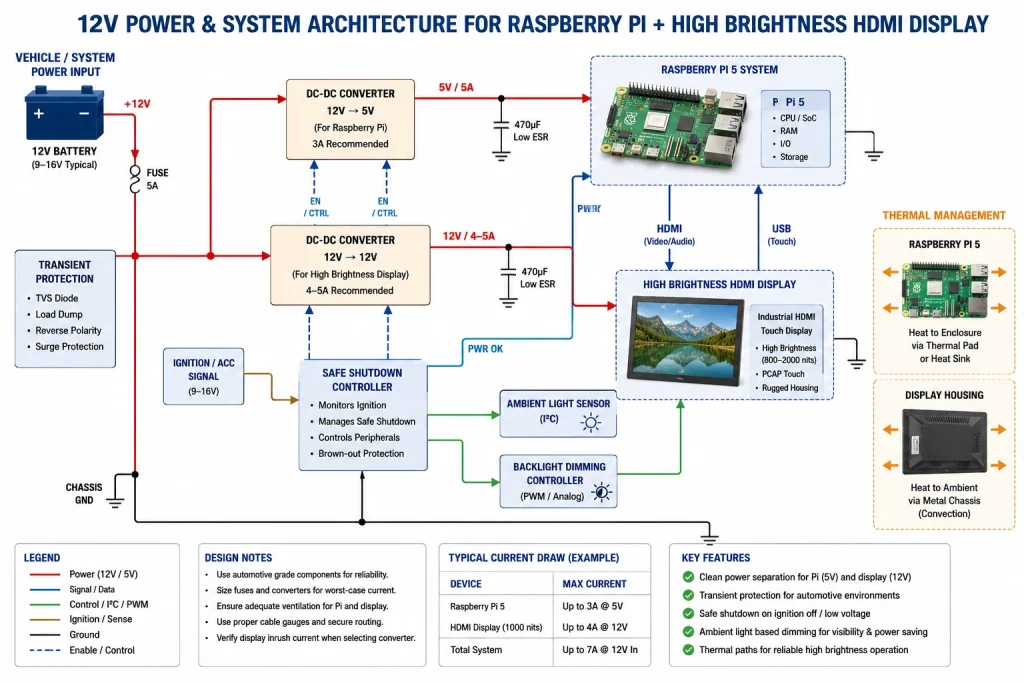
I sistemi marini e veicolari solitamente partono da una linea di alimentazione a batteria da 12 V, non da un semplice adattatore di rete USB-C da 5 V. La scheda tecnica del Raspberry Pi 5 specifica un'alimentazione CC da 5 V/5 A tramite USB-C con supporto Power Delivery. Ciò corrisponde a un budget di ingresso di circa 25 W, prima di considerare display, dispositivi USB, memoria, radio, telecamere o audio. Un display ad alta luminosità aggiunge un proprio carico di retroilluminazione, e un touchscreen può richiedere alimentazione tramite USB o controller.
L'errore più comune è quello di alimentare il Raspberry Pi e lo schermo con un adattatore USB per auto di scarsa qualità. Potrebbe funzionare durante i test al banco, ma smettere di funzionare all'avvio del motore, al variare del carico dell'alternatore, all'accensione di una pompa o al raggiungimento della massima luminosità della retroilluminazione. Nei veicoli e nelle imbarcazioni reali, il progetto dovrebbe prevedere un convertitore DC-DC ad ampio ingresso, fusibili adeguati, protezione contro l'inversione di polarità, soppressione dei transitori, una corretta messa a terra e un margine di corrente sufficiente per l'avviamento a freddo e la massima luminosità.
Questo è uno dei motivi per cui è vero Monitor per Raspberry Pi da 12V Può semplificare l'integrazione. Se il display accetta già un'alimentazione a 12 V, il progettista del sistema può mantenere la linea di alimentazione del display separata dall'alimentazione regolata a 5 V del Raspberry Pi. Questo evita di dover far passare sia la scheda a singolo circuito (SBC) che la retroilluminazione attraverso un piccolo convertitore. Inoltre, semplifica l'assistenza sul campo perché il display, il Raspberry Pi e le periferiche possono essere isolati durante la risoluzione dei problemi.
HDMI vs DSI: la scelta dell'interfaccia per applicazioni nautiche e veicolari.
Raspberry Pi supporta sia il protocollo HDMI che il protocollo MIPI DSI per la visualizzazione, ed entrambi sono validi. Per i progetti in ambito nautico e automobilistico, l'HDMI è spesso la scelta più semplice da implementare sul campo, in quanto supporta schermi più grandi, consente un instradamento dei cavi più lungo e pratico ed è compatibile plug-and-play con molti monitor industriali. L'USB può trasmettere i dati touch separatamente. Questo rende l'HDMI adatto per cruscotti, pannelli di navigazione, sistemi di videosorveglianza, segnaletica e terminali di servizio, dove lo schermo può essere montato lontano dal Raspberry Pi.
DSI può essere più pulito per dispositivi integrati compatti, soprattutto quando il display è vicino alla scheda Raspberry Pi e lo spazio nell'involucro è limitato. Kadi Display Guida al collegamento del display LCD MIPI DSI per Raspberry Pi spiega i punti di selezione DSI come risoluzione, dimensioni e luminosità, mentre il suo guida alla selezione dell'interfaccia di visualizzazione Questo documento confronta le principali interfacce utilizzate nei progetti HMI embedded e industriali. Per lo schermo di un veicolo, l'interfaccia migliore è quella che resiste alla configurazione meccanica, al percorso dei cavi, all'ambiente elettromagnetico e al flusso di lavoro di manutenzione.
In pratica, l'HDMI è generalmente preferibile quando il display ha una diagonale di 10,1 pollici o superiore, quando la distanza di montaggio non è estremamente ridotta o quando lo stesso monitor deve funzionare anche con un PC, un Jetson, un NVR o un host industriale. Il DSI è invece più indicato quando l'involucro è compatto, lo schermo è piccolo e il progettista ha il controllo dell'intera infrastruttura.
Montaggio: la differenza tra un display e un'interfaccia HMI funzionante.
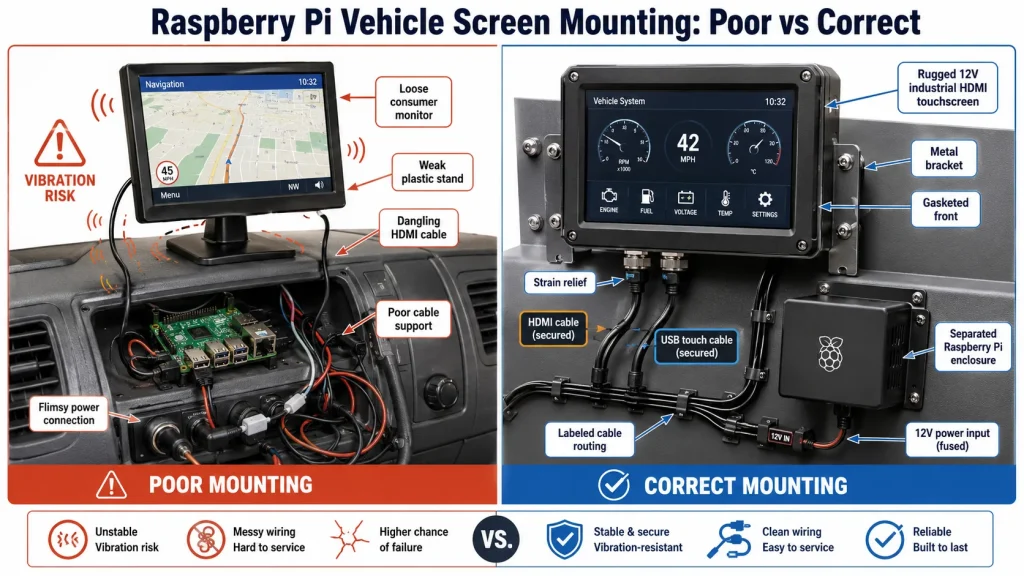
Il montaggio viene spesso considerato un dettaglio meccanico, ma nelle apparecchiature in movimento influisce direttamente sull'affidabilità. Il display di una barca o di un veicolo deve rimanere leggibile all'angolo di visione normale dell'operatore, rimanere fisso anche in presenza di vibrazioni, evitare sollecitazioni ai cavi e impedire all'acqua di penetrare nella parte frontale. Se lo schermo vibra, i riflessi peggiorano e la precisione del touch screen ne risente. Se la staffa si flette, i connettori si allentano nel tempo. Se il raggio di curvatura del cavo è troppo stretto, il display potrebbe superare i test di fabbrica ma guastarsi dopo ripetuti movimenti.
Per un display affidabile per veicoli basato su Raspberry Pi, è necessario un supporto, una cornice per montaggio a pannello o una soluzione in stile VESA compatibile con il dispositivo. La progettazione deve tenere conto dell'angolo di visualizzazione, della possibilità di utilizzo con i guanti, dell'orientamento rispetto al sole, dell'accesso per la manutenzione, dell'uscita dei cavi e della profondità dell'involucro. Un display per applicazioni nautiche presenta ulteriori vincoli: tenuta stagna, resistenza alla corrosione, compressione delle guarnizioni, esposizione ai raggi UV e agenti chimici per la pulizia. In molti casi, un monitor touchscreen industriale per montaggio a pannello è più sicuro di un semplice modulo LCD, poiché la struttura frontale, il vetro di copertura e l'involucro sono già progettati come un'unica unità.
Per installazioni in ambienti difficili, specificare punti di fissaggio in metallo, sistemi di scarico della tensione, connettori di bloccaggio ove necessario e spazio sufficiente per i cavi HDMI e USB. Utilizzare un cavo ad angolo retto solo se si conoscono il raggio di curvatura e il comportamento in caso di vibrazioni. Non lasciare la scheda Raspberry Pi appesa al cavo del display; montare il Raspberry Pi separatamente e proteggerlo dalla condensa e dalle vibrazioni.
Pannello touch e vetro frontale: cosa cambia in condizioni di umidità o movimento?
Un touchscreen utilizzato su una scrivania viene solitamente toccato con un dito pulito in aria asciutta. Un touchscreen per applicazioni nautiche o automobilistiche, invece, può essere utilizzato con guanti, dita bagnate, in presenza di vibrazioni, residui di sale, polvere o sbalzi di temperatura improvvisi. Queste condizioni influenzano le prestazioni previste del touch capacitivo e il comportamento dei tocchi falsi. Pertanto, la configurazione del front stack deve essere specificata insieme all'applicazione: spessore del vetro di copertura, rivestimento AG/AR, incollaggio ottico, taratura del controller touch, reiezione dell'acqua, modalità guanti e messa a terra sono tutti fattori importanti.
Per l'uso nautico, le gocce d'acqua possono creare rumore al tocco se il controller non è tarato. Per i veicoli, le vibrazioni possono rendere difficile premere piccoli elementi dell'interfaccia utente. Un layout di icone più grande e una spaziatura dell'interfaccia utente studiata appositamente possono essere più importanti di una risoluzione più elevata. I contenuti di Kadi Display relativi al touch industriale descrivono i fattori di selezione dei monitor touch come il touch capacitivo, il bonding ottico, il trattamento AG/AR/AF e i requisiti di aggiornamento industriale. display HDMI ad alta luminosità Pertanto, la scelta dovrebbe basarsi su un gruppo display-touch completo, piuttosto che sul solo valore di luminosità del pannello.
Progettazione termica e funzionamento 24 ore su 24, 7 giorni su 7.
I display per imbarcazioni e veicoli spesso rimangono accesi per lunghi periodi. La segnaletica digitale su una nave passeggeri, il cruscotto di un veicolo logistico o lo schermo di guida per l'agricoltura possono funzionare tutto il giorno. L'elevata luminosità aumenta il calore generato dalla retroilluminazione, mentre la luce solare riscalda l'involucro dall'esterno. Anche il Raspberry Pi produce calore, soprattutto quando esegue flussi video da telecamere, mappe, dashboard web o carichi di lavoro di intelligenza artificiale locali.
Il design termico dovrebbe separare il Raspberry Pi, il convertitore di potenza e la retroilluminazione del display il più possibile. Utilizzare un contenitore con percorsi di conduzione, ventilazione se l'ambiente lo consente e pad termici o piastre di montaggio metalliche dove necessario. Anche il software dovrebbe essere d'aiuto: ridurre la luminosità dello schermo in condizioni di scarsa illuminazione ambientale, spegnere il display quando inattivo, registrare la temperatura della CPU e utilizzare un watchdog per i sistemi non presidiati. Per quanto riguarda il display, la durata della retroilluminazione non è solo un dato riportato nella scheda tecnica; dipende fortemente dalla temperatura di esercizio e dal ciclo di lavoro della luminosità.
Un buon design non si limita ad acquistare il display più luminoso disponibile. Sceglie un livello di luminosità che risolva il problema della visibilità all'aperto senza generare calore inutile. In molti casi, ad esempio in veicoli e imbarcazioni in zone ombreggiate, una luminosità compresa tra 800 e 1000 nit con incollaggio ottico e vetro antiriflesso risulterà più affidabile di un pannello sovraccaricato che funziona alla massima potenza tutto il giorno.
Quadro di selezione: costruire l'esposizione attorno all'ambiente
L'approccio più affidabile è quello di partire dall'ambiente di utilizzo, per poi scegliere il display. Per uno schermo informativo in cabina, la famiglia di display ufficiali Raspberry Pi potrebbe essere sufficiente. Per la plancia di comando di una nave, il terminale di un carrello elevatore, il cruscotto di un cantiere o il chiosco veicolare per esterni, il display dovrebbe essere considerato come un componente industriale. Luminosità, tensione di ingresso, montaggio, tenuta, comportamento al tocco e durata devono essere verificati prima di finalizzare l'involucro.
Esempi di casi
Assistente alla navigazione marittima
Un sistema Raspberry Pi visualizza dati GPS, sovrapposizioni AIS, informazioni meteo e stato del motore sulla plancia di comando di una piccola imbarcazione. Lo schermo è parzialmente riparato, ma risente del riflesso dell'acqua e occasionalmente della luce solare diretta. Un display da 500 nit ha un aspetto accettabile in cabina, ma diventa illeggibile verso mezzogiorno. La soluzione migliore è un touchscreen industriale HDMI da 800-1000 nit con vetro di copertura antiriflesso, ingresso a 12 V e parte frontale sigillata. Il Raspberry Pi utilizza un'alimentazione separata a 5 V regolata ed è montato in una scatola di derivazione a secco dietro il cruscotto.
Cruscotto del veicolo agricolo
Un Raspberry Pi gestisce una dashboard per i dati di campo e l'anteprima della telecamera all'interno della cabina di un trattore. I principali rischi sono rappresentati da vibrazioni, polvere, luce solare che filtra attraverso il vetro curvo e variazioni di tensione quando si azionano gli accessori. Un display HDMI ad alta luminosità con staffa metallica e linea di alimentazione a 12V separata riduce i rischi di integrazione. Il software utilizza pulsanti di grandi dimensioni, controllo automatico della luminosità e uno script di riavvio watchdog.
Segnaletica digitale per veicoli passeggeri
Un bus navetta utilizza un Raspberry Pi per visualizzare informazioni sul percorso e pubblicità. Il display non è esposto alla pioggia, ma funziona per molte ore al giorno ed è esposto alla luce solare attraverso i finestrini. In questo caso, le scelte fondamentali sono una luminosità compresa tra 700 e 1000 nit, una conversione stabile da 12V a 5V, un supporto di montaggio sicuro e un adeguato isolamento termico dietro il pannello. Uno schermo industriale robusto potrebbe costare di più all'acquisto, ma evita guasti comuni come pannelli con luminosità ridotta, cavi allentati e surriscaldamento dei monitor di consumo.
Lista di controllo finale prima della produzione
Prima di costruire qualcosa di più di un prototipo, testate il display nell'ambiente reale del veicolo o dell'ambiente marino. Controllate lo schermo a mezzogiorno, al crepuscolo e di notte. Durante il test, tenete il motore o i carichi elettrici accesi. Se necessario, toccate lo schermo con i guanti e con le dita bagnate. Scuotete la staffa, controllate il movimento dei cavi e monitorate la tensione e la temperatura del Raspberry Pi alla massima luminosità.
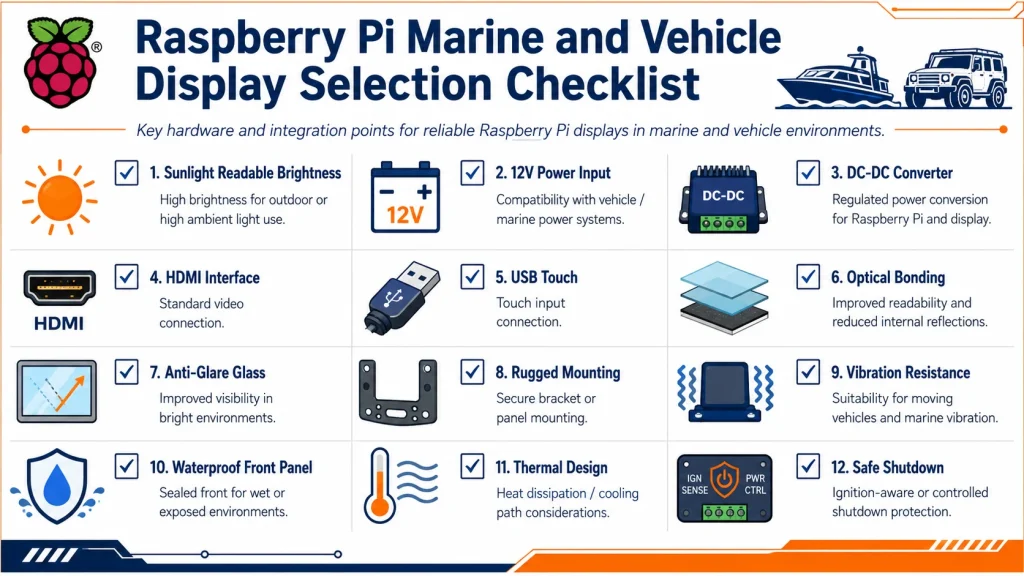
Ai fini dell'acquisto, è fondamentale definire il display come un sistema: dimensioni dello schermo, risoluzione, luminosità, interfaccia HDMI o DSI, metodo touch, tensione di ingresso, tipo di montaggio, vetro di copertura, incollaggio ottico, temperatura di esercizio, lunghezza del cavo e durata prevista. Per i progetti di display marini e schermi per veicoli basati su Raspberry Pi, questa visione sistemica è ciò che distingue un prototipo funzionante da un prodotto affidabile.
La conclusione pratica è semplice: utilizzare un display Raspberry Pi standard per esperimenti in interni e pannelli leggeri; utilizzare un Display industriale Raspberry Pi o un monitor HDMI robusto quando lo schermo deve resistere alla luce solare, all'alimentazione a 12V, alle vibrazioni e a lunghe ore di funzionamento. Nelle applicazioni nautiche e automobilistiche, la luminosità mantiene il display leggibile, il design dell'alimentazione ne garantisce la stabilità e il montaggio ne assicura la durata.
Note sulla fonte
Scheda tecnica del Raspberry Pi 5: alimentazione CC a 5 V/5 A tramite USB-C con supporto Power Delivery; temperatura di esercizio da 0 °C a 70 °C; valore MTBF indicato per l'utilizzo in ambiente non contaminato da terra.
Scheda tecnica del Raspberry Pi Touch Display 2: luminosità della retroilluminazione di 500 cd/m², trattamento superficiale antiriflesso, temperatura di esercizio da -20 °C a +70 °C, touch capacitivo a cinque dita.
Kadi Display Display 12,1 pollici 1280-800 nits display industriale HDMI pagina: alta luminosità di 800 nits, ingresso HDMI plug-and-play e ingresso di alimentazione a 12 V per l'integrazione del sistema.
Schermo LCD touchscreen industriale Kadi Display da 15 pollici: elevata luminosità di 1000 nit e posizionamento per esterni/industria in ambienti luminosi.
Pagine guida di Kadi Display per Raspberry Pi su display e interfacce: selezione HDMI/DSI, opzioni di display ad alta luminosità per Raspberry Pi e considerazioni sulle interfacce per display industriali.
Disclaimer
Questo articolo è destinato alla formazione ingegneristica e alla pianificazione di contenuti SEO. Luminosità, potenza, temperatura, durata e valori ambientali sono indicativi, salvo diversa indicazione nella scheda tecnica di un prodotto specifico. I sistemi elettrici per applicazioni marine e veicolari possono presentare vincoli di progettazione critici per la sicurezza, requisiti normativi e condizioni transitorie estreme. Prima della produzione, verificare tutte le specifiche relative a potenza, tenuta, vibrazioni, compatibilità elettromagnetica (EMC), montaggio e display con il fornitore finale e l'integratore di sistema. Raspberry Pi è un marchio di Raspberry Pi Ltd. Gli altri marchi appartengono ai rispettivi proprietari.
PREVIDENTE
Come scegliere un modulo display LCD TFT industriale: guida su dimensioni, luminosità, interfaccia, touch e personalizzazione
Prossimo
Schermi per Raspberry Pi leggibili alla luce del sole
Lascia un commento

Ultimi Blog & Notizie
- Electronic Component Obsolescence Management for Industrial Displays: An OEM Guide
- How to Develop a Production Ready Custom Display Assembly TFT Module Touch Cover Glass FPC Bonding and Mounting
- 15 Pin vs 22 Pin Raspberry Pi DSI Connectors Cable Pinout and Compatibility
- Native MIPI DSI vs LVDS or HDMI Bridge: An OEM Display Architecture Decision Guide
- MIPI DSI Display Driver Development for Embedded Linux What Hardware Buyers Need to Confirm
Blog & Notizie correlate
-
 TN contro IPS2024-7-9
 -
TN contro IPS2024-7-9

