




Casa
-
Blog & Novas
-
Choosing a Raspberry Pi Touchscreen for Factory HMI: 7 Key Specs Engineers Should Check
Choosing a Raspberry Pi Touchscreen for Factory HMI: 7 Key Specs Engineers Should Check
2026-07-01
12:51
Choosing a Raspberry Pi Touchscreen for Factory HMI: 7 Key Specs Engineers Should Check
Factory HMI Parameter Guide for Raspberry Pi Touchscreen Projects
Por Equipe Técnica da Kadi Display | www.kadidisplay.com
Why Factory HMI Screens Need a Different Selection Logic
Raspberry Pi is now used far beyond hobby projects. In factories, labs, test benches, smart equipment, warehouse terminals, small production lines, and machine monitoring panels, it often becomes the core of a low-cost HMI system. A Raspberry Pi touchscreen HMI can show machine status, production counters, alarm messages, maintenance checklists, sensor dashboards, barcode data, or web-based SCADA pages without the cost and lock-in of a traditional PLC panel.
But a factory touchscreen display is not the same as a desktop monitor. It may run 8 to 24 hours per day. It may face dust, vibration, oil mist, cleaning alcohol, gloves, electromagnetic noise, and strong overhead LED lighting. It may be mounted inside a steel cabinet, on a machine arm, behind a front panel, or in a narrow enclosure where heat builds up slowly.
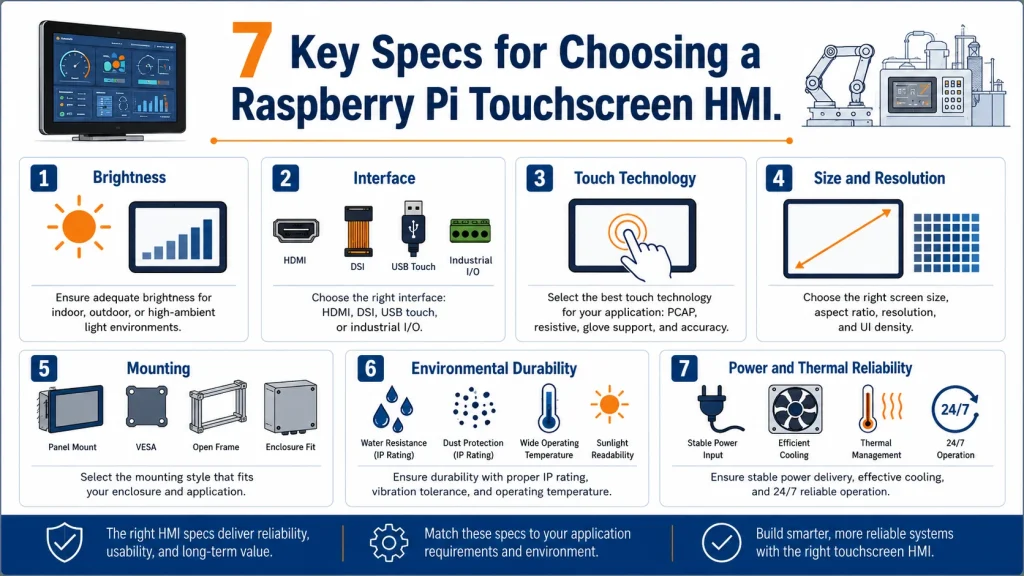
That is why engineers should not choose a Raspberry Pi touchscreen only by size, price, or whether it “works with Pi.” The correct approach is to check seven engineering specifications: brightness, display interface, touch technology, mounting structure, environmental durability, power and thermal design, software integration, and lifecycle support. Kadi Display’s Raspberry Pi Displays category is a useful internal reference point because it focuses on TFT and touchscreen modules for embedded, industrial, and compact Raspberry Pi applications.
A consumer touchscreen may be good enough for a classroom demo. A real industrial touch screen for Raspberry Pi needs to remain readable, responsive, mountable, serviceable, and stable after thousands of operating hours.
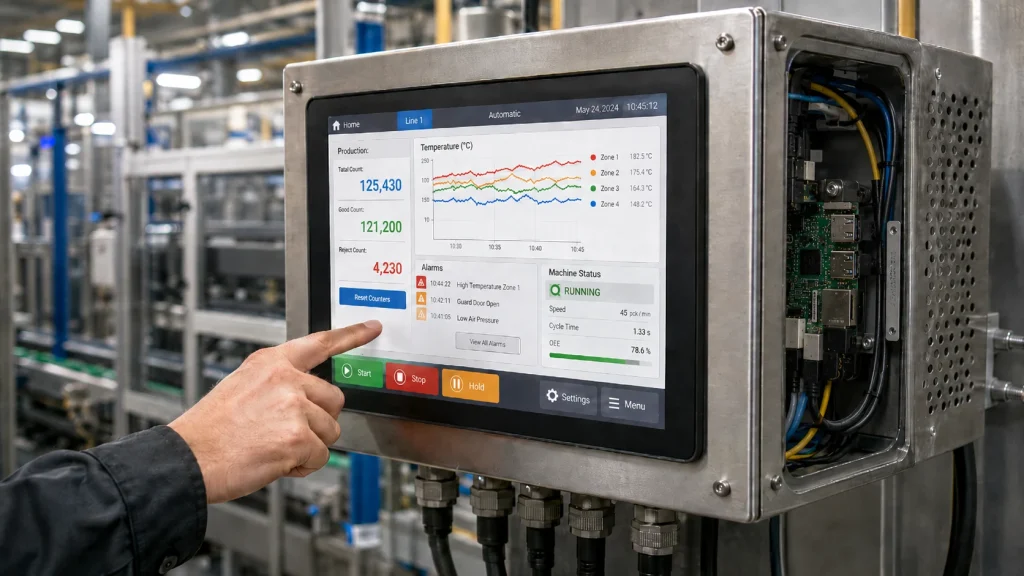
Brightness — 250 Nits, 500 Nits, or 1000 Nits?
Brightness is the first specification engineers usually notice, but it is also one of the most misunderstood. In factory environments, the right brightness depends on ambient light, installation angle, surface treatment, and how long operators look at the screen.
For indoor factory HMI, 400–500 nits is often a practical baseline. It is bright enough for most production floors, maintenance stations, instrument panels, and embedded machine interfaces. Raspberry Pi’s Touch Display 2 product information lists a 720 × 1280 TFT LCD with true multi-touch capacitive input and an anti-glare surface; public product brief information lists 500 cd/m² brightness. That makes it better suited to indoor interactive panels than older low-brightness screens.
However, a factory is not always visually controlled. A screen mounted near a window, under high-bay LED lights, or inside a semi-open warehouse may need 700–1000 nits. For sunlight-facing workstations, outdoor loading docks, vehicle-adjacent panels, or inspection equipment used near open doors, a 1000 nits industrial display becomes a safer choice.
A 250 nits monitor can be acceptable for office dashboards or indoor digital signage, but it is usually too low for a factory touchscreen display that must be read quickly from different angles. The Raspberry Pi Monitor is designed more for desktop and education use than harsh factory HMI, and its typical brightness is listed at 250 nits.
For a brighter Raspberry Pi HMI project, the phrase high brightness Raspberry Pi display can be used naturally when discussing 700–1000 nits and optically bonded display options.
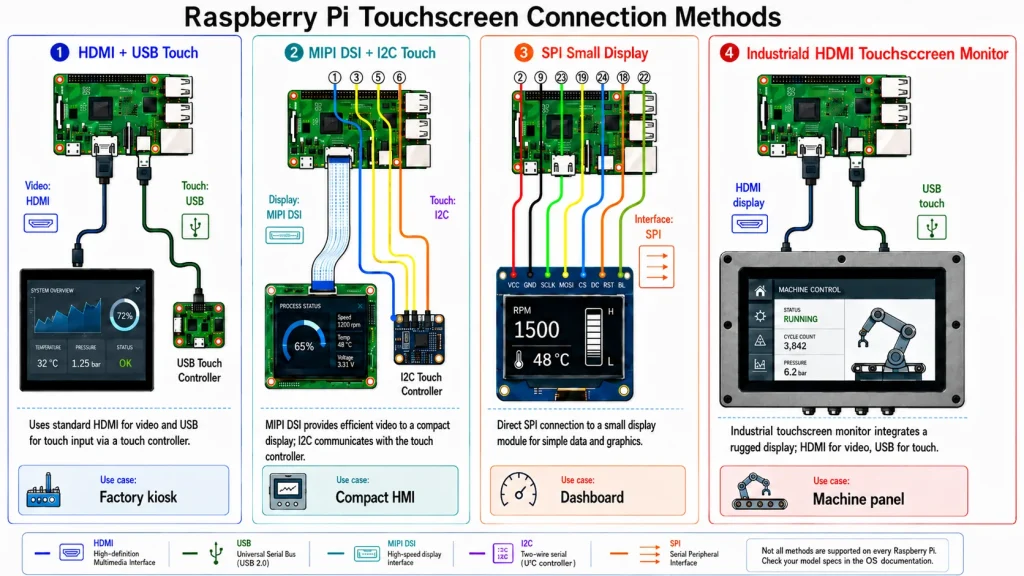
Interface — HDMI, MIPI DSI, USB Touch, or GPIO?
The interface decides not only how the Raspberry Pi touchscreen connects, but also how easy it is to integrate, service, and scale.
HDMI plus USB touch is usually the easiest path for factory HMI. HDMI carries video, USB carries touch input, and the operating system sees the display like a normal monitor plus HID touchscreen. This is simple for kiosk software, browser-based dashboards, Qt applications, Node-RED panels, and Python GUI tools. It is also convenient when engineers need larger screens such as 10.1-inch, 12.1-inch, 15-inch, or 21.5-inch industrial touchscreen monitors.
MIPI DSI is cleaner for compact embedded HMI display designs. It uses fewer external cables, supports a thinner product structure, and can be a good choice for 4.3-inch, 5-inch, 7-inch, and 10.1-inch integrated panels. The downside is that DSI compatibility must be checked carefully. Connector pinout, driver IC, overlay support, kernel configuration, and touch controller all matter.
USB-C display can be attractive, but engineers should confirm whether the screen uses DisplayPort Alt Mode, HDMI conversion, or proprietary hardware. Not every USB-C display behaves the same way with Raspberry Pi. GPIO or SPI screens are useful for small embedded devices, but they are rarely the best choice for a factory HMI above 3.5 or 4 inches because refresh rate and software load become limiting factors.
For interface-related internal linking, the phrase industrial touch screen for Raspberry Pi can connect this section to Kadi Display’s Raspberry Pi display product category.
Touch Technology — PCAP or Resistive?
Touch technology changes the user experience more than many teams expect. For a Raspberry Pi touchscreen HMI, the two most common options are projected capacitive touch, often called PCAP, and resistive touch.
PCAP touch is the preferred choice for most modern factory HMI panels. It supports multi-touch, smooth response, hard cover glass, and a clean front surface. It is suitable for machine dashboards, control menus, production data entry, and interactive industrial kiosks. It also works well with optical bonding and anti-glare glass.
However, PCAP is sensitive to grounding, water, glove thickness, cover glass thickness, and electrical noise. For factory use, engineers should ask whether the touch controller supports glove mode, wet touch tuning, thick cover glass, and noise filtering. A PCAP screen that works perfectly on a desk may behave poorly when mounted beside a motor drive or inside a metal cabinet without proper grounding.
Resistive touch is older but still useful. It works with gloves, styluses, and dirty fingers. It can be appropriate for low-cost equipment, maintenance panels, and harsh environments where multi-touch is not required. The disadvantages are lower optical clarity, softer surface feel, wear over time, and less premium interaction.
The phrase factory touchscreen display can be used as an internal link when discussing panel integration and industrial HMI automation.
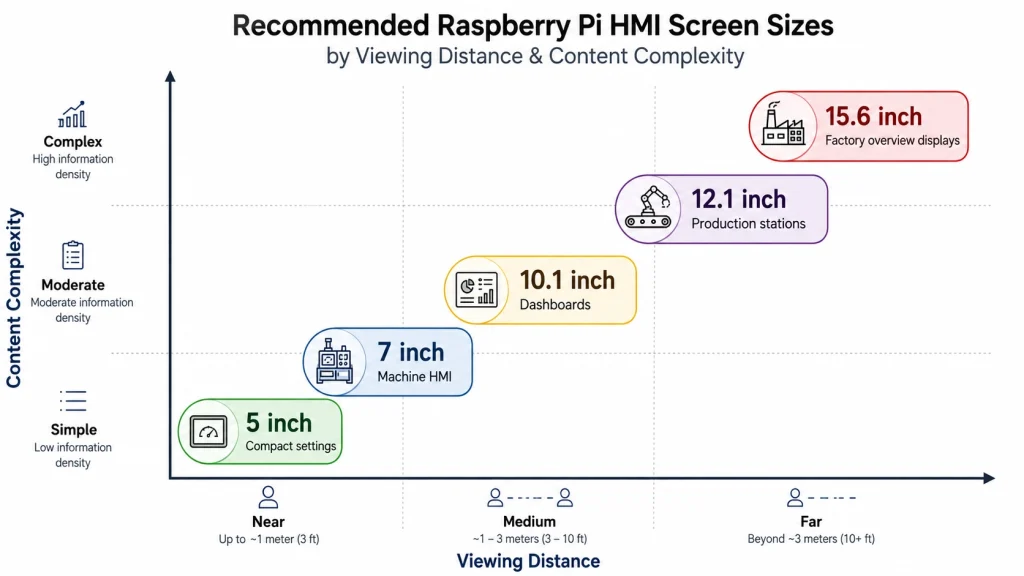
Size, Resolution, and Viewing Distance
The best Raspberry Pi touchscreen HMI is not always the largest one. Size and resolution should match what the operator actually needs to see and touch.
A 4.3-inch or 5-inch display can work for compact machine settings, test equipment, portable inspection tools, and embedded instruments. It is suitable for icons, values, basic controls, and status pages. A 7-inch display is a strong general-purpose size for small HMI panels and Raspberry Pi kiosks. A 10.1-inch display gives more room for dashboards, charts, alarm lists, and multi-zone interfaces. A 12.1-inch or 15.6-inch screen is better for operator stations, digital signage, production line monitoring, and applications where information must be read from a distance.
Resolution matters because factory HMI text must be readable. High resolution looks better, but it also increases UI rendering load and may require better software optimization. For Raspberry Pi 4 or Raspberry Pi 5, 1280×800 and 1920×1080 are practical for many HDMI HMI projects. For compact DSI screens, 800×480 remains common and reliable.
Touch target size is just as important as pixel count. In a factory, operators may wear gloves, move quickly, or touch the screen from an angle. Buttons should be large enough to avoid false touches. Critical controls should not be placed too close together. Alarm acknowledgement buttons should be clearly separated from navigation controls.
Mounting Structure — Open Frame, Panel Mount, VESA, or Custom Housing?
Mounting is where many Raspberry Pi HMI projects move from prototype to real engineering. A screen taped to a test bench can prove the software concept. It cannot survive a factory installation.
Open frame touchscreen monitors are common in industrial HMI because they are designed to be integrated into cabinets, kiosks, and machine enclosures. They usually provide a metal frame, mounting holes, controller board access, and a front structure that can be sealed by the final enclosure.
Panel mount displays are used when the screen must be installed into a cutout in a control cabinet. Engineers should confirm the cutout size, front bezel design, screw positions, seal compression, and maintenance access. VESA mounting is useful for operator stations, wall mounts, arm mounts, and adjustable workstations. It is easier to service but may require cable protection.
Custom housing is the best choice when the product must become a finished industrial device. This may include cover glass, optical bonding, front IP protection, cable strain relief, gasket sealing, and internal heat spreading. For factory Raspberry Pi touchscreen HMI projects, the mechanical question should be asked early: “How will this be mounted, sealed, cleaned, and repaired?” If the answer is unclear, the screen is not production-ready.
The phrase open frame touchscreen monitors can be used in this section when explaining cabinet, kiosk, and machine-enclosure integration.
Environmental Durability — Temperature, Dust, Vibration, and Cleaning
A factory is not one environment. A clean electronics assembly line, a woodworking shop, a food processing station, a chemical packaging line, and a metal cutting machine all place different stress on a touchscreen.
At minimum, engineers should check operating temperature, storage temperature, front protection, cover glass strength, surface treatment, cable locking, and backlight lifetime. A display installed near a heat source or inside a sealed cabinet may run much warmer than the room temperature suggests.
For industrial touchscreens, front protection ratings such as IP65 are commonly used when dust and water spray matter. IP65 indicates dust-tight protection and protection against water jets under defined test conditions. This does not mean the entire system is waterproof unless the enclosure, gasket, cable entry, and mounting design are also rated.
Cover glass matters too. Factory HMIs are touched, cleaned, hit, and sometimes misused. Chemically strengthened glass, anti-glare treatment, anti-fingerprint coating, and optical bonding can all improve real-world durability. For a Raspberry Pi HMI installed near oil mist or cleaning fluids, the front surface should be easy to wipe and resistant to common cleaning procedures.
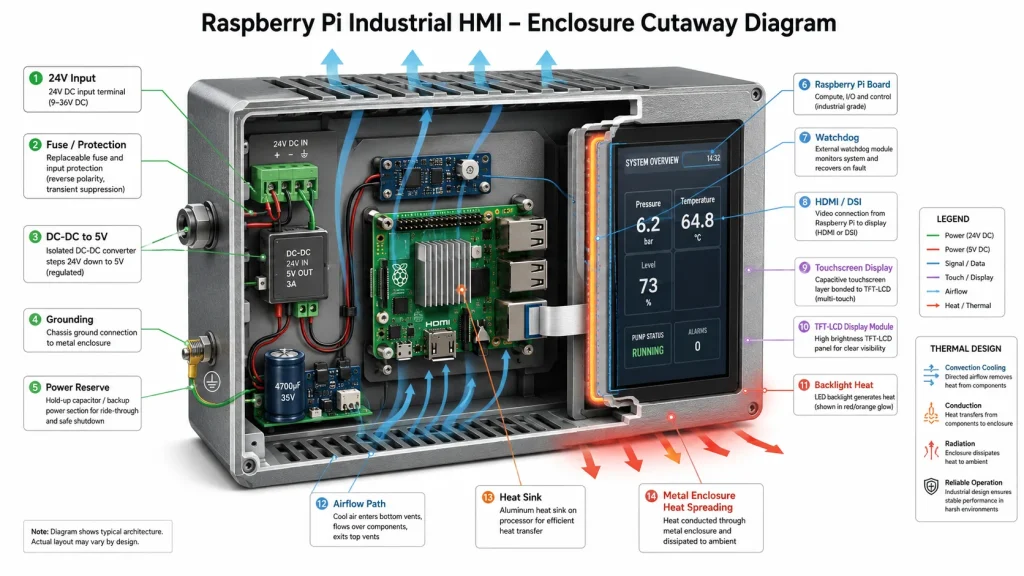
Power, Heat, and 24/7 Reliability
A Raspberry Pi touchscreen HMI is a system, not just a display. The Raspberry Pi, display backlight, touch controller, USB devices, network adapter, and storage all share the reliability burden.
Raspberry Pi 5 official product and accessory information recommends a high-quality 5V 5A USB-C power supply for best performance with peripherals, and Raspberry Pi’s Active Cooler combines an aluminium heatsink with a temperature-controlled blower fan for heavy-load operation. This matters for HMI projects because factory panels often run in kiosk mode all day.
For industrial use, engineers should consider a stable 5V supply with enough current reserve, an industrial DC-DC converter if the system is powered from 12V or 24V, proper ground connection between Pi, display, touch panel, and enclosure, active or passive cooling depending on CPU load and enclosure design, high-endurance storage or eMMC, watchdog configuration, application auto-restart, and controlled shutdown when removable power is used.
For 24/7 factory touchscreen display projects, thermal design is not optional. A display with a strong backlight adds heat. A Raspberry Pi inside the same sealed housing also adds heat. If the enclosure has no thermal path, the internal temperature may rise slowly over several hours and cause throttling, display instability, or shortened component life.
A reliable embedded HMI display should be tested at the worst-case cabinet temperature, highest brightness, maximum CPU load, and longest expected runtime.
Software Integration: Kiosk Mode, Drivers, and Touch Calibration
Hardware selection is only half of the Raspberry Pi HMI project. The software stack must also be stable. Many factory HMIs use a browser-based interface. Raspberry Pi kiosk mode can boot directly into a full-screen web page or application, which is useful for dashboards, production counters, digital signage, and local control panels. This approach is simple because the HMI can be updated like a web application.
Other projects use Qt, GTK, Python, Flutter, Node-RED Dashboard, Grafana, custom Chromium apps, or local industrial protocols. The touchscreen should behave like a standard input device wherever possible. HDMI plus USB touch is often easier here because Linux usually recognizes the touch input through HID drivers.
For MIPI DSI screens, software setup may require device-tree overlays, kernel driver support, I²C touch driver configuration, and rotation settings. This is manageable, but it must be documented. A display that works only after manual commands is not suitable for factory deployment.
Important software checks include whether touch works after cold boot, whether the screen recovers after power loss, whether rotation matches physical mounting, whether calibration remains stable, whether the application auto-starts, whether the system handles network loss, whether a technician can replace the unit without rebuilding the OS image, and whether remote updates are supported.
A Practical Selection Framework for Engineers
This framework prevents overbuying and under-specifying at the same time. A basic Raspberry Pi screen may be enough for a lab fixture. A factory machine panel may require an industrial touchscreen monitor. A semi-outdoor workstation may need a 1000 nits display with optical bonding. The right answer depends on the installation, not the product name.
Example Configurations
Example A: Low-Cost Indoor Machine Dashboard
Use case: small production machine, indoor factory floor, web dashboard, and operator settings. Recommended configuration: 7-inch or 10.1-inch Raspberry Pi touchscreen, 400–600 nits brightness, HDMI + USB touch or MIPI DSI, PCAP touch, panel mount structure, stable 5V power, and kiosk mode. The lighting is controlled, the interface is not safety-critical, and the priority is simple integration and stable software.
Example B: Bright Factory Workstation
Use case: assembly line station near windows and overhead LED lighting. Recommended configuration: 10.1-inch industrial touch screen for Raspberry Pi, 700–1000 nits brightness, anti-glare cover glass, PCAP touch, VESA or panel mount, industrial DC input, and thermal test at maximum brightness. The higher brightness improves readability, while anti-glare treatment reduces reflection from lights and windows.
Example C: Embedded Equipment HMI
Use case: Raspberry Pi Compute Module inside a finished industrial device. Recommended configuration: MIPI DSI or compact HDMI display, 5-inch to 7-inch size, custom cover glass, optical bonding if required, I²C touch controller, controlled internal cable routing, custom carrier board, and documented Linux image. Here the display becomes part of the product, not an external accessory.
Example D: Factory Digital Signage with Touch
Use case: production overview board with touch navigation. Recommended configuration: 15.6-inch or larger industrial touchscreen monitor, HDMI input, USB touch, 250–500 nits for indoor use, VESA mount, kiosk mode, remote update, and watchdog. The larger display improves viewing distance, and HDMI + USB reduces integration complexity.
Common Mistakes to Avoid
The first mistake is choosing a touchscreen only because it is cheap. Low-cost screens often work for prototypes, but missing documentation, weak mounting, low brightness, or poor cable retention can become expensive later.
The second mistake is ignoring brightness until the installation stage. A screen that looks perfect in an office may be unreadable under factory lighting.
The third mistake is assuming that “Raspberry Pi compatible” means industrial-ready. Compatibility only means the display can connect and show an image. It says little about operating temperature, mounting, touch tuning, electrical noise, or lifecycle support.
The fourth mistake is using consumer cables in vibration-prone locations. HDMI and USB cables should be secured, strain-relieved, or replaced by internal board-to-board or FPC connections in finished products.
The fifth mistake is testing for one hour and calling the system reliable. A factory HMI should be tested across thermal conditions, restart cycles, power interruptions, and full production workloads.
Summary: The Best Raspberry Pi Touchscreen Is the One That Survives the Factory
Choosing a Raspberry Pi touchscreen for factory HMI is not a cosmetic decision. It is a system engineering decision. Screen brightness controls readability. Interface choice controls integration. Touch technology controls operator experience. Mounting controls serviceability. Environmental protection controls survival. Power and thermal design control reliability. Software integration controls daily usability.
For indoor factory panels, a 400–600 nits Raspberry Pi touchscreen HMI is often enough. For bright production floors, a 700–1000 nits industrial display is safer. For embedded products, MIPI DSI and custom cover glass may be the cleanest route. For larger operator stations, HDMI + USB industrial touchscreen monitors are often the fastest path to a stable deployment.
The best factory touchscreen display is not necessarily the most expensive screen. It is the screen whose specifications match the machine, the operator, the lighting, the enclosure, the software stack, and the expected service life.
Notas da fonte
Raspberry Pi official product information was used for general reference on Touch Display 2 brightness, anti-glare surface, resolution, and touch functionality; Raspberry Pi Monitor brightness; and Raspberry Pi 5 power/cooling recommendations. Kadi Display public pages were used as internal-link references for Raspberry Pi displays, high-brightness Raspberry Pi screens, MIPI DSI display selection, open frame touchscreen monitor applications, and Raspberry Pi industrial HMI content.
Isenção de responsabilidade
This article is intended for engineering education, SEO/GEO content planning, and product selection guidance. Product specifications such as brightness, operating temperature, touch controller behavior, IP rating, optical bonding, backlight lifetime, and Raspberry Pi compatibility vary by exact model and configuration. Always confirm final parameters with the display supplier, Raspberry Pi documentation, enclosure manufacturer, and application safety requirements before production deployment. Brand names including Raspberry Pi, HDMI, USB, and Kadi Display belong to their respective owners.
PRIVENTE
Zero Insertion Force Connectors in Industrial LCD Displays: Why They Matter
NEXTO
GT911 I²C Address Problems: Why Your LVGL Touchscreen Is Not Detected
Deixe um comentário

Recent Blog & News
- MIPI DSI Connector and FPC Pinout Check: How to Compare a Display Module with Your Host Board
- Can You Reuse a MIPI DSI Display Across SBCs and SoMs? A Host Migration Checklist
- How to Read a MIPI DSI Timing Table: Pixel Clock, Porches, Sync Width, and Refresh Rate
- Existing Driver, Driver Modification, or New Driver? How to Check a Raspberry Pi CM4 MIPI DSI Panel Before Ordering
- Industrial Display Stack-Up Design: Integrating LCD, Touch, PCB, FPC, and Enclosure

