
Главная
-
Блог & Новости
-
Choosing Industrial PCAP Touchscreens for Gloves Water and Thick Cover Glass
Choosing Industrial PCAP Touchscreens for Gloves Water and Thick Cover Glass
2026-09-26
11:12
Choosing Industrial PCAP Touchscreens for Gloves Water and Thick Cover Glass
An industrial PCAP touchscreen can support gloves, wet conditions, and a protective cover lens, but those capabilities must be specified together. A successful bare-finger demonstration does not establish glove performance, and rejecting water without false input does not establish that an operator can keep working through it. Select the sensor, controller, cover stack, and tuning as one evaluated configuration.
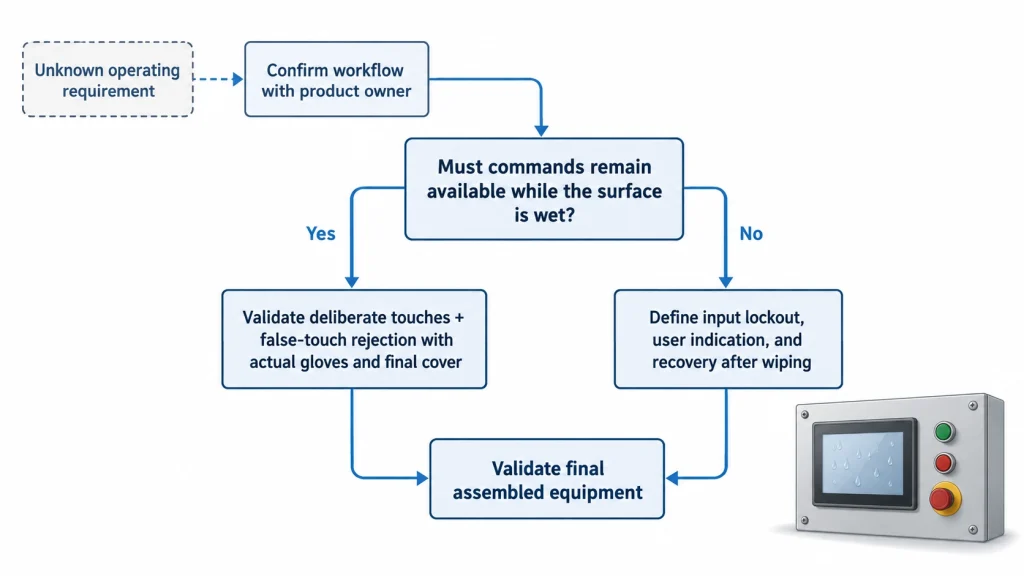
The first purchasing question is therefore operational: must people continue entering commands while the surface is wet, or may the interface suspend input until it is wiped? That distinction changes the candidate list more than a generic claim of waterproof touch. This guide helps equipment designers and buyers turn real operating conditions into a testable touchscreen requirement before ordering evaluation samples.
Match industrial PCAP touch to the required interaction
Start with the condition that the operator cannot avoid. Use the three cases below to separate essential operating capability from optional convenience, then combine every condition that must occur at the same time.
Dry operation with mandatory gloves
For a machine used with protective gloves, identify the actual glove models before discussing touch sensitivity. Record material, thickness where available, fit, liner, and whether operators wear two layers. Supply samples in the sizes actually used. A loose fingertip can create a different contact condition from the same glove stretched tightly across a finger, so a single demonstration by the supplier is a weak acceptance basis.
Describe the required actions as well: selecting a large button, dragging a slider, entering numbers, or using simultaneous touches. A candidate that reliably recognizes an isolated tap may still be unsuitable for a continuous drag. Recommend testing the smallest intended controls, corner targets, and the normal approach angle rather than asking only whether the screen detects a gloved finger.
Rain or splashes during normal operation
Separate three requirements: avoiding unintended commands, recognizing deliberate touches, and returning to normal after the liquid is removed. A design may meet one and fail another. If the machine can pause input during cleaning, specify the lockout behavior and a clear recovery indication. If a worker must operate it during rain, active wet-touch performance becomes a condition of selection.
Also define the liquid. Fresh water, salt contamination, and cleaning residues should not be represented by an unspecified spray. Dawar describes liquid behavior as dependent on sensor design, controller selection, and tuning; its published capabilities are examples from that supplier, not specifications for every PCAP assembly. Dawar PCAP touch tuning supports asking for application-specific evidence rather than relying on a technology label.
Protective glass combined with gloves and moisture
When all three conditions matter, require their simultaneous evaluation. Passing separate tests with a thin lens, a bare finger, and a dry surface does not demonstrate the combined condition. Ask the supplier to identify the exact assembly and configuration used for its claim, then compare that configuration with your intended build.
Figure 1 separates operating through moisture from deliberately suspending input. This is a product requirement decision; neither branch is automatically the right answer for every industrial interface.
Understand what the combined requirement changes
PCAP systems infer touch from changes in an electrical sensing arrangement. The controller does not simply measure the mechanical pressure applied to the glass. A glove and a cover stack change the relationship between the finger and sensor; moisture introduces another influence that the controller must distinguish from intended input. Their effects cannot be summarized by adding two thickness numbers.
Microchip describes glove support and moisture performance within its maXTouch controller family. That establishes that PCAP is not inherently restricted to bare, dry fingers. It does not establish compatibility between an arbitrary controller, sensor pattern, and cover construction. Controller family features are an entry point for supplier screening, not an assembled-product acceptance report.
More sensitivity is not the complete solution
If a supplier proposes a tuning change, ask which observed problem it addresses and what must be checked again. Restoring weak intentional touches is only useful if idle behavior, release detection, edge performance, and other required operating states remain acceptable. Request a before-and-after comparison using the same hardware and test procedure so that a tuning improvement is distinguishable from a changed sample or test condition.
Avoid specifying internal controller parameters without the relevant controller documentation and tuning support. A buyer generally needs an outcome and evidence boundary, not a universal threshold value. Ask whether the chosen configuration changes gesture availability, report behavior, startup handling, or response after contamination. Those questions reveal compromises that a simple pass label can conceal.
Separate weak detection from unwanted detection
When a dry bare finger works but the specified glove does not, first preserve the same assembly and compare the required glove configurations. The useful question is whether deliberate contact can be distinguished consistently from the untouched state. If supplier diagnostics are available, ask the tuning engineer to compare those states and explain the observed margin. Do not infer that a controller lacks capability from one host-level missed tap; the application may also be rejecting an event it received.
A wet idle screen that generates events presents a different problem. Improving detection of a weak finger signal does not by itself demonstrate rejection of liquid-related input. Compare untouched wet behavior with deliberate wet interaction, then repeat the dry-glove case after any tuning change. A configuration that solves one condition by losing another required condition is not an acceptable combined solution.
This creates a practical selection trade-off: retain the configuration that meets the whole mandatory operating envelope, even if another sample feels more responsive in a favorable demonstration. Use controller diagnostics to investigate the distinction, but judge acceptance at the application level where a coordinate becomes a command.
Cover thickness is only one stack variable
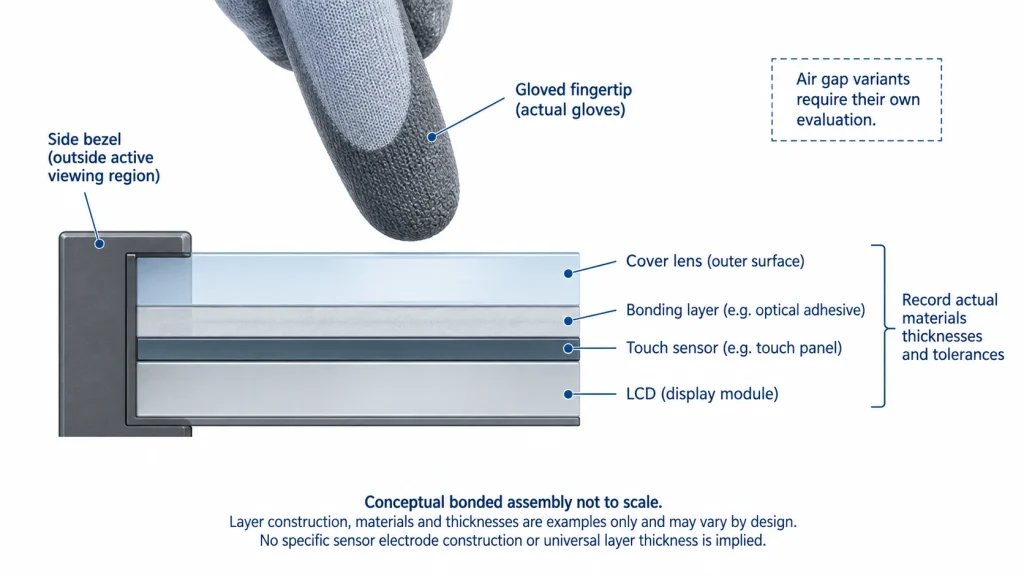
Keep a drawing of the complete front assembly: cover material, thickness and tolerance, decoration, coating, adhesive, sensor, LCD, and enclosure overlap. An air gap and a bonded layer are different constructions. A test through a loose glass sheet should not silently become evidence for a bonded production assembly.
KadiDisplay’s industrial display stack-up guide provides the wider mechanical context. For this selection, use the stack drawing to freeze what is being evaluated. Request written confirmation of acceptable changes before altering the cover, bonding process, or sensor position. Do not infer a universal maximum glass thickness from another supplier’s demonstration.
The physical stack also helps explain a misleading demonstration: adding pressure may change the glove contact while leaving the electrical configuration unchanged. Record how the operator approached and contacted the surface instead of interpreting a forceful successful tap as proof that ordinary use is reliable. The acceptance task should reflect the expected working motion.
Figure 2 identifies the interfaces that must stay consistent between evaluation and production. Its purpose is to make the sample configuration explicit, not to prescribe one sensor construction.
Evaluate a candidate in the equipment it will serve
Begin with a documented baseline and extend it toward the actual application. Record the display module, sensor, controller revision, tuning file identifier, cover drawing, software version, supply, and mounting arrangement. This makes a failed test actionable and a successful test reproducible. A sample with unidentified firmware is difficult to compare with the next delivery.
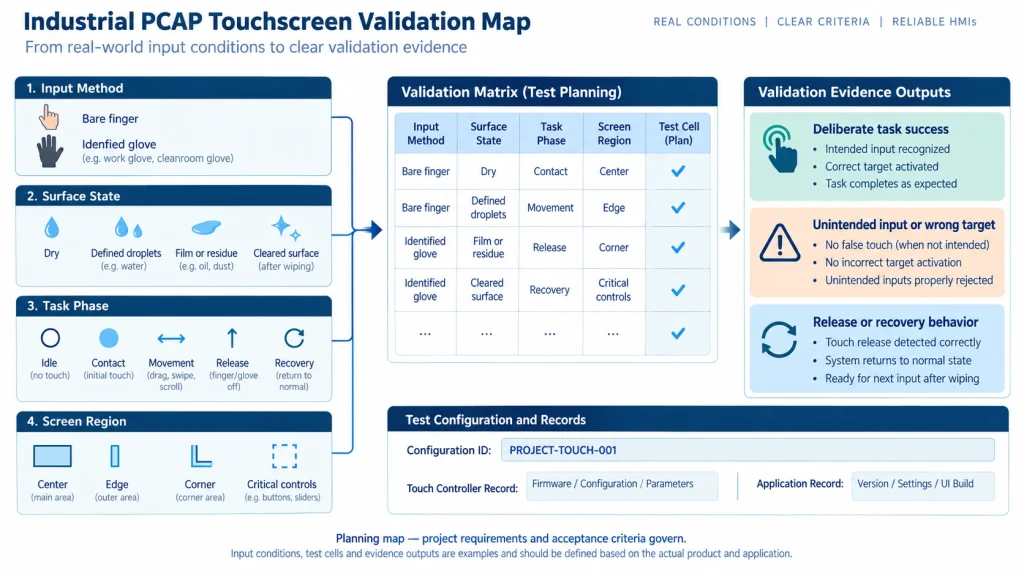
Use a matrix that exposes the missing combinations
The following matrix is a suggested planning tool, not a prescribed certification test. Replace its generic conditions with the actual operating requirements and agree on acceptance criteria before testing. Define attempt counts, sample coverage, exposure duration, and permitted errors with the responsible product team; this article does not supply universal pass thresholds.
Do not combine every result into one percentage that hides the failure mode. A missed tap, a wrong target, a broken drag, and a spontaneous command have different consequences. Keep the raw observations associated with the condition, screen region, and configuration. If a test produces a false command, record what the application actually did rather than reporting only a controller event count.
Turn the matrix into a repeatable task sequence
For each required condition, evaluate the sequence from idle to contact, movement if needed, release, and return to idle. Include moisture arriving before a touch and arriving while a touch is held when both are credible operating conditions. Those sequences ask different questions: whether input starts correctly, whether an existing command remains valid, and whether it stops correctly. A static photograph of droplets proves none of them.
Define the application outcome before counting trials. For a numeric entry task, success might mean that the requested value appears once and is accepted by the intended control; for a slider, it includes maintaining the required drag and releasing at the chosen value. The team must set its own allowed error and response limits. Keep missed events, duplicate events, wrong-target activation, and stuck input in separate result fields so a favorable average cannot conceal a consequential failure.
TIP Record the touch-event log and the application screen against the same time reference. This helps distinguish a missing sensor report from a host or interface response problem. Use these records to guide investigation; a synchronized recording alone does not identify the root cause.
After changing a tuning file, rerun the relevant sequence using the same gloves, exposure, stack, and UI. Retain the earlier result rather than replacing it. A before-and-after comparison becomes persuasive when the intended failure disappears and the other mandatory behaviors remain acceptable.
A visual coverage map helps the team see whether one required combination or transition has disappeared between the written matrix and the executed trial. It also keeps task success, unintended input and recovery as separate evidence streams.
Include the assembled electrical environment
After a controlled initial evaluation, repeat the relevant conditions with the production-intent enclosure, cabling, display operation, power source, and peripheral activity. If behavior changes, vary one factor at a time and retain the baseline. Do not assume that water, electrical interference, or a mechanical feature is the cause merely because it is present.
For a touchscreen that works before assembly and fails afterward, the narrower PCAP metal-enclosure isolation checklist addresses the investigation. Keep that debugging exercise separate from proving glove and wet-operation requirements: a repaired assembly still needs the intended use conditions tested again.
Test the user interface as well as touch coordinates
Use the actual screen layout where possible. A coordinate trace alone does not tell you whether an operator can enter a value correctly, see that a command was accepted, or recover from a rejected gesture. Have representative users perform defined tasks while keeping the hardware and software configuration fixed.
WARNING For consequential actions, review the surrounding interaction design with the product owner. A touch technology selection does not determine whether confirmation, a dedicated physical control, or another protective measure is required. Do not treat a successful wet-touch test as evidence that an emergency or safety function has been approved.
Turn the results into a supplier shortlist
A useful shortlist contains candidates with compatible evidence, not just similar marketing descriptions. Ask each supplier to state whether the result applies to a standard assembly, a custom sensor, a specific controller configuration, or an engineering sample still requiring development. Keep untested conditions visible instead of treating silence as a pass.
Request the sample scope in plain language. For example, ask for evaluation of the identified glove models on the specified cover drawing, with the defined liquid exposures and application tasks. Include the conditions under which input may be inhibited and how recovery should work. This is more actionable than requesting a waterproof industrial touchscreen with high sensitivity.
Classify results by the decision they support
Use three shortlist states. An evaluation-ready candidate has evidence for the essential combination and an identified assembly available for your trial. A development candidate has a plausible configuration but an open tuning, stack, or interaction question. A rejected candidate fails a mandatory condition that the proposed scope does not resolve. These states describe evidence maturity; they are not quality grades assigned to a supplier.
For example, a candidate that rejects droplets by suspending all input can remain viable for an interface with an approved cleaning lockout. The same behavior is a disqualifying mismatch when commands must remain available in rain. A candidate that recognizes the required glove only on a thinner cover is a development option if changing the cover is allowed; it has not met the original specification. These are conditional selection examples, not reported test results.
When a candidate misses only small edge targets but performs the central task reliably, examine whether the edge interaction is mandatory and whether the UI can legitimately change. If the same symptom appears only after enclosure assembly, prioritize a controlled assembly investigation before discarding the touch technology. Neither observation proves a root cause. The value of the distinction is that it selects the next useful check instead of restarting the supplier search blindly.
CAUTION Do not convert an untested combined condition into a pass by combining separate glove, water, and cover-glass demonstrations. Keep that candidate conditional until the required combination is evaluated on the identified assembly.
Compare exclusions before comparing price
A quotation should identify what is supplied and what remains your integration responsibility. Clarify whether the cover lens, touch sensor, controller board, bonding, cables, tuning support, and test evidence are included. A lower component price may describe a different delivery scope rather than a more economical equivalent.
Ask how the approved tuning configuration is identified in production and which changes require notification or reevaluation. Make no assumption about lifetime availability, field update support, or future retuning being included. These are supplier-specific commitments that must appear in the agreed project documents.
В industrial display RFQ checklist can help organize that package. For this topic, the decisive attachments are the operating-condition description, glove samples, stack drawing, interface requirements, and agreed evaluation matrix.
Know when to reopen the technology choice
If no candidate supports a mandatory combination, first distinguish an incomplete requirement from a demonstrated limitation. Could cleaning use a deliberate lockout? Could the interface avoid a gesture that is unnecessary to the task? Could the cover construction change without sacrificing its mechanical purpose? These are product decisions, not automatic reasons to relax acceptance criteria.
Where the required interaction remains unsupported, evaluate another input approach with its own limitations. A resistive touchscreen or physical controls may deserve consideration, but neither should be declared suitable merely because PCAP failed one test. Carry the same actual gloves, contamination, usability tasks, and enclosure conditions into the alternative evaluation.
Additional questions about deployment
Does an IP rating prove wet touch operation
No. Treat enclosure ingress evidence and touch behavior as separate requirements. Ask what assembly and test configuration an ingress claim covers, then request operating evidence for the interface under the intended surface condition. Water remaining outside the enclosure can still be relevant to user input. Conversely, successful touch operation is not proof of enclosure sealing.
Can a replacement glove be accepted without retesting
Do not assume equivalence from a common material name. Use a controlled change review: identify the new glove, compare the intended fit and use conditions, and repeat the affected interaction tests. The product owner can define a proportionate verification scope, but the original evidence should remain tied to the glove configurations actually evaluated.
Specify the operating result before placing the sample order
Proceed when the sample request states what the operator must do, under which combined glove and liquid conditions, through which final cover construction, and how success will be judged. If those inputs remain unknown, obtain them before interpreting a supplier demonstration as a selection decision.
For a KadiDisplay inquiry, send that requirement package to the project contact team and ask which proposed configuration can be evaluated against it. Keep the first commitment focused on a defined sample and evidence scope; production approval follows the assembled-equipment results.
Primary references
- Microchip maXTouch touchscreen controllers — controller-family capabilities; exact product documentation governs an implementation.
- Dawar PCAP touch tuning — supplier-specific discussion of gloves, cover lenses, and liquids.
ENGINEERING DISCLAIMER This article supports PCAP requirement definition and sample evaluation. It does not approve a controller configuration, establish an enclosure ingress rating, or authorize safety-related machine functions. False commands, missed releases, and inaccessible controls require review against the actual equipment risk and operating workflow. Use the identified sensor and controller documentation, released cover drawing, controlled tuning file, and agreed final-system acceptance plan. Stop approval if a required wet or gloved state remains untested, produces unintended commands, or depends on an undocumented configuration change; resolve the gap with the supplier and responsible product engineering team.
Предыдущий
Больше нет
Следующая
USB Touchscreen Keeps Disconnecting in an Industrial HMI: A Fault-Isolation Workflow
Оставить комментарий

Последние блоги и новости
- Choosing Industrial PCAP Touchscreens for Gloves Water and Thick Cover Glass
- USB Touchscreen Keeps Disconnecting in an Industrial HMI: A Fault-Isolation Workflow
- HDMI Monitor Works on a Laptop but Not an SBC: EDID, HPD, and Timing Checks
- MIPI DSI Display Works at Room Temperature but Fails After Warm-Up: A Troubleshooting Workflow
- LCD Prototype Passed but Pilot Units Fail: A Display Integration Isolation Workflow
Блог и новости
-
 TN против IPS2024-7-9
 -
TN против IPS2024-7-9