
Home
-
Blog & News
-
How to Connect a Custom TFT Display Module to a ProAV or Control Room System: HDMI, LVDS, eDP, MIPI and USB
How to Connect a Custom TFT Display Module to a ProAV or Control Room System: HDMI, LVDS, eDP, MIPI and USB
2026-07-10
11:06

Connecting a custom TFT display module to a ProAV or control room system is not only a matter of choosing HDMI, LVDS, eDP, MIPI DSI, or USB. In many broadcast control rooms, command centers, industrial monitoring systems, and operator consoles, the real challenge is matching the external video source, controller board, panel-side interface, touch signal, cable design, and long-term maintenance plan. A display may have the right size and resolution, but the system can still fail if HDMI is mistaken for a bare-panel interface or USB is treated as a video signal.
Why Choosing the Wrong Display Interface Creates Integration Problems
Display interface selection starts with the whole system
A ProAV display interface should be selected from the full signal path, not from the display module alone. A typical control room system may include a media server, workstation, matrix switcher, embedded controller, industrial PC, touch controller, and one or more TFT LCD panels. Each part may use a different interface.
The buyer’s first question should be: where does the video signal come from, and what interface does the TFT panel actually require? HDMI or DP may be used at the system input, while LVDS, eDP, or MIPI DSI may be used on the panel side. USB is often used for touch communication. These roles should be defined before sample selection.
For projects that mainly compare panel-side embedded interfaces, LVDS vs MIPI for industrial TFT LCD displays provides a more focused explanation of how LVDS and MIPI DSI differ in cable distance, signal stability, compact design, and industrial HMI integration.
Typical integration problems in ProAV projects
Common issues appear when system designers select a custom TFT module without confirming the signal chain. HDMI output from a workstation usually cannot drive a bare TFT LCD panel directly. An LVDS panel may not work if the mapping, channel count, voltage, or timing is different from the controller board. A MIPI DSI display may require lane number, initialization code, and driver support. A USB cable may enable touch, but it does not carry the main video signal.
These problems are especially costly in ProAV and control room environments because display downtime can affect live operation, monitoring efficiency, and system upgrade schedules.
Understanding Each Interface in a ProAV Display System
HDMI for external video sources
HDMI is commonly used for external video sources such as PCs, media servers, broadcast workstations, industrial computers, and AV switchers. It is familiar to system integrators because it supports plug-in video input at the equipment level.
However, HDMI should not automatically be treated as the interface of the TFT panel itself. In many custom display projects, HDMI enters a controller board first. The controller board then outputs the required signal to the LCD panel, such as LVDS or eDP, depending on the panel specification.
LVDS for panel-side connection
LVDS is often used between the controller board and TFT LCD panel, especially in industrial display modules and larger embedded screens. It is commonly selected when a project needs stable internal display transmission and compatibility with industrial LCD panels.
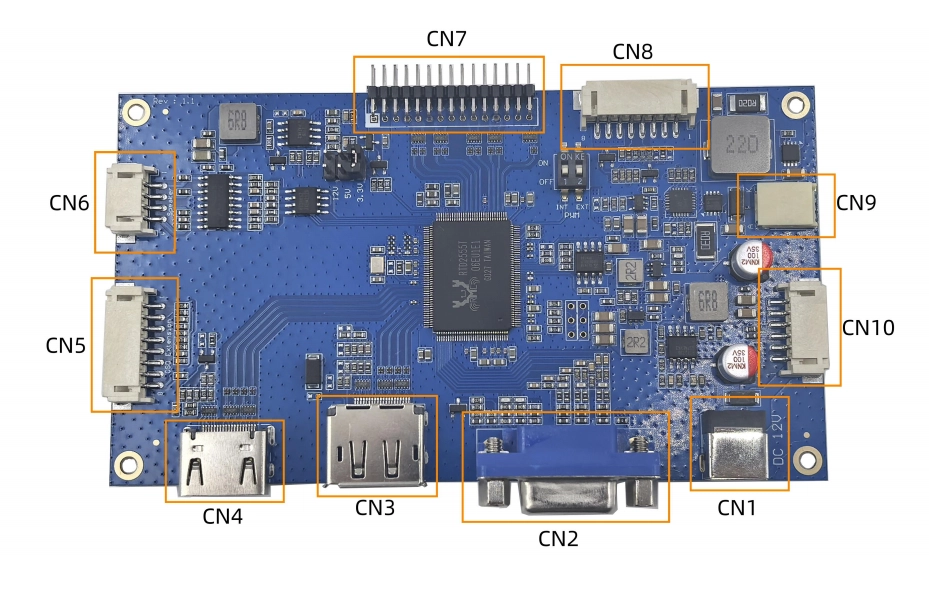
Before choosing an LVDS panel, buyers should confirm single or dual channel, VESA or JEIDA mapping, connector pinout, resolution, cable length, and grounding. In ProAV display integration, an HDMI to LVDS controller board for custom TFT display modules can be relevant when the system input is HDMI, DP, or VGA but the panel side requires Dual 8 LVDS output.
eDP for modern embedded displays
eDP is often used in modern embedded displays, industrial PCs, and panel PC-style systems. It may be suitable when the selected TFT panel or mainboard supports eDP and the project requires a modern internal display connection.
The key is not whether eDP is newer than LVDS. The correct choice depends on the available controller output, panel resolution, cable routing, backlight control method, and lifecycle requirement.
MIPI DSI for compact embedded systems
MIPI DSI is more common in compact embedded systems, ARM-based devices, SBC projects, and embedded Linux HMI designs. It is usually suitable for short-distance internal connections where the host platform directly supports MIPI output.
For ProAV systems, MIPI DSI is less often the external interface. It may appear inside a compact display module or embedded control terminal. Buyers should verify lane count, initialization code, touch interface, FPC direction, and software support before approving a sample.
USB for touch—not video
USB is often used for capacitive touch in industrial displays, operator consoles, and interactive control panels. It should be specified separately from the video interface.
For example, a display assembly may use HDMI for video input and USB for touch. Another system may use LVDS for panel video and USB touch through an industrial PC. Treating USB as the only display interface can cause confusion during RFQ and sample testing.
Recommended Interface Combinations for Different ProAV Systems
Broadcast control room
A broadcast control room often uses external sources such as workstations, switchers, or media servers. In this case, HDMI or DP may be used at the system input, followed by a controller board that drives the TFT LCD panel through LVDS or eDP. USB may be used if the display includes capacitive touch.
This structure is practical when the system requires familiar video input but still uses a custom TFT module inside the final equipment.
Multi-screen monitoring systems
Multi-screen control rooms need consistent resolution, stable long-time operation, and predictable replacement. The display interface should be selected together with the video distribution architecture, power design, cable length, and mechanical mounting.
If multiple display modules are used across one control surface, buyers should confirm whether all screens can share the same controller board family, brightness setting method, touch interface, and lifecycle plan.
Interactive operator consoles
Interactive operator consoles usually require both display and touch. The video interface may be HDMI, LVDS, eDP, or MIPI DSI depending on the architecture, while USB or I2C may be used for touch.
For these applications, touch performance should be checked after enclosure assembly. Cover glass thickness, grounding, cable routing, gloves, moisture, and nearby electrical noise may affect the user experience.
Embedded control terminals
Compact embedded control terminals may use MIPI DSI or eDP when the host board supports these interfaces directly. If the terminal is part of a larger ProAV system, the system designer should still define whether the display receives external video input or works as a local embedded HMI.
Common Mistakes When Connecting a Custom TFT Module
Treating HDMI as a panel interface
HDMI is often a video input interface, not a bare-panel signal. If the project requires a custom TFT LCD module, the buyer should confirm whether a controller board is needed between the HDMI source and the LCD panel.
Ignoring touch interface requirements
A display RFQ that only says “HDMI display” may miss the touch requirement. For interactive control panels, buyers should specify touch type, touch interface, operating system, and driver expectations.
Ordering a display before checking the mainboard
A display should not be selected before the host platform is confirmed. The mainboard output, operating system, resolution, available power, enclosure space, and cable route should guide the display choice.
Choosing the wrong controller board
The controller board must match both sides of the system: input source and panel output. Input may be HDMI, DP, VGA, Type-C, or another interface. Output may be LVDS, eDP, MIPI, or another panel interface. The resolution, timing, backlight control, and touch path should be verified against the product specification.
What Buyers Should Confirm Before Requesting Samples
Required technical information
A clear RFQ should include the host device, mainboard model, video source, required resolution, display size, brightness target, panel interface, touch type, touch interface, cable length, connector direction, operating system, enclosure drawing, installation environment, target quantity, and lifecycle expectation.
This information helps a supplier recommend the correct display module, controller board, cable, touch structure, and customization path.
Questions worth asking the supplier
Useful questions include: Does the display require a controller board? Can the supplier match HDMI input to LVDS or eDP panel output? Is USB touch supported by the operating system? Can the FPC, cable, cover glass, backlight, or housing be customized? Is there a replacement plan if the panel or board changes later?
These questions help prevent repeated sampling and reduce redesign risk.
Choosing a Supplier for ProAV Display Projects
Technical support matters as much as the display itself
For ProAV and control room display projects, the supplier should understand both display modules and system integration. Buyers should look for support in interface matching, controller board selection, cable design, touch integration, mechanical customization, and documentation for sample testing.
Kadi Display is an industrial TFT LCD and custom display manufacturer based in Shenzhen, with product categories covering TFT-LCD modules, TFT touch displays, monitor displays, embedded solutions, tools and accessories, and customized display products.
When a customized display solution makes more sense
A standard display may work when the size, interface, brightness, and enclosure are already fixed. A customized display solution becomes more practical when the project needs a special cable direction, controller board, cover glass, touch structure, brightness level, housing design, or interface conversion.
For buyers evaluating long-term supply and engineering support, the Shenzhen display manufacturer for industrial and medical display solutions page can help review company background and manufacturing focus before deeper project discussion.
Conclusion
A custom TFT display module can be connected to a ProAV or control room system in several ways, but the right choice depends on the full signal chain. HDMI, DP, or VGA may serve as external video inputs. LVDS, eDP, or MIPI DSI may drive the panel side. USB is commonly used for touch. The safest purchasing decision comes from confirming the host device, controller board, panel interface, touch interface, cable design, operating environment, and lifecycle requirement before sample approval.
For a project review, buyers can contact Kadi Display with your display interface requirements and provide the host platform, display size, resolution, target brightness, video input, panel interface, touch requirement, cable length, mechanical drawing, application scenario, sample plan, and target quantity.
FAQs
Q1: Can HDMI connect directly to a TFT LCD module?
A1: Usually, HDMI cannot directly drive a bare TFT LCD panel. In many custom TFT display module projects, HDMI is used as the external video input to a controller board, and the controller board outputs LVDS, eDP, MIPI DSI, or another panel-side signal.
Q2: Which interface is best for a broadcast control room display?
A2: The right interface depends on the system architecture. HDMI or DP may be suitable for external video input from a workstation or switcher. LVDS or eDP may be used inside the display assembly to drive the panel. USB may be required for touch control.
Q3: Should I choose LVDS or eDP for a custom TFT module?
A3: LVDS may be suitable for many industrial TFT LCD modules and controller-board designs, while eDP may fit modern embedded platforms or higher-resolution panel PC structures. The correct choice should be verified against the mainboard, controller board, panel specification, cable route, and lifecycle requirement.
Q4: Is USB only used for touch in industrial displays?
A4: In many industrial display assemblies, USB is used for touch communication rather than the main video signal. The display image normally uses HDMI, DP, LVDS, eDP, MIPI DSI, or another video interface depending on the system design.
Q5: What information should I send before requesting ProAV display samples?
A5: Send the video source, host platform, display size, resolution, brightness target, required input interface, panel interface, touch type, touch interface, cable length, connector direction, operating system, mechanical drawing, installation environment, target quantity, and expected lifecycle.
PREVIOUS
No more
NEXT
How to Choose Display Interfaces for Rugged Industrial HMI and Panel PC Projects
Leave A Comment

Latest Blog & News
- How to Connect a Custom TFT Display Module to a ProAV or Control Room System: HDMI, LVDS, eDP, MIPI and USB
- How to Choose Display Interfaces for Rugged Industrial HMI and Panel PC Projects
- Automotive-Grade TFT LCD Displays: How to Choose a Rugged Screen for Harsh Vehicle Environments
- Industrial Touchscreen Displays for Kiosks, POS and Self-Service Terminals: How to Choose the Right TFT Touch Display
- LCD Display Connector Failure Modes: ZIF Lock, FPC Cable, Solder Joint, and Contact Wear