
Raspberry Pi-schermen voor industriële HMI
2026-05-27
11:05
Raspberry Pi-schermen voor industriële HMI
Een voordelig alternatief voor traditionele PLC-panelen
Het bouwen van praktische gebruikersinterfaces met Raspberry Pi-schermen, industriële touchscreenmonitoren en betaalbare HMI-displayarchitectuur.
Door het technische team van Kadi Display | www.kadidisplay.com
Waarom Raspberry Pi HMI steeds meer terrein wint in de industriële sector
Jarenlang was het veilige antwoord voor machinevisualisatie simpel: koop een traditioneel PLC HMI-paneel uit hetzelfde automatiseringsecosysteem als de controller. Die keuze is nog steeds logisch voor gereguleerde productielijnen, veiligheidskritische machines en installaties waar langdurige leveranciersondersteuning belangrijker is dan de hardwarekosten. Er is echter snel een andere categorie projecten ontstaan: pilotmachines, laboratoriumopstellingen, slimme kiosken, dataterminals voor fabrieken, apparatuur voor kleine series, bewakingssystemen op afstand en IIoT-gateways die een duidelijk bedieningsscherm nodig hebben, maar niet alle functies van een volledig eigen HMI-paneel vereisen.
Dit is waar Raspberry Pi-schermen interessant worden. Een Raspberry Pi HMI kan een goedkope single-board computer, een touchscreen, webgebaseerde dashboards, Python- of Node-RED-logica, MQTT-data, Modbus-gateways en een op maat gemaakte behuizing combineren tot een flexibele industriële touchscreenmonitor. Het resultaat is geen directe vervanging voor elk PLC-paneel. Het is een voordeligere HMI-displayarchitectuur voor projecten waar openheid, snelle iteratie en softwareflexibiliteit belangrijk zijn.
De economische aspecten zijn de belangrijkste reden waarom mensen naar de Raspberry Pi kijken. Raspberry Pi biedt de Compute Module 4 aan vanaf $41,25 en beschrijft deze als geschikt voor industriële toepassingen. De documentatie van Raspberry Pi positioneert de Compute Modules ook voor commerciële en industriële toepassingen zoals digitale signage, thin clients en procesautomatisering. De hardwareprijs is exclusief display, behuizing, stroomconversie, I/O-beveiliging, softwareontwikkeling en compliance-werkzaamheden, maar het verklaart wel waarom systeemontwerpers zich afvragen of een goedkoop HMI-display gebouwd kan worden rondom de Raspberry Pi in plaats van een eigen paneel.
De belangrijkste vraag is niet of de Raspberry Pi goedkoper is, maar waar hij het meest geschikt voor is. Een Raspberry Pi-scherm moet worden beoordeeld als onderdeel van een HMI-systeem: de weergave-interface, touchtechnologie, bedrijfstemperatuur, opstartbetrouwbaarheid, opslagduur, afdichting van de behuizing, EMI-gedrag, stroombeveiliging, protocolondersteuning en onderhoudsmodel zijn allemaal van belang. Wanneer deze punten goed worden aangepakt, kan de Raspberry Pi een praktisch alternatief voor PLC-HMI's worden voor de juiste industriële projecten.
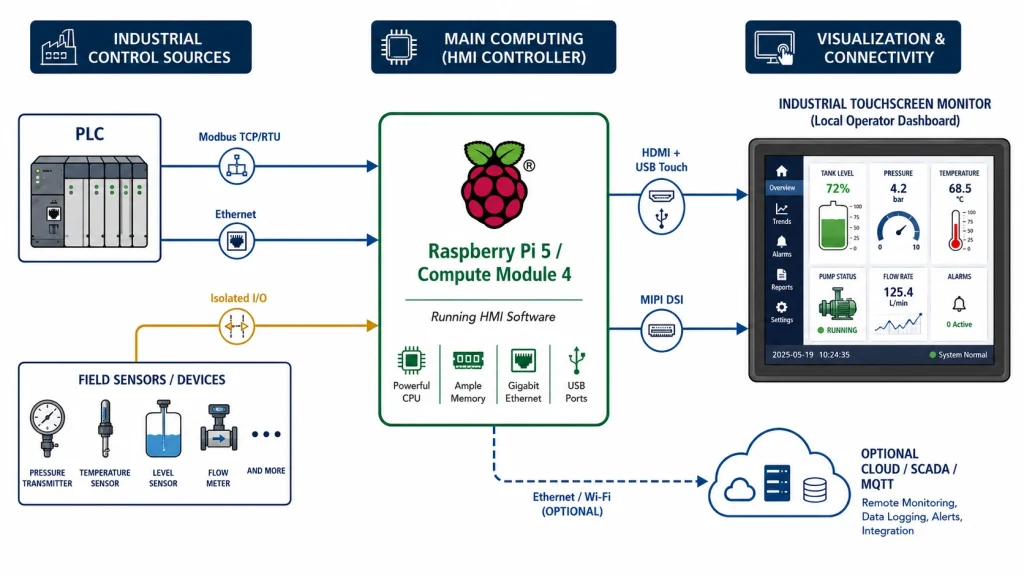
Traditionele PLC HMI versus Raspberry Pi HMI: verschillende ontwerpfilosofieën
Traditionele PLC HMI-panelen zijn ontworpen met het oog op stabiliteit, integratie met leveranciers, gecertificeerde accessoires en een voorspelbare ondersteuningsduur. Ze omvatten doorgaans een industriële voedingsingang, montagemogelijkheden voor panelen, software die is gekoppeld aan een PLC-ecosysteem en een configuratieworkflow die bekend is bij automatiseringsingenieurs. Voor installaties die 24/7 draaien, zijn deze eigenschappen geen luxe. Ze verlagen het risico bij de inbedrijfstelling.
Een Raspberry Pi HMI begint vanuit een ander uitgangspunt. Het lijkt meer op een embedded computer met een beeldscherm. De software kan een browsergebaseerd dashboard zijn, een Qt-applicatie, een Node-RED-interface, een Grafana-paneel, een Python GUI, CODESYS-visualisatie of een aangepaste Linux-applicatie. In plaats van te vragen of het scherm tot een PLC-familie behoort, vraagt de ontwerper zich af of de HMI betrouwbaar gegevens kan uitlezen, alarmen duidelijk kan weergeven, bestand is tegen de omgeving en gedurende de levensduur van het product onderhoudbaar is.
Dit verschil brengt zowel vrijheid als verantwoordelijkheid met zich mee. Een Raspberry Pi-scherm kan goedkoop en zeer aanpasbaar zijn, maar de systeemintegrator moet de details ontwerpen die een PLC HMI-leverancier normaal gesproken verborgen houdt. Denk hierbij aan afsluitgedrag, slijtage van de opslag, watchdog-herstel, elektrische isolatie, aarding, aanraakkalibratie, leesbaarheid in zonlicht, firmware-updates en cyberbeveiliging.
De weergavelaag: waarom het scherm net zo belangrijk is als de Pi
Veel mislukte Raspberry Pi HMI-projecten falen op het gebied van het beeldscherm, niet op de processor. Een beeldscherm uit een ontwikkelingskit werkt misschien prima op een testbank, maar stelt teleur in een fabriek omdat de helderheid te laag is, het aanraakpaneel kwetsbaar is, de kijkhoek slecht is of de kabelverbinding niet bestand is tegen trillingen. Bij industriële HMI is het scherm het onderdeel dat de operator dagelijks aanraakt.
Kadi-weergavelijsten Raspberry Pi-displaymodules Door gebruik te maken van TFT- en touchscreenopties, met een enkele FPC-aansluiting die video-uitvoer, aanraakbediening en voeding ondersteunt voor ingebedde en compacte Raspberry Pi-toepassingen. In het Raspberry Pi DSI-artikel wordt ook opgemerkt dat industriële embedded systemen Raspberry Pi als HMI-controller kunnen gebruiken en dat DSI een correcte hardwareverbinding, voedingsrails, device-tree overlays en drivers vereist, in plaats van een simpele plug-and-play-functionaliteit.
Voor grotere of eenvoudigere installaties is HDMI plus USB-touch vaak handiger. Kadi Display's 12,3-inch plug-and-play industriële monitor Het apparaat maakt gebruik van HDMI 1.4a of Type-C video, USB-touch, een helderheid van 800 nits, een werktemperatuur van -20 tot 70 °C en een voedingsspanning van 6-27 V. Op dezelfde pagina staat dat het in de meeste gevallen compatibel is met Raspberry Pi en Jetson via HDMI en USB-touch, en dat er ook mogelijkheden zijn voor aanpassing van de aansluitingen, kabels, montage en behuizing. Dat is het soort productpositionering dat beter past bij een Raspberry Pi HMI-project dan bij een consumententabletscherm.
Helderheid is ook belangrijk. Een paneel van 400 nits is wellicht prima in een schakelkast of binnenwerkplek. Een industriële touchscreenmonitor van 800-1000 nits is geschikter voor lichte fabriekshallen, kiosken of semi-buitenwerkplekken. Een lcd-scherm met een hoge helderheid van 1500-2000 nits is aan te raden wanneer er direct zonlicht op het scherm valt. De keuze voor het scherm moet afhangen van de omgevingsverlichting, het ontwerp van de behuizing en de kijkhoek van de gebruiker, en niet van de prijs van het Raspberry Pi-bord.
Tabel 1. PLC HMI-paneel versus Raspberry Pi HMI — Praktische vergelijking
Interfacemogelijkheden: HDMI, MIPI DSI, LVDS en USB Touch
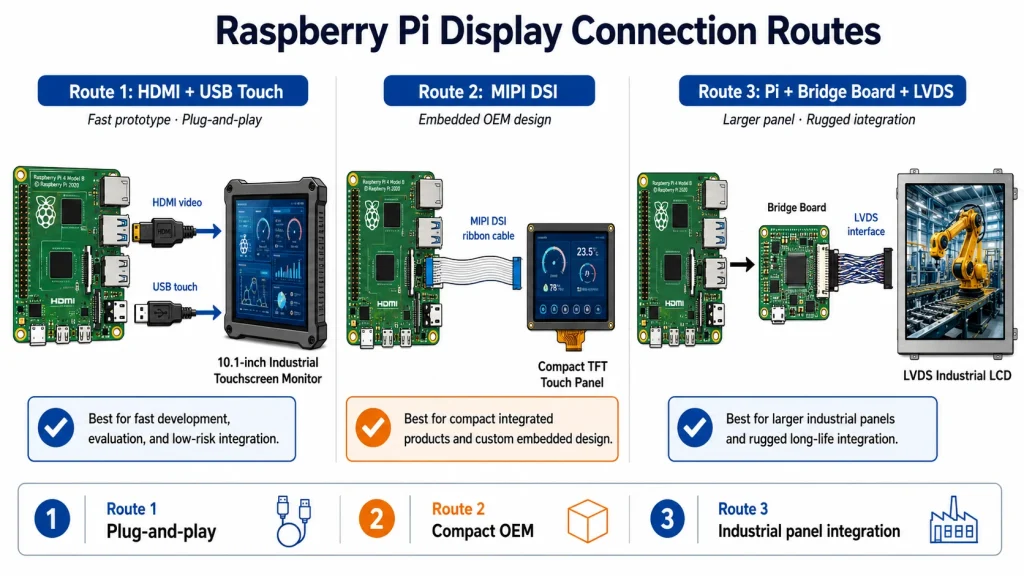
Een Raspberry Pi HMI maakt doorgaans op twee manieren verbinding met het scherm: via HDMI plus USB-touchscreen of MIPI DSI. HDMI is de meest flexibele optie. Het is eenvoudig te testen, werkt met veel monitoren en maakt plug-and-play-schermen mogelijk die ook gebruikt kunnen worden met Windows- en Linux-pc's, Jetson-boards of embedded x86-systemen. Voor een industrieel touchscreen-monitor die in een kast is gemonteerd, is HDMI plus USB-touchscreen vaak de snelste manier om een werkend prototype te realiseren.
MIPI DSI is compacter en eleganter wanneer het scherm dicht bij de printplaat zit. Het vermindert de omvang van de connectoren en ondersteunt dunne, ingebouwde formfactoren. De keerzijde is de extra integratie-inspanning. Kadi Display's DSI-richtlijnen wijst erop dat DSI niet zo gebruiksvriendelijk is als HDMI en de juiste aansluiting, voedingsrails, overlays en drivers vereist. Dat maakt DSI aantrekkelijk voor OEM-producten, maar veeleisender voor eenmalige fabrieksprojecten.
LVDS wordt nog steeds veel gebruikt in industriële displays van ongeveer 7 tot 21 inch, omdat het robuust genoeg is voor langere interne kabeltrajecten en breed ondersteund wordt door industriële LCD-modules. Een Raspberry Pi heeft mogelijk een adapterkaart of bridge nodig om LVDS-panelen te gebruiken. Deze extra elektronica kan gerechtvaardigd zijn wanneer de gewenste schermgrootte, helderheid of robuustheid niet beschikbaar is via directe DSI of HDMI.
De praktische selectieregel is eenvoudig: gebruik HDMI plus USB-touch voor snelheid, onderhoudsgemak en platformonafhankelijke compatibiliteit; gebruik MIPI DSI voor compacte, ingebouwde producten; gebruik LVDS of eDP wanneer het paneelecosysteem of het mechanisch ontwerp dit vereist.
Kostenmodel: Waar de besparingen daadwerkelijk zijn en waar niet.
De term 'goedkoop HMI-display' kan misleidend zijn. De Raspberry Pi is weliswaar goedkoop, maar een industriële HMI bestaat uit meer dan alleen een processor. Een realistische materiaallijst omvat de Pi of Compute Module, een carrierboard, een displaymodule, een capacitief touchscreen, een afdekglas, stroomingangsbeveiliging, een behuizing, montagemateriaal, kabels, opslag, thermisch ontwerp en de benodigde tijd voor softwareontwikkeling.
De besparingen zijn het grootst wanneer het project flexibele software, een aangepaste gebruikersinterface, webconnectiviteit, multimedia, datalogging of snelle iteratie vereist. Een Raspberry Pi kan een volledig Linux-systeem draaien, een dashboard in de browser weergeven, lokale logbestanden opslaan, gegevens via MQTT publiceren en visualisaties bijwerken zonder de rigide workflow van veel PLC HMI-editors. Bij kleine series of OEM-apparatuur kan die softwarevrijheid meer waard zijn dan de hardwarebesparing.
De besparingen zijn minder groot wanneer het project gecertificeerde industriële I/O, strikte deterministische besturing, veiligheidsfuncties en langdurige leveranciersverantwoordelijkheid vereist. In die gevallen moet de PLC de besturingseenheid blijven. De Raspberry Pi HMI kan nog steeds dienen als gebruikersinterface, dashboard of onderhoudsterminal, maar mag de veiligheidslogica of realtime besturing niet vervangen, tenzij het hele systeem daarvoor is ontworpen en gevalideerd.
Betrouwbaarheid: De checklist die industriële HMI onderscheidt van makerprojecten
Een Raspberry Pi HMI wordt pas industrieel als het omringende ontwerp ook industrieel is. Het eerste probleem is de opslag. Standaard microSD-kaarten kunnen defect raken bij herhaaldelijk schrijven, plotselinge stroomuitval of trillingen. Compute Module-ontwerpen met eMMC-opslag, alleen-lezen besturingssystemen, logrotatie of externe industriële SSD's zijn doorgaans geschikter voor apparatuur met een lange levensduur.
Het tweede probleem is de voeding. Fabriekskasten bevatten vaak schakelruis, spanningsdalingen, relaisbelastingen, motoren en lange kabels. Een Raspberry Pi mag niet op dezelfde manier worden gevoed als een experiment op een bureau. Gebruik een stabiele industriële gelijkstroomingang, overspanningsbeveiliging, beveiliging tegen omgekeerde polariteit, zekeringen, een goede aarding en, waar nodig, geïsoleerde communicatie-interfaces.
Het derde probleem is herstel. Van een PLC-paneel wordt verwacht dat het na een stroomstoring probleemloos opnieuw opstart. Voor een Raspberry Pi HMI geldt hetzelfde: een watchdog-functie, automatische herstart van de applicatie, een veilige afsluitstrategie en een gedocumenteerd updateproces. Wanneer het bedieningsscherm onderdeel is van een productieomgeving, betekent een defecte GUI downtime.
Het vierde punt betreft het mechanisch ontwerp. Het scherm moet gebruikmaken van een duurzaam aanraakpaneel, afdekglas, een geschikte helderheid, betrouwbare kabelgeleiding en een frontstructuur die bestand is tegen stof, olie, handschoenen, reinigingsvloeistoffen en vocht. Kadi Display's TFT-touchscreen categorie De nadruk ligt op industriële besturing, embedded systemen, touch-opties, interfaceflexibiliteit en OEM/ODM-ondersteuning, wat relevante punten zijn voor de ontwikkeling van een Raspberry Pi-scherm van prototype naar product.
Tabel 2. Checklist voor industrialisatie van Raspberry Pi HMI
Softwarearchitectuur: Web HMI, Node-RED, Qt en CODESYS
Een Raspberry Pi HMI biedt de ontwerper verschillende softwaremogelijkheden. Een web-HMI is vaak het meest onderhoudbaar. De Pi draait Chromium in kioskmodus en laadt een lokaal of extern dashboard. Dit werkt goed voor SCADA-light-schermen, machinestatuspagina's, kwaliteitscontroleposten, energiedashboards en onderhoudsterminals.
Node-RED is handig voor dataflow-projecten die Modbus, MQTT, HTTP API's, databases en eenvoudige dashboards combineren. Het is geen vervanging voor een gevalideerd PLC-programma, maar het is uitstekend geschikt voor het verbinden van databronnen en het bouwen van lichte bedieningsschermen.
Qt, Python en aangepaste Linux-applicaties zijn sterker wanneer de gebruikersinterface zeer gecontroleerd, offline, voorzien van een eigen merk of prestatiegevoelig moet zijn. CODESYS-visualisatie kan aantrekkelijk zijn wanneer het team engineering volgens de IEC 61131-3-norm wil en een PLC-achtig gedrag op compatibele platforms nastreeft. De sleutel is het scheiden van verantwoordelijkheden: deterministische besturing hoort bij de PLC of realtime controller; visualisatie, receptbeheer, logging, onderhoudsworkflows en edge-connectiviteit kunnen op de Raspberry Pi HMI worden uitgevoerd.
Waar passen Raspberry Pi-schermen het beste?
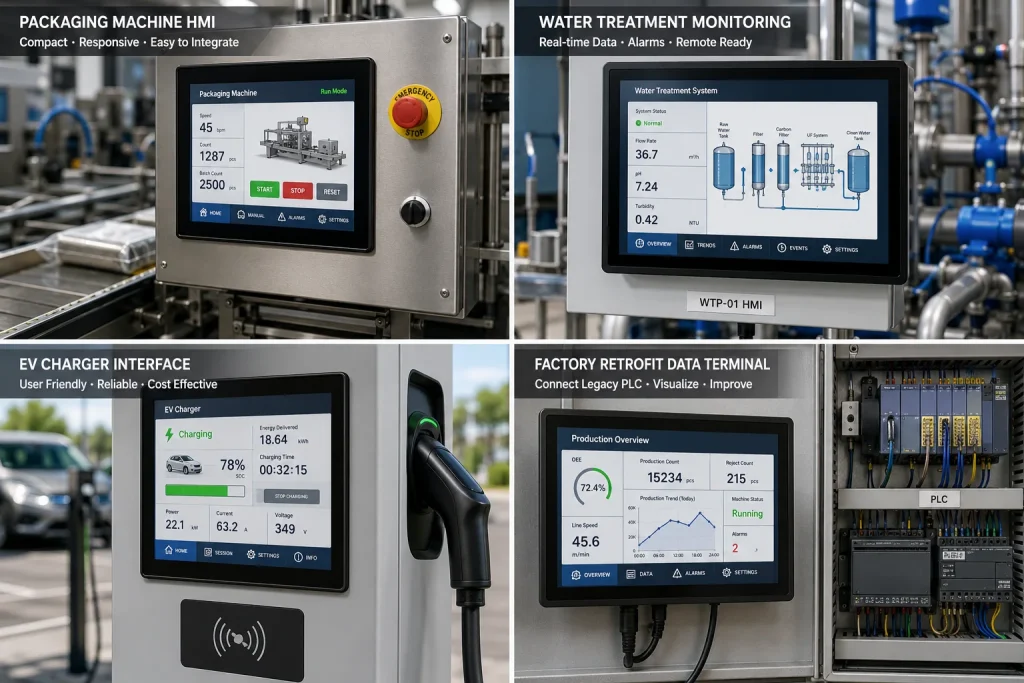
De beste toepassingen zijn doorgaans niet de meest risicovolle productiebesturingen. Het zijn juist de vele plekken waar operators informatie nodig hebben, maar waar het systeem geen volledig eigen HMI-paneel rechtvaardigt. Voorbeelden hiervan zijn kleine verpakkingsmachines, testbanken, slimme landbouwcontrollers, waterzuiveringsinstallaties, laboratoriuminstrumenten, servicepanelen voor EV-laders, energiemonitoringsstations, dashboards voor machine-retrofit, onderhoudsschermen voor robotcellen en magazijnterminals.
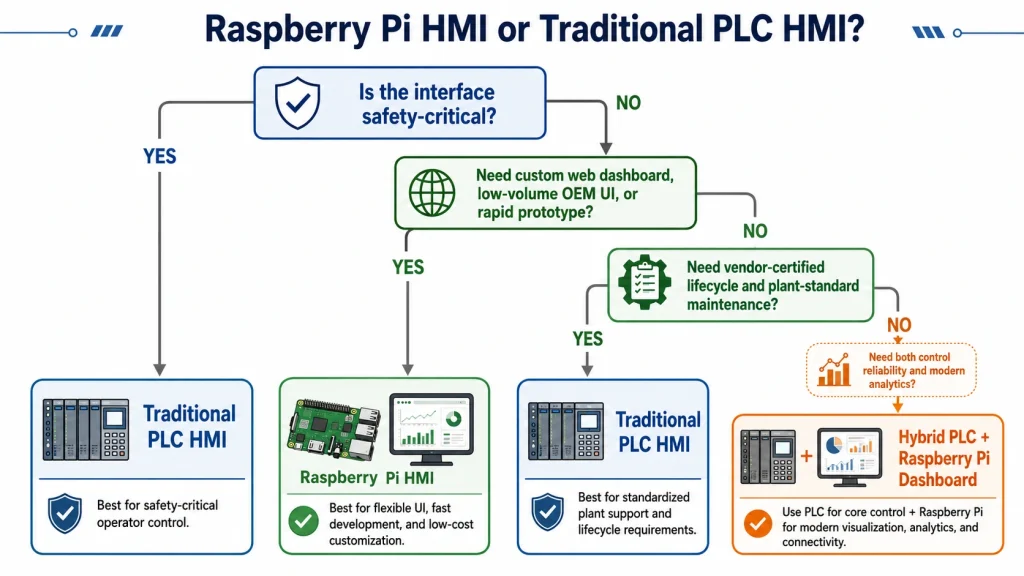
Een Raspberry Pi HMI is ook handig als secundair bedieningspaneel naast een PLC HMI. Het PLC-paneel blijft de officiële bediening voor de operator, terwijl het Pi-scherm analyses, cameravoorbeelden, productiegeschiedenis, onderhoudshandleidingen, PDF-handleidingen, status van ondersteuning op afstand en IIoT-gegevens weergeeft. Deze hybride aanpak voorkomt de valse keuze tussen een PLC HMI en een Raspberry Pi. In veel fabrieken is een combinatie van beide de beste oplossing.
Voor OEM's zijn Raspberry Pi-schermen aantrekkelijk wanneer de productinterface regelmatig moet veranderen. Traditionele HMI-software kan efficiënt zijn voor automatiseringsschermen, maar is minder flexibel voor modern UI-ontwerp, meertalige content, cloud-login, web-API's, video of klantbranding. Een op Pi gebaseerde HMI kan eruitzien en zich gedragen als een modern embedded apparaat, terwijl het toch kan communiceren met PLC's en sensoren.
Waar Raspberry Pi HMI de verkeerde keuze is
Een evenwichtig SEO-artikel mag niet beweren dat Raspberry Pi elk HMI-probleem oplost. Het is de verkeerde keuze wanneer het project veiligheidscertificeerde besturing, door de leverancier ondersteunde levenscyclusverantwoordelijkheid, strikt gevalideerde softwarewijzigingscontrole, certificering voor gevaarlijke omgevingen of diepe integratie in het alarm- en receptsysteem van één enkele PLC-leverancier vereist. Het kan ook een verkeerde keuze zijn wanneer het onderhoudsteam van de fabriek Linux-gebaseerde systemen weigert of geen ondersteuning kan bieden voor aangepaste software.
Het is ook riskant wanneer de integrator kiest voor consumentenschermen. Goedkope displays kunnen slechte kijkhoeken, zwakke achtergrondverlichting, korte kabels, kwetsbare connectoren, instabiele aanraakfunctionaliteit en een onduidelijke bedrijfstemperatuur hebben. Voor industriële touchscreen-monitorprojecten is de leverancier van het display net zo belangrijk als het Raspberry Pi-model.
Een ander waarschuwingssignaal zijn ongecontroleerde software-updates. Een hobbyproject kan pakketten vrijelijk updaten; een HMI in een fabriek kan dat niet. Elke Raspberry Pi HMI die in een productieomgeving wordt gebruikt, moet beschikken over een bevroren besturingssysteemimage, een versiebeheer van het applicatiepakket, een rollback-methode, gedocumenteerde inloggegevens en een procedure voor het herstellen van een back-upimage.
Voorbeelden in de stijl van een casestudy
Voorbeeld 1: Een kleine OEM bouwt een testinstrument voor op de werkbank. Een traditionele PLC HMI is stabiel, maar de gebruikersinterface voelt verouderd aan en verhoogt de kosten van een product dat in kleine aantallen wordt geleverd. Een Raspberry Pi 5 met een 10,1-inch industrieel HDMI-touchscreen Het apparaat voert een lokale webapplicatie uit, slaat testresultaten op in een database en maakt via USB of RS485 verbinding met een microcontroller. In dit geval is het Raspberry Pi-scherm een uitstekend en voordelig HMI-display, omdat het besturingsrisico laag is en de gebruikersinterface belangrijk is.
Voorbeeld 2: Een voedselverwerkingslijn heeft een hoofdbedieningspaneel nodig voor bewegingsregistratie, recepten, alarmen, reiniging en noodprocedures. Hier blijft een PLC HMI de juiste primaire interface. Een Raspberry Pi HMI kan worden toegevoegd als secundair dashboard voor OEE, onderhoudshandleidingen, energiegegevens of cameravoorbeelden, maar mag het gevalideerde PLC-paneel niet vervangen zonder een volledige risicoanalyse.
Voorbeeld 3: Een pompstation op afstand heeft een lokaal servicescherm nodig. De operator bezoekt het station af en toe, leest de status af, wijzigt niet-kritieke parameters en controleert de alarmgeschiedenis. Een Raspberry Pi Compute Module met eMMC, een industriële touchscreenmonitor, Modbus TCP-communicatie en een afgedichte behuizing kan de kosten verlagen en tegelijkertijd een beter datadashboard bieden dan een kleine, gepatenteerde HMI.
Samenvatting: Een praktisch alternatief, geen universele vervanging.
Raspberry Pi-schermen worden een serieuze optie voor industriële HMI, omdat ze lage hardwarekosten, grote softwareflexibiliteit, moderne UI-mogelijkheden en een breed scala aan toepassingen combineren. weergave-interface optiesEen Raspberry Pi HMI kan een praktisch alternatief zijn voor een PLC HMI voor pilotmachines, OEM-apparatuur, dataterminals, bewakingspanelen op afstand en bedieningsinterfaces met een laag risico.
De sleutel is eerlijke engineering. De Raspberry Pi mag niet worden behandeld als een gecertificeerd PLC-paneel, tenzij het volledige systeem dienovereenkomstig is ontworpen, getest en ondersteund. Gebruik displays van industriële kwaliteit, bescherm de stroomvoorziening, kies voor betrouwbare opslag, vergrendel de software-image, plan herstel in het veld en houd veiligheidskritische besturing in een geschikte PLC of controller.
Voor veel projecten is het beste antwoord niet PLC HMI versus Raspberry Pi. Het beste antwoord is om elk te gebruiken waar het het sterkst in is: PLC-hardware voor deterministische besturing en betrouwbaarheid volgens fabrieksnormen; Raspberry Pi-schermen voor flexibele visualisatie, dashboards aan de rand van het netwerk, aangepaste workflows en kostenefficiënte embedded HMI. Dat is waar het goedkope HMI-scherm niet alleen voordeliger, maar ook nuttiger wordt.
Bronvermeldingen
Geüpload referentiedocument voor opmaak en structuur: 10-brightness-spectrum-framework.docx.
Raspberry Pi Compute Module 4 product page: https://www.raspberrypi.com/products/compute-module-4/
Raspberry Pi Compute Module documentation: https://www.raspberrypi.com/documentation/computers/compute-module.html
Raspberry Pi 5 product page: https://www.raspberrypi.com/products/raspberry-pi-5/
Kadi Display Raspberry Pi display category: https://www.kadidisplay.com/product_category/displays-for-raspberry-pi/
Kadi Display MIPI DSI Port on Raspberry Pi article: https://www.kadidisplay.com/blog-news/what-is-the-mipi-dsi-port-on-raspberry-pi-and-how-is-it-used/
Kadi Display 10 inch Raspberry Pi touchscreen setup article: https://www.kadidisplay.com/blog-news/how-to-set-up-a-10-touchscreen-lcd-for-raspberry-pi-2/
Kadi Display 12.3 inch IPS HDMI industrial monitor product page: https://www.kadidisplay.com/products/12-3-inch-ips-monitor-with-capacitive-touch-hdmi-plug-play-industrial-display/
Kadi Display display interface selection guide: https://www.kadidisplay.com/blog-news/display-interface-selection-guide/
Kadi Display TFT LCD touch display category: https://www.kadidisplay.com/product_category/displays-tft-touch-2/
Vrijwaring: Dit artikel is bedoeld voor technische marketing en technische opleidingen. Productspecificaties, kosten, compatibiliteit, helderheid van de achtergrondverlichting, bedrijfstemperatuur en levensduur zijn indicatief en kunnen variëren afhankelijk van het model, de leverancier, de OS-versie, de behuizing en de implementatieomgeving. Raspberry Pi is een handelsmerk van Raspberry Pi Ltd. PLC, HMI, HDMI, Linux, Modbus, OPC UA, MQTT en andere namen behoren toe aan hun respectievelijke eigenaren. Controleer de veiligheids-, EMC-, milieu-, cybersecurity- en wettelijke vereisten voordat u een op Raspberry Pi gebaseerde HMI in productiemachines gebruikt.
Voorgaande
Van demobord tot industrieel product: GT911 + LVGL-touchscreens stabiel maken voor continu gebruik
Volgende
Dezelfde "hoge helderheid", maar een andere techniek: hoe de methoden voor LCD-achtergrondverlichting met 1000 nits en 2000 nits werkelijk van elkaar verschillen.
Laat een reactie achter

Laatste Blog & Nieuws
- Industrial LCD EOL: What Happens from Pre-Announcement to Replacement Mass Production?
- Electronic Component Obsolescence Management for Industrial Displays: An OEM Guide
- How to Develop a Production Ready Custom Display Assembly TFT Module Touch Cover Glass FPC Bonding and Mounting
- 15 Pin vs 22 Pin Raspberry Pi DSI Connectors Cable Pinout and Compatibility
- Native MIPI DSI vs LVDS or HDMI Bridge: An OEM Display Architecture Decision Guide