
الصفحة الرئيسية
-
مدونة & أخبار
-
Industrial Display Obsolescence Management Plan Template: BOM, PCN, EOL, LTB, and Validation
Industrial Display Obsolescence Management Plan Template: BOM, PCN, EOL, LTB, and Validation
2026-11-06
12:10
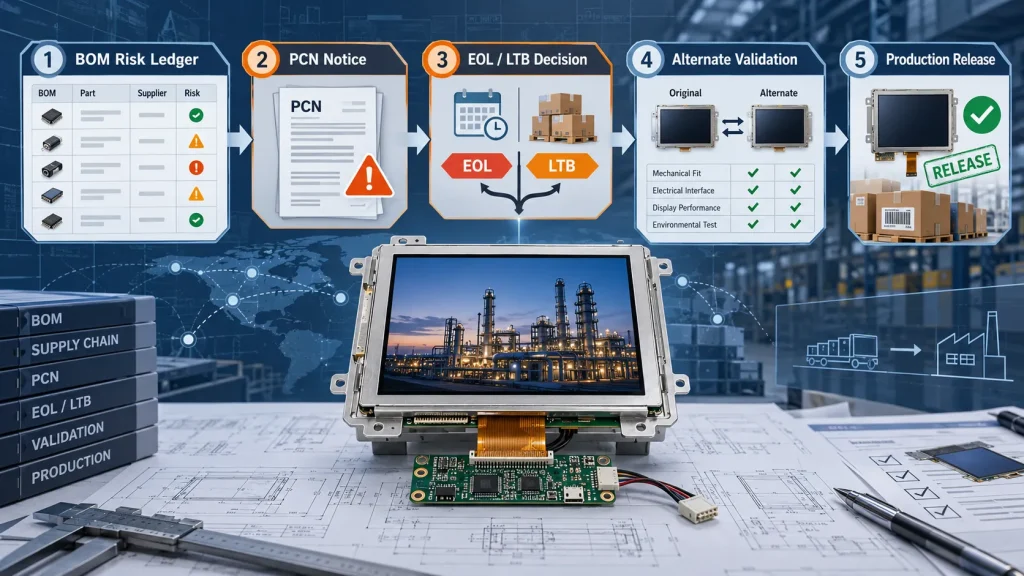
An industrial display obsolescence management plan turns lifecycle risk into controlled records, decisions, and release gates. It tells an OEM what is approved, which items are at risk, who reviews a supplier notice, when a last-time buy is justified, and what evidence permits a replacement display to enter production.
An industrial display is more than a panel. Its approved assembly may include the backlight, driver ICs, touch system, cover glass, bonding materials, FPCs, cables, firmware, and mechanical parts. A change can affect fit, image quality, electrical behavior, touch performance, or field service. The template below gives engineering, procurement, quality, and the display supplier one operating record.
How to Use This Industrial Display Obsolescence Management Plan
Create one controlled plan for each equipment platform or display assembly. Give it an owner, revision, approval date, and review frequency. Link entries to the approved purchase specification and drawings. Cover production, service demand, and variants that use the same display.
Use the following five sections as the minimum template:
|
Plan section |
Minimum record |
Decision it supports |
|
BOM and approved baseline |
Part number, maker, revision, lifecycle status, source, criticality, approved alternates |
Which change can stop production or require requalification? |
|
PCN register |
Notice date, affected item, change description, effective lot or date, evidence, owner, response due |
Can the change be accepted, tested, deferred, or rejected? |
|
EOL and LTB log |
Notice, last order date, last shipment date, forecast, service demand, mitigation choice |
Should the OEM buy inventory, qualify a replacement, or use a bridge strategy? |
|
Validation matrix |
Form, fit, function, optical, touch, environmental, reliability, pilot, acceptance result |
Is the replacement safe to release for the intended equipment? |
|
Release and traceability record |
Approved sample, drawings, firmware, deviations, lot/date code, inspection plan, change history |
Can production identify and control the released configuration? |
Establish the Controlled BOM and Risk Baseline
Start with the complete orderable assembly, not only the marketing model number. Record the manufacturer and supplier part numbers, revision, approved drawing, firmware or configuration identifier, relevant manufacturing site, and included accessories. For a bonded touch display, identify the LCD, touch system, cover glass, bonding system, cable, and programmed settings.
Add a lifecycle field for each critical item: active, mature, not recommended for new designs, EOL announced, LTB open, or obsolete. Record the status date and source. Rate risk using operational impact, qualified alternatives, program life, validation effort, lead time, and inventory.
A useful rule is to rate the risk to the equipment, not the price of the part. A low-cost touch controller or backlight LED can create a high project risk if its replacement changes firmware, optics, thermal behavior, or compliance evidence. The industrial display RFQ checklist can help define the assembly boundary and lifecycle information before the baseline is approved.
Route Every PCN Through a Defined Review
A Product Change Notification should enter a controlled register when received. Record the affected part and revision, reason, implementation date, factory or process, first traceable lot, sample availability, and response deadline. Assign engineering and supply-chain owners.
Compare the notice with the approved baseline. Changes to glass, polarizer, backlight, driver ICs, touch controllers, adhesives, FPCs, firmware, test limits, or manufacturing location can have different consequences. Classify the PCN as documentation only, minor with inspection updates, validation required, or unacceptable.
Close the PCN only when required evidence is complete: updated drawings, comparison data, traceable samples, test results, approved deviations, and an authorized decision.
Convert an EOL Notice Into an LTB or Replacement Decision
An EOL notice starts a dated decision process. Enter the last order and shipment dates, minimum order conditions, stock, and cancellation limits. Recalculate demand through production and service, including yield loss, qualification samples, pilot builds, scrap, and forecast uncertainty.
The team should compare three paths:
- Last-time buy:appropriate when demand is bounded, storage controls are practical, and redesign or validation costs outweigh inventory exposure.
- Qualified replacement:appropriate when demand continues beyond the feasible inventory horizon or when storage, authenticity, or degradation risks make a lifetime buy unsafe.
- Bridge buy plus replacement:appropriate when a limited purchase protects production while engineering validates the successor.
The decision record should show assumptions, total cost, schedule, technical and inventory risks, and the approval owner. The NASA electronic parts obsolescence standard evaluates resolution options against cost, schedule, and technical risk. The International Institute of Obsolescence Management lifecycle paper places obsolescence within the wider product lifecycle.
Define the Replacement Validation and Release Gate
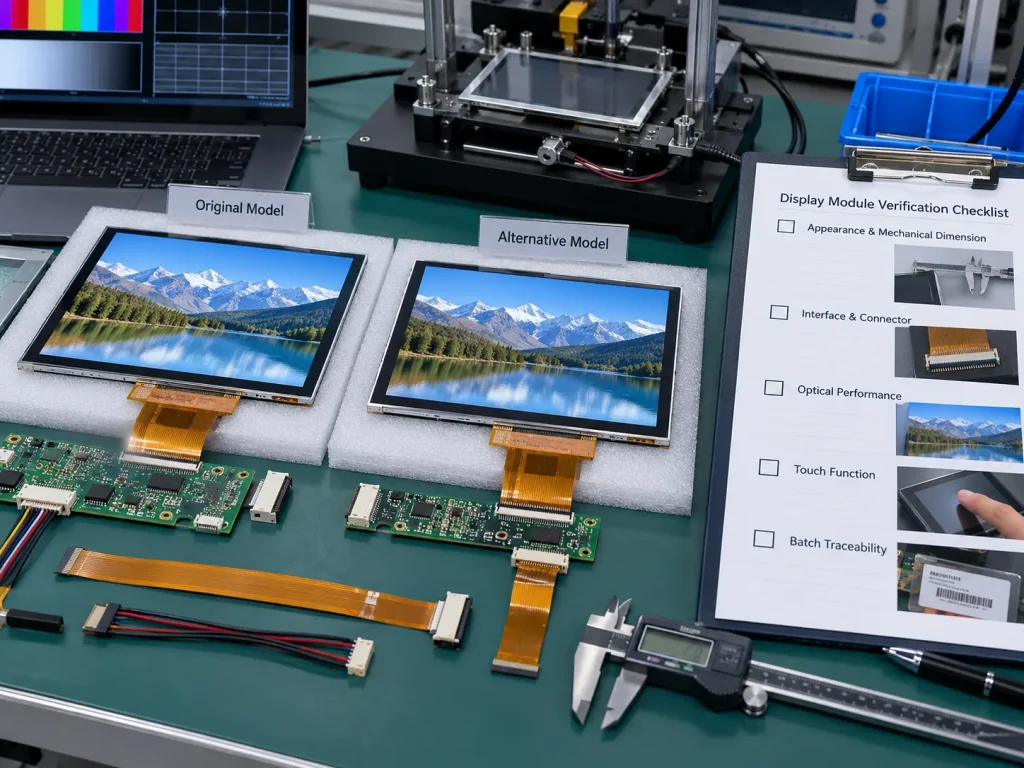
Name the evidence needed before a replacement enters production. Begin with hard-stop form, fit, and function checks: module outline, thickness, active and viewing areas, mounting datums, connector and FPC geometry, pin assignment, interface, voltage rails, power sequence, timing, backlight, and controller compatibility.
Validate performance in the actual system. Compare optics, response, flicker, image retention, power, startup, touch behavior, noise immunity, and thermal performance under agreed methods. Environmental and reliability testing should reflect the equipment mission profile. Run a pilot with production-intent parts, tooling, cables, firmware, fixtures, and inspection criteria.
إن industrial LCD drop-in replacement checklist provides a deeper qualification sequence. If the successor requires a new cover lens, FPC, interface board, bonding stack, or mechanical feature, route the work through a customized display review instead of assuming the catalog module is a drop-in replacement.
Release only the tested configuration. Archive the drawings, golden sample identity, firmware version, validation report, deviations, pilot lot, and sign-off. Update incoming inspection and traceability before mass production.
Set Ownership, Review Cadence, and Escalation Rules
Name responsibilities. Procurement collects notices and commercial dates. Engineering assesses interchangeability and defines validation. Quality controls evidence, deviations, inspection, and traceability. Operations confirms inventory and timing. The product owner accepts residual risk. The supplier provides configuration records, samples, data, and agreed change communication.
Review high-risk BOM items monthly and the full plan at least quarterly, or when forecast, field demand, or supplier status changes. Escalate an unacknowledged PCN, an LTB deadline inside validation lead time, low inventory, unavailable samples, or a failed hard-stop requirement.
Kadi’s supplied lifecycle reference gives an indicative sequence for suitable projects: a pre-announcement about three months before the EOL notice, a last-buy window of about six months, and final shipments roughly three to five months after the LTB deadline while the new model moves toward production. It also states an aim to support industrial displays for five to eight years. These are planning references, not universal guarantees. Confirm dates, scope, availability, and notice commitments for each display, forecast, and purchase agreement.
استنتاج
An effective plan connects the approved BOM to supplier notices, turns EOL dates into a documented LTB or replacement decision, and prevents a new display from reaching production without validation evidence. Maintaining the record before a shortage supports measured choices instead of emergency sourcing. To apply the template, send the display part number, drawing, host interface, forecast, service horizon, and lifecycle notices through Kadi’s engineering contact page.
أسئلة متكررة
What should an industrial display obsolescence management plan contain?
Include the controlled BOM, lifecycle risk status, PCN register, EOL and LTB dates, demand assumptions, mitigation decision, validation matrix, release package, traceability, owners, review frequency, and escalation rules.
How often should the BOM be screened for obsolescence?
Review the full plan at least quarterly and screen high-risk items more often. A new notice, forecast change, inventory drop, failed lot, or unapproved revision should trigger an immediate review.
Does a last-time buy remove the need for replacement planning?
Not always. An LTB may protect a defined period, but storage, forecast error, yield loss, damage, authenticity, or program extensions still create exposure. A bridge buy combined with replacement qualification can reduce schedule risk.
When is a replacement industrial display approved for mass production?
Approval should occur only after the production-intent configuration passes the agreed form, fit, function, optical, touch, environmental, and pilot criteria. The OEM should also freeze the drawing, firmware, deviations, golden sample identity, incoming inspection plan, and lot traceability requirements.
السابق
لا مزيد
التالي
How to Build Supply Chain Resilience for Long-Lifecycle Industrial Display Projects
اترك تعليق

آخر مدونة وأخبار
- Industrial Display Obsolescence Management Plan Template: BOM, PCN, EOL, LTB, and Validation
- How to Build Supply Chain Resilience for Long-Lifecycle Industrial Display Projects
- Last-Time Buy or LCD Replacement? A Decision Framework for Long-Lifecycle Display Projects
- How to Control TFT LCD Revisions After Replacement Approval: Golden Samples, PCNs, Lot Traceability, and Incoming Inspection
- Industrial LCD EOL: What Happens from Pre-Announcement to Replacement Mass Production?
مدونة ذات صلة وأخبار
-
 TN مقابل IPS2024-7-9
-
TN مقابل IPS2024-7-9