
Accueil
-
Blog & Actualités
-
Le meilleur rapport qualité-prix ? Pourquoi le format 1280×720 (720p) reste-t-il la pierre angulaire du marché des écrans industriels en 2025 ?
Le meilleur rapport qualité-prix ? Pourquoi le format 1280×720 (720p) reste-t-il la pierre angulaire du marché des écrans industriels en 2025 ?
2026-05-23
17:39
Le roi du rapport coût-performance ?
Pourquoi le format 1280×720 (720p) reste la pierre angulaire du marché des écrans industriels en 2025
Analyse approfondie des résolutions 1280×720, 1280×800 et 1920×1080 : à quelle résolution appartient réellement chaque résolution ?
Par l'équipe technique de Kadi Display | www.kadidisplay.com
Le débat sur la résolution qui ne sera jamais tranché
Tous les deux ou trois ans, le secteur de l'affichage industriel est confronté à une version similaire du même débat. Une nouvelle résolution devient disponible sur le marché, l'écart de prix se réduit, et quelqu'un – généralement un responsable produit – rédige une note interne affirmant que la norme précédente est désormais obsolète et que la feuille de route produit doit migrer immédiatement vers la spécification supérieure. En 2020, cet argument a été avancé pour le passage de la résolution 1280×800 à la résolution 1280×720. En 2023, il a été avancé pour le passage de la résolution 1920×1080 à la résolution 1280×800. Dans les deux cas, la transition s'est opérée plus rapidement sur le haut de gamme que sur les segments moyen et bas de gamme.
Entre-temps, 1280×720 (HD, ou 720p) Les ventes ont continué. Non pas parce que les acheteurs ignoraient l'existence des résolutions supérieures, mais parce que, pour une part importante des applications d'affichage industriel, la HD est parfaitement suffisante, que la chaîne d'approvisionnement associée est la plus mature et la plus prévisible du secteur, et que les économies réalisées par rapport à la Full HD au niveau système sont réelles et constantes. Cet article examine en détail les avantages concrets de la HD en 2025 – non pas comme une défense nostalgique d'une norme vieillissante, mais comme une analyse technique des conditions actuelles permettant de déterminer dans quels cas la résolution 1280×720 est pertinente par rapport à ceux où les résolutions 1280×800 ou 1920×1080 constituent la solution optimale.
En résumé : la HD est là pour durer. Mais son rôle est aujourd’hui mieux défini qu’il y a trois ans, et c’est cette compréhension qui permet de distinguer une spécification de résolution précise d’une spécification qui surinvestit dans des capacités inutilisables par l’application ou qui ne répond pas aux exigences nécessaires au framework d’interface utilisateur.
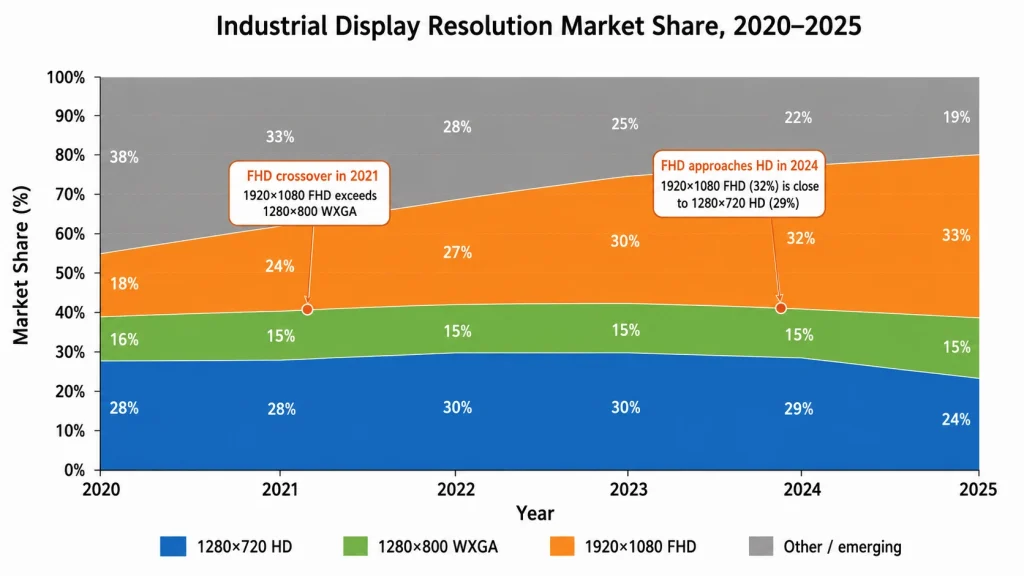
Perspective du marché : D’après une étude de la chaîne d’approvisionnement des écrans industriels, la résolution 1280 × 720 représentait encore environ 24 à 27 % des nouvelles commandes de panneaux industriels de 5 à 12 pouces début 2025, ce qui en faisait le deuxième segment de résolution le plus demandé après le 1920 × 1080. Sa part de marché diminue depuis son pic, mais lentement : la demande annuelle en valeur absolue est restée globalement stable grâce à la croissance du marché global. La HD n’est pas en déclin ; elle est simplement supplantée par la FHD.
Que signifie réellement 1280×720 ? Et pourquoi le nombre de pixels ne fait pas tout.
Les mathématiques de la haute définition aux dimensions des panneaux industriels
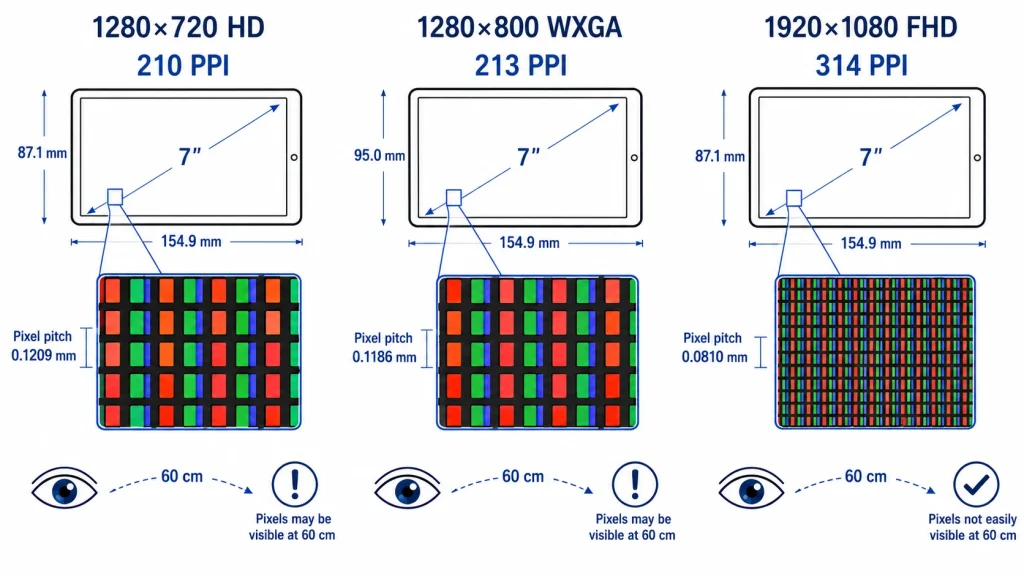
Sur un écran de 7 pouces (taille la plus courante pour les panneaux IHM industriels montés sur machine), la résolution 1280×720 offre une densité de pixels d'environ 210 pixels par pouceSur un écran de 10,1 pouces, cette densité chute à environ 147 ppp. Ces valeurs sont importantes car la capacité de l'œil humain à distinguer les pixels individuels à une distance de vision donnée détermine la résolution minimale pratique. À la distance de vision typique d'un panneau opérateur industriel (40 à 70 cm du visage), le seuil de résolution angulaire est d'environ 1,7 minute d'arc par pixel.
En effectuant le calcul : à une distance de vision de 60 cm et avec une résolution de 210 ppp (écran HD de 7 pouces), la taille angulaire des pixels est d’environ 1,6 minutes d'arc — légèrement en dessous du seuil. Concrètement, cela signifie qu'à cette distance et pour cette taille d'écran, les pixels individuels sont indiscernables. L'affichage paraît « net » dans le sens où la structure des pixels est invisible. À 10,1 pouces et 147 ppp, les pixels deviennent légèrement discernables à 60 cm pour les personnes ayant une bonne acuité visuelle ; toutefois, l'impact pratique sur la lisibilité des interfaces utilisateur industrielles est négligeable pour les textes de plus de 12 points et les éléments d'interface de plus de 24 pixels.
Concrètement, cela signifie que pour l'utilisation courante des IHM industrielles (affichage d'indicateurs d'état, de valeurs de processus, de listes d'alarmes, de menus de navigation et de graphiques de tendances simples), une interface HD bien conçue sur un écran de 7 à 10 pouces, à une distance de visionnage standard, n'entraîne aucune perte de résolution perceptible par rapport aux résolutions WXGA ou FHD. Cette limitation n'apparaît que pour les textes de très petite taille, les détails graphiques très fins ou lors d'un zoom sur des données complexes ; des scénarios qui concernent des applications spécifiques et non la grande majorité des déploiements d'IHM en atelier.
L’avantage de la chaîne d’approvisionnement que les chiffres ne révèlent pas
L'un des avantages les plus significatifs de la HD dans les spécifications d'affichage industriel ne réside pas du tout dans la résolution, mais dans… profondeur de la chaîne d'approvisionnementL'écosystème de fabrication des écrans HD de 7 et 10,1 pouces (1280 × 720 pixels) est parmi les plus matures de toute l'industrie des écrans LCD TFT. De nombreux fabricants d'écrans à Taïwan, au Japon, en Corée du Sud et en Chine produisent des écrans HD de ces tailles. L'offre est répartie entre de nombreux fournisseurs, les délais de livraison sont systématiquement plus courts que pour les écrans Full HD de tailles équivalentes, et la stabilité des prix sur un horizon de planification produit de 12 à 18 mois est nettement supérieure à celle des écrans Full HD, pour lesquels un seul contrat important avec un grand client peut entraîner des fluctuations significatives des prix au comptant.
Pour les concepteurs de produits industriels visant des cycles de production de 7 à 10 ans, la résilience de la chaîne d'approvisionnement est un critère de spécification crucial, tant sur le plan technique que financier. Une spécification d'affichage reposant sur une dalle FHD d'un seul fournisseur est plus vulnérable aux interruptions de production, aux problèmes d'allocation et à la volatilité des prix qu'une spécification basée sur une dalle HD provenant d'un large éventail de fournisseurs. Le coût total d'une modification des spécifications d'affichage en cours de projet – refonte de la carte porteuse, nouveau routage des câbles FPC, revalidation du logiciel, qualification des fournisseurs et nouveaux tests de certification – se chiffre généralement en centaines de milliers d'euros pour les produits industriels complexes. La plus grande diversité de fournisseurs de la HD réduit considérablement ce risque.
1280×720 contre 1280×800 — La différence est plus petite qu'il n'y paraît
Onze pour cent de pixels en plus ne signifient pas onze pour cent de mieux.
La comparaison entre la HD (1280×720) et la WXGA (1280×800) est beaucoup moins médiatisée que celle entre la HD et la Full HD, ce qui se comprend aisément : le passage à la Full HD implique 125 % de pixels en plus et une technologie de fabrication et d’interface totalement différente. Le passage de la HD au WXGA, quant à lui, ne représente que 125 % de pixels supplémentaires. 11 % de pixels en plus (921 600 contre 1 024 000), peut souvent être réalisé avec le même silicium d'interface et le même matériel de pilotage, et sur des écrans de 7 à 10 pouces, ne produit pratiquement aucune différence de densité de pixels perceptible à l'œil humain.
Le véritable avantage du 1280×800 par rapport au 1280×720 ne réside pas dans la résolution, mais dans le format d'image. Le format 16:10 du WXGA offre 80 pixels verticaux supplémentaires par rapport au 16:9 de la HD. Pour certaines interfaces utilisateur, ces 80 pixels sont précieux : ils permettent d'afficher une ligne supplémentaire d'informations d'état, une barre de navigation permanente en haut sans empiéter sur la zone de contenu, ou encore un rendu légèrement plus proportionné des documents. Les interfaces des dispositifs médicaux, où le format 16:10 correspond mieux à la mise en page des formulaires cliniques standard, ont toujours privilégié le WXGA pour cette raison.
Mais pour les applications IHM pures (panneaux de contrôle de processus, gestion des alarmes, tableaux de bord d'équipements), la différence entre 720 et 800 pixels verticaux est rarement un facteur déterminant lors de la conception du panneau. La plupart des frameworks IHM industriels sont conçus pour s'adapter parfaitement aux deux formats d'image. Les ingénieurs qui choisissent le 1280×800 spécifiquement pour le format 16:10 bénéficient d'un réel avantage (quoique modeste) ; ceux qui le choisissent comme… Mise à niveau depuis la HD Sans exigence spécifique d'interface utilisateur pour la hauteur supplémentaire, les utilisateurs paient une prime de 5 à 10 % sur le panneau pour une différence qui ne se manifeste pas dans le produit déployé.
Référence produit : Écran LCD TFT industriel 10,1 pouces 1280×800 avec fonction tactile PCAP — Kadi Display — Module LCD TFT IPS 10,1 pouces de qualité industrielle (1280 × 800 WXGA) avec technologie tactile capacitive, large plage de températures de fonctionnement et interface LVDS ou MIPI DSI en option. Convient aux terminaux médicaux, aux bornes interactives embarquées et aux appareils IHM portables.
Quand le WXGA est le meilleur choix par rapport à la HD
Dans certains cas précis, la résolution WXGA surpasse véritablement la HD, notamment grâce au format 16:10 qui offre un avantage en termes d'interface utilisateur, impossible à obtenir par de simples ajustements logiciels. C'est le cas, par exemple, des interfaces où une barre d'outils latérale et la zone de contenu principale doivent coexister horizontalement sur une largeur de 1280 pixels ; la hauteur de 800 pixels permet une utilisation confortable des deux. On peut également citer les appareils dont les dimensions physiques de l'écran sont limitées par la géométrie du boîtier, qui ne permet pas l'installation d'une dalle 16:9 standard sans bordures apparentes. Enfin, il convient de mentionner les gammes de produits pour lesquelles la documentation réglementaire ou les logiciels anciens exigent une résolution verticale minimale supérieure à 720 pixels.
En dehors de ces cas particuliers, l'avantage du WXGA sur la HD est modeste et dépend du contexte. La chaîne d'approvisionnement pour le WXGA en 10-12 pouces est bien établie, mais plus restreinte que pour la HD : les options de fourniture sont moins nombreuses et la disponibilité des dalles en dessous de 10 pouces est plus limitée. Pour un produit qui n'a pas besoin du format 16:10, partir d'une résolution HD et concevoir l'interface utilisateur autour de 720 pixels verticaux constitue généralement le choix technique le plus pragmatique.
Référence produit : Écran Kadi Display IPS TFT LCD 12,1 pouces (1280 x 800 pixels) avec autofocus Écran LCD TFT IPS de 12,1 pouces (30,8 cm) avec résolution de 1280 × 800 pixels, traitement anti-traces de doigts, interface LVDS et technologie tactile CTP. Conçu pour les environnements industriels et médicaux exigeants où le format 16:10 et la résistance chimique sont indispensables.
1280×720 contre 1920×1080 — L’écart réel et quand cela compte
Comparaison des spécifications techniques
Matrice de comparaison des spécifications de résolution
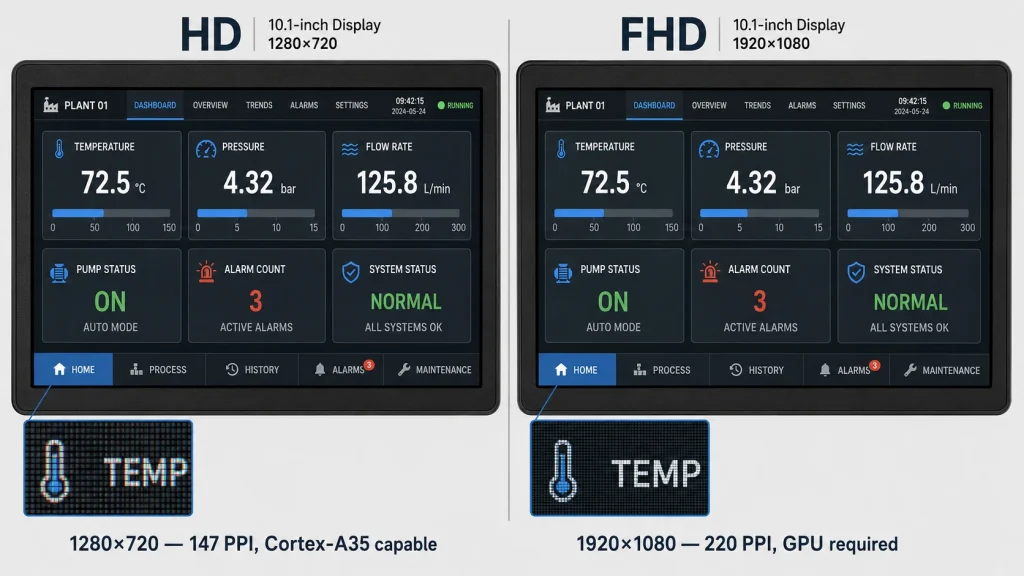
Dans ce tableau, la ligne relative aux exigences du SoC est celle qui explique la plus grande différence de coût au niveau système. Le rendu d'une image Full HD à 60 images par seconde nécessite un processeur doté d'une fréquence d'horloge suffisante pour exécuter le logiciel IHM et d'un GPU avec un débit de remplissage suffisant pour composer les calques d'affichage sans perte d'images. La configuration minimale requise pour un rendu fluide de l'interface utilisateur en Full HD est un processeur de type Cortex-A55 avec un GPU dédié de la série Mali ou équivalent — une configuration dont le coût est sensiblement plus élevé que celui requis pour la HD.
Un écran HD piloté par un SoC Cortex-A35 (ou même un microcontrôleur haut de gamme avec contrôleur d'affichage LTDC ou équivalent) affiche sans difficulté une interface homme-machine industrielle simple à 60 images par seconde. En revanche, ce même SoC Cortex-A35, chargé d'afficher une trame Full HD, peinerait à gérer des compositions multicouches complexes et risquerait de produire des artefacts de fréquence d'images en cas de forte charge. Il ne s'agit pas d'un problème théorique, mais d'une contrainte de conception concrète que les équipes découvrent lors des tests d'intégration, une fois les spécifications de la dalle définies. La résolution de l'écran et le niveau du processeur sont spécifiés conjointement.; changer l'un sans l'autre en cours de projet est coûteux.
Là où la Full HD surpasse véritablement la HD
La Full HD offre un avantage réel et mesurable par rapport à la HD dans certains cas précis qu'il convient de détailler. Les écrans de vision industrielle et d'inspection par IA en sont l'exemple le plus flagrant : lorsqu'un écran affiche le flux vidéo d'une caméra de 4 mégapixels ou plus, avec des marqueurs de défauts annotés par IA, la résolution des marqueurs et le niveau de détail de l'image visibles sur un écran Full HD sont nettement supérieurs à ceux d'un écran HD. En 1280 × 720, une image de caméra de 4 mégapixels est affichée à environ 22 % de sa résolution source ; en Full HD, elle est affichée à 52 %. La différence en termes d'utilité diagnostique est visible et significative.
Les écrans SCADA et les écrans de salle de contrôle à forte intensité de données de plus de 12 pouces constituent une autre application Full HD à part entière. La densité d'informations requise par une interface SCADA sophistiquée (affichage simultané de plusieurs graphiques de tendances, listes d'alarmes, schémas d'équipements et éléments de navigation) dépasse un certain nombre d'éléments disponibles sur un écran HD. Le seuil se situe approximativement entre 8 et 12 widgets de données simultanés. Pour les écrans de 10 à 12 pouces, les interfaces HD nécessitent soit un texte de petite taille (illisible à distance de visionnage en milieu industriel), soit la pagination (ce qui réduit la perception de l'environnement). La Full HD (FHD) supprime entièrement cette contrainte pour une même taille d'écran.
Lorsque le coût de la FHD n'est pas justifié
Le cas où la FHD est le plus souvent surdimensionnée dans les applications industrielles concerne l'interface opérateur de base des équipements montés sur machine : écran d'un automate programmable ou d'un contrôleur de robot, panneau d'état d'une ligne de convoyage, interface d'un système de pesage, moniteur de processus simple. Ces interfaces affichent généralement moins de six éléments de données simultanément (valeur actuelle, consigne, indicateur d'état, état d'alarme et navigation) et sont utilisées par des opérateurs qui interagissent avec elles pendant de brèves périodes, souvent équipés d'EPI.
Dans ce scénario, la Full HD n'offre aucun avantage fonctionnel par rapport à la HD. La densité de pixels supérieure n'améliore pas la lisibilité des indicateurs d'état (leur lisibilité est limitée par la conception des icônes, et non par le nombre de pixels). Le coût plus élevé du SoC n'améliore pas le temps de réponse (principalement dû à la latence de communication du PLC, et non à la fréquence d'images du GPU). Enfin, le coût plus élevé de la dalle n'améliore ni la durabilité, ni la plage de températures, ni la résistance à l'environnement industriel. Dans ce cas précis, le surcoût unitaire du système pour la Full HD représente un investissement sans gain fonctionnel mesurable.
L’argument du coût total du système — Où se situent les véritables économies ?
Les débats sur la résolution dans les spécifications d'affichage industriel se concentrent souvent sur la dalle seule. Si la dalle représente la différence la plus visible, elle n'est pas la seule. Le processeur, l'interface d'affichage, le développement logiciel nécessaire aux tests spécifiques à la résolution et le profil de risque de la chaîne d'approvisionnement sont tous impactés par une modification de la spécification de résolution. Le tableau ci-dessous compare l'impact du choix de la résolution sur l'architecture système d'un terminal embarqué industriel représentatif, pour un volume de production de 500 unités.
Comparaison d'architectures système — Terminal industriel 7 pouces pour un volume de 500 unités
Les niveaux de composants et leurs coûts relatifs reflètent les conditions générales du secteur en 2025. Le choix final dépend du fournisseur, du volume et des exigences spécifiques de l'application. Consultez les fiches techniques des composants avant de vous engager dans une conception.
L'écart de coût total du système pour 500 unités entre la HD et la FHD n'est pas le chiffre qui retient le plus l'attention lors des réunions d'évaluation produit, car il est réparti entre plusieurs postes (écran, SoC, interface, logiciel) qui sont analysés séparément. Lorsqu'on le totalise par projet, la réaction est généralement la surprise. Voici le calcul qui explique pourquoi la part de marché de la HD ne s'est pas effondrée malgré la croissance de la FHD. — pour le grand nombre de terminaux industriels qui n'ont réellement pas besoin de la densité de pixels FHD, la différence de coût du système est une raison commerciale réelle et récurrente de rester en HD.
Erreur fréquente : les équipes qui passent de la HD à la FHD « pour assurer la pérennité » d’un simple panneau opérateur constatent souvent que l’écran FHD impose une mise à niveau du SoC non prévue au budget. Cette mise à niveau nécessite alors une carte porteuse différente, elle-même soumise à de nouveaux plans mécaniques. Trois mois après le début du projet, une mise à niveau de la résolution qui semblait simple a entraîné une modification du périmètre d’ingénierie, bien plus coûteuse que la simple différence d’affichage initiale. Il est donc essentiel de définir les exigences réelles de résolution de l’application avant de choisir la résolution.
Analyse d'adéquation application par application
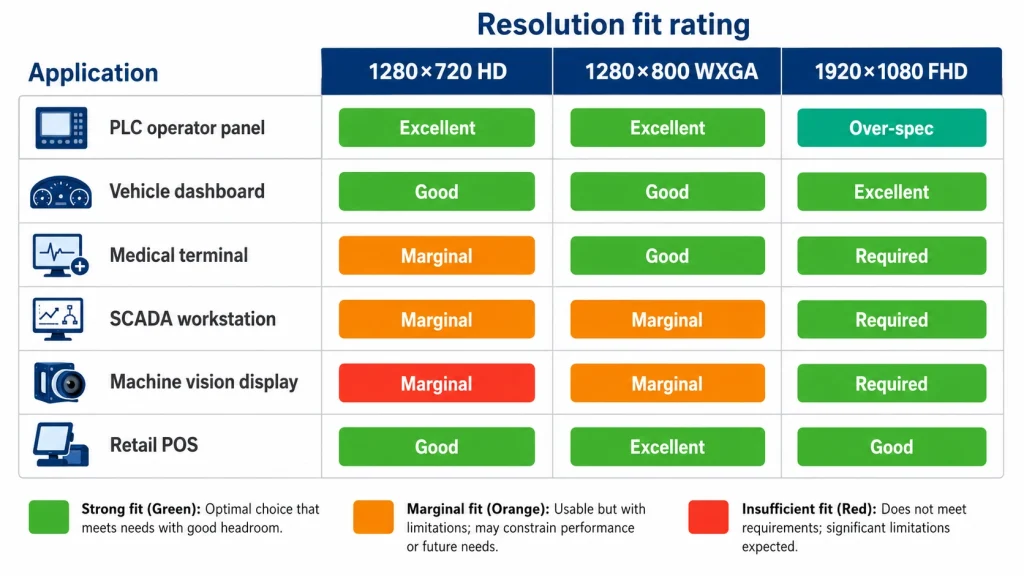
Connaître la structure de coûts théorique est utile ; savoir où elle s’applique à des applications concrètes l’est encore plus. Le tableau suivant associe les types d’applications d’affichage industriel courants aux trois niveaux de résolution.
Matrice d'ajustement de la résolution pour applications industrielles
La ligne concernant la vision industrielle dans ce tableau mérite une attention particulière. C'est le cas le plus clair où La HD est véritablement insuffisante — non pas « moins idéal », mais en réalité en deçà du seuil fonctionnel requis pour l'application. Si le cahier des charges inclut un affichage en ligne du flux vidéo d'une caméra de 4 MP ou plus avec des annotations IA superposées, la HD produira des annotations trop grossières pour être utilisables sur les panneaux de taille courante des systèmes d'inspection. Dans ce cas, la FHD n'est pas une amélioration, mais une exigence, et spécifier la HD n'est pas une optimisation des coûts ; c'est une erreur de conception qui engendrera des réclamations sur le terrain.
La rangée de panneaux de commande PLC/machine est le cas inverse : c'est là que FHD est véritablement surdimensionné. Pour chaque dimension essentielle à l'application, la résolution, la densité de pixels et la capacité du GPU ne constituent pas des contraintes déterminantes pour le bon fonctionnement d'un panneau opérateur d'automate programmable. Les véritables contraintes sont les suivantes : l'écran fonctionne-t-il de manière fiable de -20 °C à +60 °C ? Résiste-t-il aux vibrations et aux interférences électromagnétiques de la machine sur laquelle il est monté ? L'écran tactile PCAP est-il réactif avec des gants ? La chaîne d'approvisionnement est-elle suffisamment stable pour garantir une production de huit ans sans remplacement de panneau ? Les panneaux HD répondent mieux à toutes ces questions que les panneaux FHD, car les lignes de production qui les fabriquent sont plus matures et l'écosystème qui les entoure est plus étendu.
La dimension logicielle — Compatibilité des frameworks d'interface utilisateur et coût de développement
Quels frameworks d'interface utilisateur industrielle ciblent quelle résolution ?
Les frameworks logiciels IHM industriels offrent différents niveaux de prise en charge native pour la HD, la WXGA et la FHD. QtQt, le framework d'interface utilisateur C++ dominant pour les applications embarquées industrielles, est conçu pour être indépendant de la résolution : les applications Qt s'adaptent à toutes les résolutions, et un même projet Qt peut cibler les résolutions 1280×720 et 1920×1080 avec des ajustements de mise en page relativement mineurs. Le travail de qualification pour certifier une application Qt sur une nouvelle configuration d'affichage prend généralement 1 à 2 semaines d'ingénierie, et non un cycle de développement complet.
Les frameworks IHM Web — notamment les interfaces de navigateur basées sur Chromium utilisées dans certains terminaux industriels modernes — présentent un tableau plus complexe. Les mises en page CSS s'adaptent naturellement à la résolution de la fenêtre d'affichage, mais Dans de nombreux modèles d'interface utilisateur industrielle Web, les tailles de police, les dimensions des icônes et les tailles des zones tactiles par défaut sont calibrées pour une résolution Full HD comme référence.L'utilisation d'une interface homme-machine (IHM) web conçue pour la Full HD sur un écran HD nécessite soit une mise à l'échelle (pouvant entraîner un flou des éléments), soit une refonte complète pour la taille réduite de la fenêtre d'affichage. Ce problème, bien que réversible, est réel : les équipes qui acquièrent un progiciel IHM web et spécifient ensuite du matériel HD doivent prévoir du temps de développement pour l'adaptation de l'interface utilisateur.
L'avantage LVDS pour l'intégration HD
Du côté de l'intégration matérielle, la compatibilité de HD avec LVDS monocanal Il s'agit d'un avantage significatif pour les équipes de conception travaillant avec des plateformes SoC industrielles conçues entre 2015 et 2020. La majorité des SoC de classe Cortex-A produits durant cette période intègrent une sortie d'affichage LVDS monocanal en standard. L'affichage FHD à des fréquences d'images adéquates requiert généralement soit une interface LVDS bicanal (qui divise par deux la fréquence d'horloge disponible par voie, nécessitant une configuration de pilote spécifique), soit une interface eDP (qui requiert un contrôleur DisplayPort embarqué dédié, absent de nombreux SoC plus anciens).
Pour les équipes travaillant sur des projets de mise à jour de produits (où un nouvel écran est intégré à une plateforme matérielle initialement conçue pour la HD), la possibilité de passer d'une dalle 720p à une dalle haute résolution sans modifier le SoC ni le routage de l'interface d'affichage représente un gain de temps considérable. La résolution WXGA (1280 × 800) répond souvent à ces critères : même interface, même SoC, modifications minimales de la carte. C'est rarement le cas pour la FHD, et la refonte de la carte pour prendre en charge l'eDP ou le LVDS double canal constitue un ajout non négligeable au périmètre de ce qui pouvait initialement se limiter à une simple mise à jour esthétique.
Référence produit : Écran LCD TFT 10,1 pouces (1280 × 720 pixels) avec HDMI et luminosité de 1500 nits — Kadi Display — Écran industriel IPS TFT LCD de 10,1 pouces (25,7 cm) avec résolution 1280 × 720, tactile capacitif et interface HDMI. Large plage de températures de fonctionnement, idéal pour les interfaces homme-machine (IHM), les terminaux embarqués et les applications automobiles nécessitant une résolution HD et une interface accessible.
Qui achètera encore de la HD en 2025 — et pourquoi
Segments de marché où la HD est la spécification dominante
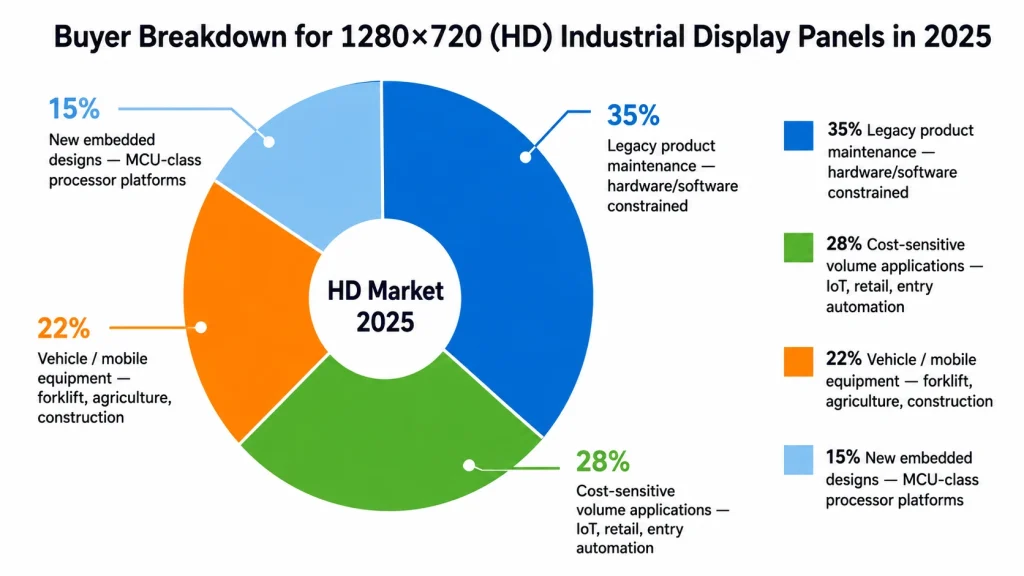
Le profil des acheteurs de panneaux industriels 1280×720 en 2025 ne forme pas un groupe homogène ; il comprend plusieurs segments distincts, chacun justifiant le maintien de cette spécification par des raisons différentes. Identifier le segment auquel appartient un projet donné permet de déterminer si la haute définition est un choix judicieux ou s’il s’agit d’une solution par défaut héritée qu’il convient de reconsidérer.
- Maintenance des produits existants : La principale catégorie de commandes de dalles HD en 2025 concerne le remplacement des écrans HD utilisés dans les produits initialement conçus pour ces écrans et toujours en production ou en maintenance. Ces commandes ne relèvent pas d'un choix de résolution, mais d'obligations liées à la chaîne d'approvisionnement. Les spécifications d'affichage sont définies par la plateforme matérielle, les logiciels et les certifications existants.
- Applications à volume limité par les coûts : Dispositifs IoT industriels à grand volume, terminaux de vente au détail destinés aux consommateurs et équipements d'automatisation industrielle d'entrée de gamme où l'affichage est une fonctionnalité nécessaire mais non différenciatrice : pour ces applications, chaque euro économisé sur le coût du système d'affichage représente un avantage concurrentiel, et la HD permet de réaliser des économies significatives par rapport à la FHD.
- Véhicules et équipements mobiles : Dans les applications IHM embarquées (tableaux de bord de chariots élévateurs, panneaux de commande d'engins agricoles, écrans mobiles pour installations industrielles), les vibrations, la plage de températures et la consommation d'énergie sont plus importantes que la densité de pixels. Les écrans HD de ces tailles sont largement disponibles en versions à large plage de températures, et l'utilisation d'une IHM en cabine ne justifie pas une densité de pixels plus élevée.
- Dispositifs embarqués et IoT dotés de processeurs de type MCU : Les nouveaux produits sont conçus autour d'une plateforme de traitement principale composée d'un microcontrôleur ou d'un processeur d'application d'entrée de gamme, sans carte graphique dédiée. La HD est souvent la résolution maximale pratique pour ces plateformes à 60 images par seconde ; la Full HD n'est pas envisageable sans une mise à niveau significative du processeur, ce qui modifie considérablement le coût total de l'appareil.
Les projets qui devraient probablement passer en FHD
Tous les utilisateurs actuels d'écrans HD ne font pas le bon choix. Dans certaines catégories de produits, les conditions qui justifiaient la HD il y a cinq ans ne sont plus réunies, et la FHD offrirait de meilleurs résultats pour un surcoût désormais acceptable. Les exemples les plus flagrants sont les applications SCADA et les IHM gourmandes en données sur écrans de 10 pouces et plus, où la complexité de l'interface utilisateur croît plus vite que la résolution d'affichage : les équipes ajoutent toujours plus d'éléments de données à l'interface sans augmenter la résolution d'affichage, ce qui engendre des interfaces de plus en plus encombrées et nuit à l'ergonomie.
Pour ces applications, la bonne question d'ingénierie n'est pas : « Pouvons-nous nous permettre la FHD ? » mais… « Quel est le coût des erreurs d'opérateur causées par une interface utilisateur qui ne peut pas afficher les informations dont l'opérateur a besoin sans pagination ? » Il s'agit d'une analyse plus complexe qu'une comparaison des coûts d'un panel, mais c'est celle qui tend à donner la bonne réponse pour les bonnes raisons.
Résumé — La position exacte du format 1280×720 en 2025
L'affirmation selon laquelle la résolution 1280×720 serait le meilleur compromis en termes de rapport qualité-prix est juste, mais incomplète. La haute définition offre de réels avantages en termes de coûts au niveau du système : dalle, processeur, interface et chaîne d'approvisionnement. Ces avantages sont concrets, reproductibles et financièrement significatifs pour les volumes de production élevés. Ce ne sont pas des raisons d'éviter la haute définition, mais plutôt des raisons de la privilégier dans les cas où elle est pertinente.
La position exacte de la HD en 2025 est la suivante : Il s'agit de la résolution appropriée pour les applications industrielles où les principales exigences de performance sont la fiabilité opérationnelle, la durabilité environnementale et la prévisibilité de la chaîne d'approvisionnement, et où la complexité de l'interface utilisateur ne nécessite pas plus de 900 000 pixels pour un affichage efficace.Cette description englobe une grande partie du marché des écrans industriels : panneaux de commande de machines, tableaux de bord de véhicules, systèmes SCADA d'entrée de gamme, terminaux IoT embarqués, points de vente et gammes de produits existantes en production. Pour ces applications, la haute définition n'est pas un compromis, mais la spécification qui offre le meilleur résultat global.
Là où la HD n'est pas la solution adéquate — vision industrielle, systèmes SCADA à forte intensité de données de plus de 12 pouces, imagerie médicale haute résolution, affichages avec superposition d'IA — l'intérêt de la FHD est évident et le surcoût est justifié. Cependant, « nous pourrions en avoir besoin un jour » ne justifie pas à lui seul le coût d'une résolution FHD inutilisée dans l'application actuelle. Il est essentiel de définir précisément les besoins de l'application. Sur une part importante du marché industriel, la résolution standard reste le 1280×720.
Pour les modules LCD TFT industriels aux résolutions 1280×720, 1280×800 et 1920×1080, disponibles en tailles de 7 à 12,1 pouces — y compris les versions à large plage de températures, l'intégration tactile PCAP, le collage optique et les interfaces LVDS / MIPI DSI / eDP / HDMI — consultez la gamme complète de produits sur kadidisplay.comAssistance aux projets OEM et ODM : Sales@sz-kadi.com.
Avertissement : Les estimations de parts de marché et de coûts mentionnées dans cet article sont des estimations directionnelles basées sur des observations générales du secteur et des études de la chaîne d’approvisionnement menées jusqu’au début de 2025. Elles ne constituent pas une étude de marché certifiée. Les fourchettes de coûts sont données à titre indicatif et varient selon le fournisseur, le volume et les composants sélectionnés. Les spécifications techniques doivent être vérifiées auprès du fabricant de panneaux concerné avant tout choix de conception. Toutes les marques citées appartiennent à leurs propriétaires respectifs.
Précédent
Test ultime en extérieur : comment les écrans industriels de 2 000 nits triomphent des environnements extrêmes
Suivant
Traitements de surface AG/AR : Lisibilité améliorée dans les environnements industriels difficiles
Laisser un commentaire

Derniers blogs et nouvelles
- Industrial LCD EOL: What Happens from Pre-Announcement to Replacement Mass Production?
- Electronic Component Obsolescence Management for Industrial Displays: An OEM Guide
- How to Develop a Production Ready Custom Display Assembly TFT Module Touch Cover Glass FPC Bonding and Mounting
- 15 Pin vs 22 Pin Raspberry Pi DSI Connectors Cable Pinout and Compatibility
- Native MIPI DSI vs LVDS or HDMI Bridge: An OEM Display Architecture Decision Guide