




Telas do Raspberry Pi legíveis sob luz solar
2026-06-08
10:17
Telas do Raspberry Pi legíveis sob luz solar
Qual deve ser o nível de brilho de um monitor industrial?
Por Equipe Técnica da Kadi Display | www.kadidisplay.com
Por que as telas do Raspberry Pi precisam de uma estrutura de controle de brilho, e não apenas de uma lista de produtos?
O Raspberry Pi transcendeu em muito as bancadas de projetos para entusiastas. Em fábricas, equipamentos de campo, carregadores de veículos elétricos, bancadas de teste, sistemas de agricultura inteligente e painéis de controle compactos, é comum encontrar um Raspberry Pi ou um Compute Module por trás de uma pequena interface touchscreen. A atração é óbvia: flexibilidade de software, suporte para Linux, recursos robustos da comunidade e um custo inicial menor do que muitos terminais HMI de PLC tradicionais. O risco é igualmente óbvio: muitas telas de Raspberry Pi foram projetadas para mesas, salas de aula, quiosques e painéis de controle, não para exposição direta ao sol.
Essa diferença se manifesta primeiramente no brilho. Uma tela de Raspberry Pi que parece nítida em um escritório pode se tornar quase ilegível do lado de fora de uma oficina. Um monitor de 250 ou 400 nits pode ser perfeitamente aceitável para um painel de informações interno. Um Raspberry Pi Touch Display 2 antirreflexo de 500 nits é um painel integrado útil para ambientes internos claros ou controlados, mas não garante automaticamente que a tela do Raspberry Pi seja legível sob a luz solar direta. Para projetos de telas sensíveis ao toque para Raspberry Pi em ambientes externos, a discussão técnica geralmente começa em torno de 800 a 1000 nits, aumentando conforme a incidência direta do sol, o brilho refletido e a necessidade de longa vida útil.
Este artigo aborda o brilho da tela como uma decisão de projeto. Ele compara 400 nits, 1000 nits e 2000 nits no contexto de projetos de IHM (Interface Homem-Máquina) com Raspberry Pi, explica por que a colagem óptica e o vidro antirreflexo podem ser tão importantes quanto a intensidade da luz de fundo e fornece uma lista de verificação prática para engenheiros que desenvolvem sistemas de IHM de baixo custo que ainda precisam de confiabilidade industrial.
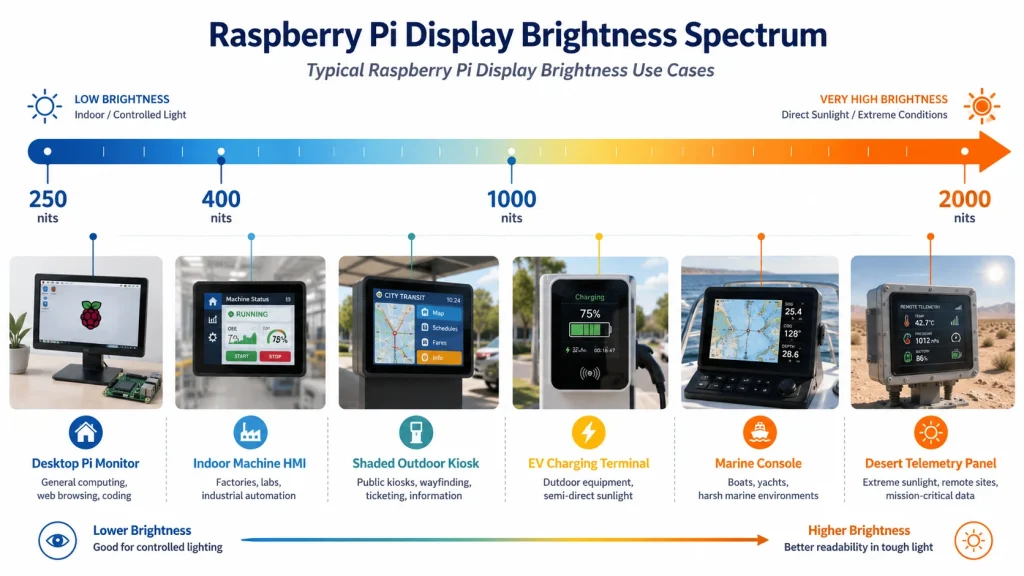
Primeiro teste comparativo: o que os monitores padrão do Raspberry Pi realmente oferecem.
Um bom ponto de partida é o ecossistema oficial do Raspberry Pi. O monitor Raspberry Pi é especificado como um LCD IPS Full HD de 15,6 polegadas com revestimento antirreflexo e brilho típico de 250 nits. Essa é uma especificação sensata para um monitor de mesa, não para uma IHM industrial para uso externo. O Raspberry Pi Touch Display 2 é mais compacto e mais adequado para sistemas embarcados: utiliza um LCD TFT de 720 x 1280, suporta toque capacitivo de cinco dedos, possui superfície antirreflexo e sua descrição indica um brilho de retroiluminação de 500 cd/m² com temperatura de operação de -20 °C a +70 °C. Esses dados são úteis porque mostram a diferença entre um monitor Pi convencional e uma tela Pi para uso externo.
Para uma IHM Raspberry Pi de uso interno, montada em uma bancada de laboratório, na estrutura de uma máquina de embalagem ou em um painel de parede dentro de uma sala de controle, 400 a 500 nits podem ser suficientes. Para uma tela montada perto de janelas, sob uma cobertura ou em um carrinho de serviço móvel que se desloca entre ambientes internos e externos, 500 nits se torna um ponto de transição, e não uma solução definitiva. Quando a tela estiver exposta à luz solar direta, uma tela Raspberry Pi de alto brilho, na faixa de 800 a 1000 nits, torna-se a base mais segura.
Kadi Display s Guia Raspberry Pi e MIPI DSI É útil por esse motivo. Seu artigo sobre o Raspberry Pi DSI observa que projetos para ambientes externos ou com muita luminosidade devem usar telas de alto brilho com luminância de 800 cd/m² ou superior, e que as soluções da Kadi Display podem atingir até 2500 cd/m², dependendo da personalização. Essa faixa é exatamente onde os projetos industriais de IHM com Raspberry Pi diferem das telas sensíveis ao toque para o consumidor.
Zonas de brilho para Raspberry Pi HMI: 400 nits, 1000 nits e 2000 nits
A maneira mais fácil de evitar especificações excessivas ou insuficientes para a tela do Raspberry Pi é definir zonas de brilho por ambiente, em vez de por categoria de produto. Os valores comuns de 400 nits, 1000 nits e 2000 nits não são apenas enfeites de marketing; são pontos de referência práticos para diferentes condições de luz ambiente.
Uma tela Raspberry Pi de 400 nits é ideal para painéis de controle internos, IHMs de máquinas, terminais de armazém, instrumentos portáteis e equipamentos que permanecem dentro do edifício. Nesses espaços, as principais preocupações são o ângulo de visão, a precisão do toque, a montagem mecânica, a EMI, a proteção contra tensão dos cabos e o design da interface do usuário do software. Brilho excessivo pode causar fadiga ocular durante longos turnos, portanto, mais nits nem sempre significam melhor desempenho.
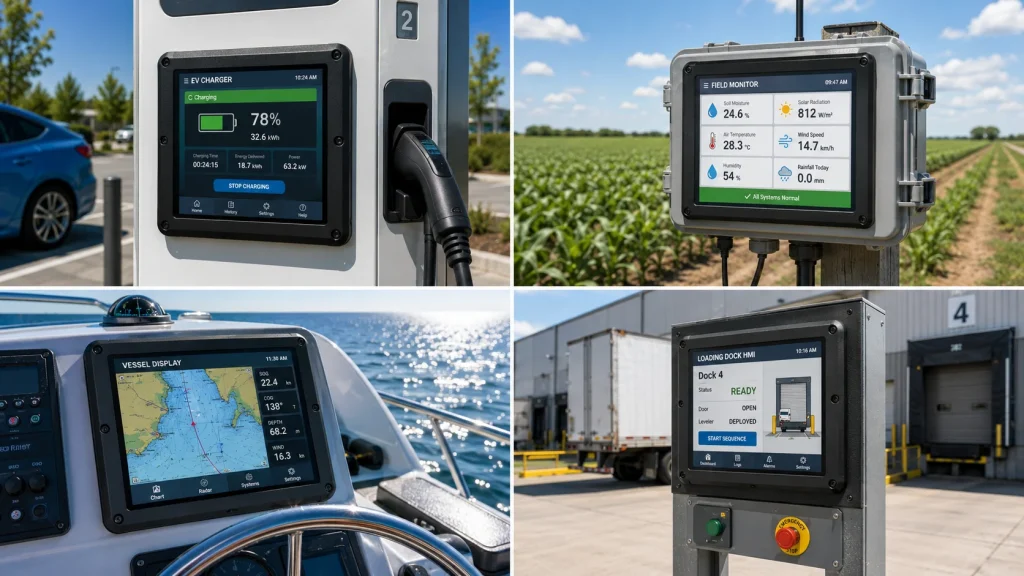
Um display industrial de 1000 nits é a escolha mais comum para projetos HMI com Raspberry Pi em ambientes semi-externos. Isso inclui quiosques externos em áreas sombreadas, displays para carregadores de veículos elétricos, caixas de monitoramento agrícola, interiores de veículos, docas de carga em fábricas, bancadas de teste externas e equipamentos de serviço utilizados sob a luz do dia. Em muitos desses casos, 1000 nits, combinados com colagem óptica e tratamento antirreflexo, proporcionam um resultado de campo superior ao de uma tela com brilho mais alto e uma camada de ar refletora.
Um monitor externo de 2000 nits pertence a uma categoria diferente. Ele é usado quando a tela precisa permanecer legível sob luz solar direta, em equipamentos marítimos, em veículos de mineração ou no deserto, em pontos de recarga expostos ou em infraestrutura pública onde os usuários não podem reposicionar o monitor. Para sistemas Raspberry Pi, 2000 nits também significam mais potência, mais calor, um driver de backlight mais robusto e um projeto térmico mais eficiente.
Tabela de seleção de brilho para displays industriais Raspberry Pi
Por que os piolhos sozinhos não determinam a legibilidade sob a luz solar?
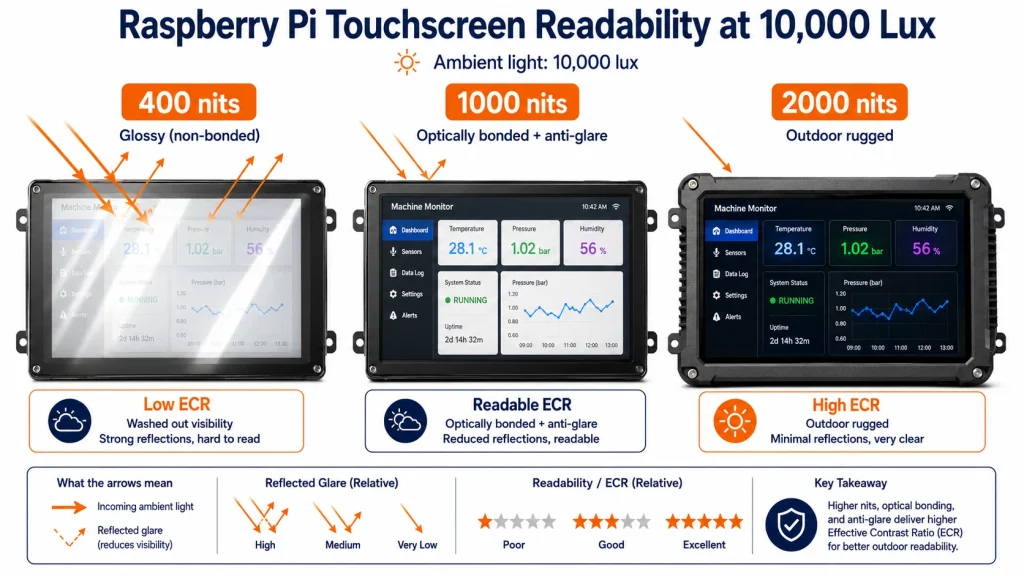
A classificação em nits de um monitor indica a quantidade de luz que o painel emite. Ela não informa quanta luz solar é refletida pelo vidro de cobertura de volta para os olhos do usuário. Essa luz refletida é o motivo pelo qual uma tela aparentemente brilhante pode apresentar problemas em ambientes externos. Um LCD brilhante de 1000 nits pode parecer pior do que um LCD colado de 800 nits com uma superfície antirreflexo bem escolhida. A medida prática é o contraste efetivo no ambiente de instalação, e não apenas o número do catálogo.
Um modelo simplificado de legibilidade utiliza a luminância refletida: L_reflect = lux ambiente x refletância / pi. Se uma tela recebe 10.000 lux e a refletância efetiva da superfície é de 4%, a luminância refletida é de aproximadamente 127 cd/m². Um painel de 400 nits, nessa situação, perde grande parte do seu contraste. Se a mesma estrutura óptica reduzir a refletância efetiva para perto de 1%, a luminância refletida cai para cerca de 32 cd/m². Essa diferença pode ser mais valiosa do que simplesmente aumentar a potência da luz de fundo.
Para o projeto de IHMs (Interfaces Homem-Máquina) com Raspberry Pi, isso significa que duas especificações devem ser analisadas em conjunto: brilho e pilha óptica. Verifique se a tela possui colagem óptica, vidro antirreflexo ou antirreflexo, uma lente de cobertura adequada e um painel de toque projetado para ambientes externos com contaminação. Em projetos de telas sensíveis ao toque para Raspberry Pi em ambientes externos, um display industrial de 1000 nits sem controle de reflexo atende apenas parcialmente às especificações.
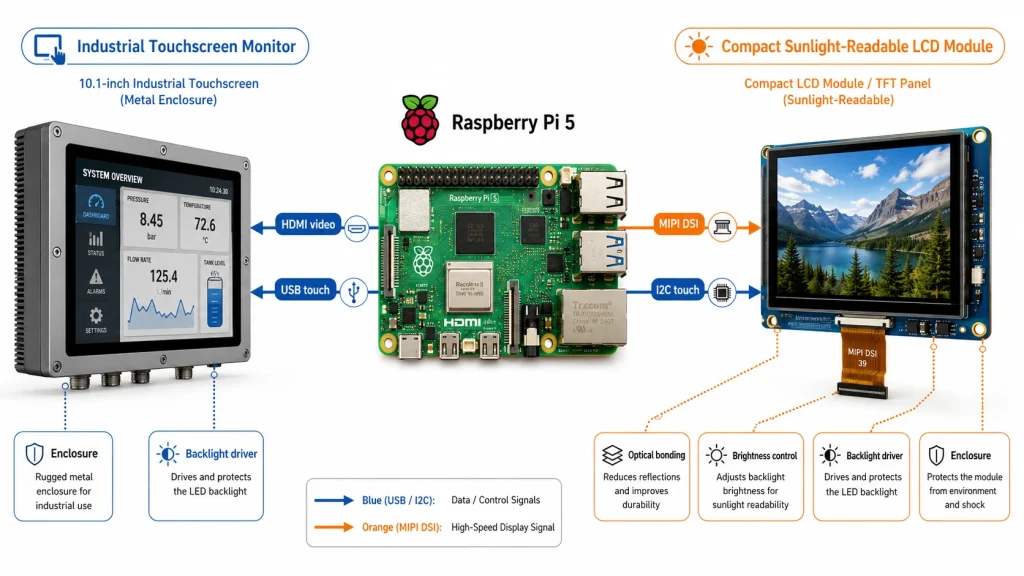
Opções de interface: HDMI, USB Touch, MIPI DSI e integração embarcada.
O brilho não é a única decisão a ser tomada. Uma tela legível sob a luz solar para Raspberry Pi também precisa se conectar perfeitamente à plataforma Pi. A combinação de HDMI com USB touchscreen é a opção de menor risco para muitos projetos de monitores touchscreen industriais. Ela se comporta como um display padrão e um dispositivo touchscreen HID, funciona com o sistema operacional Raspberry Pi e diversas distribuições Linux, além de simplificar os testes de protótipo para produção. (Kadi Display's) Monitor industrial de toque HDMI de 15,6 polegadas A página observa que o HDMI fornece saída de vídeo universal e o USB touch geralmente funciona como um dispositivo HID padrão no Windows e no Linux, incluindo comumente sistemas Raspberry Pi e Jetson.
Screens Raspberry Pi DSI Pode ser mais limpo e compacto, especialmente para telas pequenas, equipamentos alimentados por bateria e gabinetes integrados. Mas o DSI é menos "plug-and-play". Pinagem, número de pistas, temporização, sobreposição da árvore de dispositivos, comprimento do cabo ribbon, sequenciamento de energia e controle de luz de fundo precisam ser verificados. O guia MIPI DSI da Kadi Display para Raspberry Pi alerta especificamente que o protocolo DSI e a configuração personalizada exigem cuidado, além de mencionar opções de personalização como vidro de cobertura, luz de fundo, pinagem, cabos FPC e gabinete.
Uma regra prática é simples: use HDMI + USB touch quando o projeto prioriza velocidade, facilidade de manutenção e ampla compatibilidade. Use MIPI DSI quando o produto precisar de um design interno compacto, menor número de cabos ou um módulo industrial personalizado. Em ambos os casos, o alto brilho ainda depende do design da retroiluminação, do consumo de energia e do gerenciamento térmico.
1000 nits como o valor mínimo prático para telas sensíveis ao toque Raspberry Pi em ambientes externos.
Para a maioria dos projetos HMI externos com Raspberry Pi, 1000 nits é a primeira especificação que merece consideração. É um valor suficientemente alto para garantir a legibilidade sob luz solar em muitas instalações sombreadas ou parcialmente expostas, mas ainda assim com consumo de energia e dissipação de calor gerenciáveis em comparação com 1500 ou 2000 nits. A Kadi Display lista um Tela LCD MIPI de 6,0 polegadas Com resolução de 720 x 1440, brilho de 1000 nits, interface MIPI e temperatura de operação de -20 °C a +70 °C, o módulo é descrito em sua página como adequado para equipamentos externos, terminais portáteis industriais, displays automotivos e ambientes de alta luminosidade. Para um caminho óptico maior, é necessário um módulo de 1000 nits. Tela IPS de 10,1 polegadas legível sob luz solar Pode ser considerada quando os requisitos de invólucro e interface corresponderem ao projeto.
Este tipo de módulo é ideal para sistemas HMI compactos com Raspberry Pi: controladores de equipamentos pequenos, terminais de entrada de dados, gateways de sensores externos, painéis de diagnóstico móveis, dashboards agrícolas e produtos de display HMI de baixo custo, onde um painel PLC completo não é economicamente viável. O importante é não considerar 1000 nits como um número mágico. Se o display estiver atrás de uma cobertura brilhante, dentro de uma caixa profunda ou em um ângulo que reflita a luz do céu, ainda poderá ser necessário realizar colagem óptica e tratamento de superfície.
Em um sistema bem projetado, um display industrial de 1000 nits pode substituir muitos terminais HMI mais pesados e caros para monitoramento e controle não críticos à segurança. Ele oferece legibilidade suficiente para muitas aplicações externas reais, mantendo o sistema térmico adequado para gabinetes Raspberry Pi.
Quando 2000 nits se tornam necessários
Uma tela de 2000 nits não é a solução padrão para todos os sistemas Raspberry Pi externos. Ela se torna necessária quando a aplicação fica realmente exposta: sob luz solar direta por horas, com pouca ou nenhuma sombra, em ambientes com alta reflexão ou para leitura crítica sob pressão. Consoles marítimos, quiosques à beira da estrada, veículos de mineração, terminais ferroviários, equipamentos para usinas solares e estações de telemetria no deserto são bons exemplos.
A desvantagem é que 2000 nits alteram todo o projeto. A potência da luz de fundo aumenta, a temperatura da junção do LED sobe e a caixa precisa dissipar o calor da pilha de LCD. Uma caixa selada com classificação IP, contendo um Raspberry Pi, fonte de alimentação, roteador LTE e uma luz de fundo de 2000 nits, pode se tornar um problema térmico mesmo antes da instalação do software. Em projetos de alto brilho, o engenheiro mecânico e o engenheiro elétrico devem revisar o display desde o início, e não depois que a caixa já tiver sido fabricada.
Para muitos clientes, o melhor caminho é testar primeiro uma tela opticamente colada de 1000 nits sob luz ambiente real. Se a legibilidade medida falhar, então passa-se para uma tela de 1500 ou 2000 nits. Isso reduz custos, o consumo de energia e melhora a confiabilidade a longo prazo.
Colagem óptica, vidro antirreflexo/anti-inflamatório e desempenho tátil
Uma interface HMI externa para Raspberry Pi geralmente é tocada por funcionários, motoristas, visitantes ou técnicos de manutenção. Impressões digitais, gotas de água, luvas, poeira e luz solar reduzem a usabilidade. É por isso que a parte frontal é importante: a espessura do vidro de cobertura, o reforço químico, a textura antirreflexo, o revestimento antirreflexo, a colagem óptica e o ajuste do controlador de toque devem ser considerados em conjunto.
A colagem óptica preenche o espaço de ar entre o LCD e o vidro de cobertura. Isso melhora o contraste percebido, reduz a reflexão interna, fortalece a montagem frontal e ajuda a evitar a condensação no caminho óptico. O tratamento antirreflexo difunde a reflexão, criando um efeito espelhado. O tratamento antirreflexo reduz a quantidade de luz refletida. O revestimento anti-impressão digital facilita a limpeza e reduz manchas em equipamentos de uso público ou externo.
A página de produtos da Kadi Display para monitores de 6 polegadas de alto brilho lista opções de vidro de cobertura, incluindo acabamentos AG, AR e AF, colagem óptica, atribuição personalizada de pinos FPC, atualizações de brilho da luz de fundo e suporte para conversão de interface. Essas são exatamente as opções que transformam uma tela brilhante de Raspberry Pi em um monitor touchscreen industrial capaz de suportar as condições reais de instalação.
Projeto de energia e dissipação térmica: a parte que muitos projetos com Raspberry Pi ignoram.
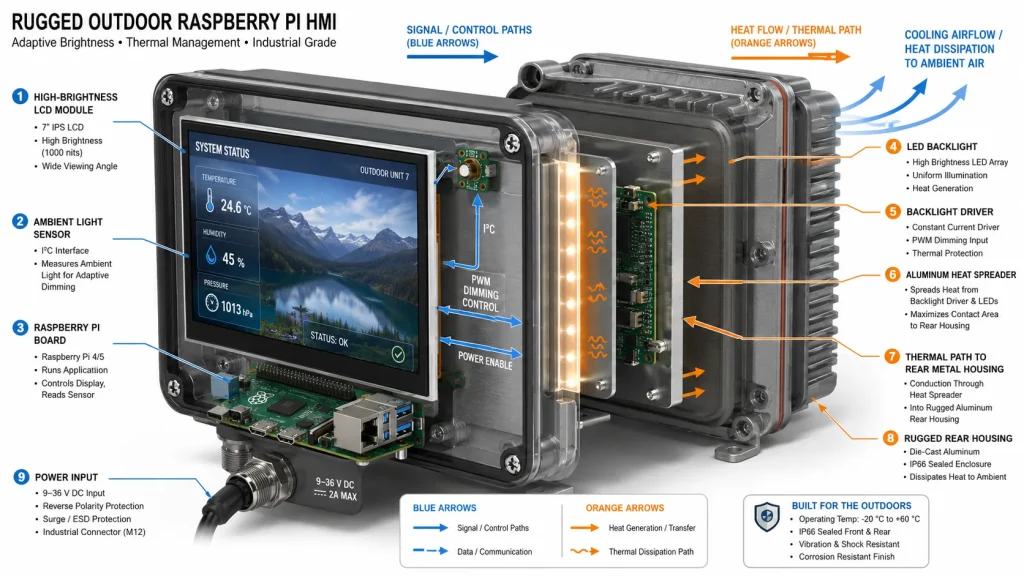
Um projeto de IHM (Interface Homem-Máquina) com Raspberry Pi geralmente começa como um protótipo de software. O protótipo pode usar uma placa de desenvolvimento, um display comum e uma fonte de alimentação de bancada. Quando a mesma ideia se torna um produto para uso externo, o display passa a ser um dos itens que mais consomem energia e geram calor no sistema. Uma tela de 1000 nits pode precisar de um driver de backlight dedicado e uma fonte de alimentação estável. Uma tela de 2000 nits pode exigir dissipadores de calor mais robustos, redução de potência e controle de brilho.
Portanto, o controle adaptativo de intensidade luminosa não é opcional para projetos robustos de uso externo. Um sensor de luz ambiente pode reduzir a luminosidade de fundo ao amanhecer, ao entardecer, em períodos nublados e à noite. Isso economiza energia, diminui a temperatura interna e protege os olhos do operador. Para um sistema Raspberry Pi alimentado por bateria ou energia solar, o controle de intensidade luminosa pode ser a diferença entre um terminal de campo funcional e uma grande dor de cabeça com a manutenção.
Os testes térmicos devem incluir exposição direta ao sol, carga máxima do processador, carga de comunicação sem fio, brilho da tela na intensidade desejada e a tela montada na orientação correta. Uma tela que passa nos testes em bancada aberta pode falhar quando instalada atrás de vidro em uma caixa metálica escura em uma tarde de verão.
Mapeamento de aplicações: qual tela Raspberry Pi usar para qual interface HMI externa?
Interface homem-máquina (IHM) para ambientes internos: escolha entre 400 e 500 nits de brilho, ângulo de visão IPS, tela sensível ao toque PCAP e montagem mecânica robusta. Priorize a legibilidade da interface do usuário, a estabilidade de EMI e o fornecimento a longo prazo.
Entrada de fábrica ou doca de carga: escolha um monitor com brilho entre 800 e 1000 nits, vidro de cobertura antirreflexo e, preferencialmente, colagem óptica. Esta é a zona de transição comum onde os monitores Raspberry Pi padrão começam a apresentar falhas.
Para quiosques externos ou displays de carregamento de veículos elétricos: escolha um display com brilho mínimo de 1000 nits, colagem óptica, tratamento de superfície antirreflexo/anti-hiperbárico, caixa resistente às intempéries, integração de toque via USB ou I2C e controle de intensidade luminosa. Se a unidade ficar exposta à luz solar direta na maior parte do dia, teste com 1500 a 2000 nits.
Terminal de monitoramento agrícola ou de campo: escolha 1000 nits para uso em locais sombreados ou com iluminação intermitente, 1500 a 2000 nits para instalações expostas e componentes com ampla faixa de temperatura de operação. Analise cuidadosamente a proteção contra poeira e água, a vedação dos cabos e o consumo de energia.
Equipamentos marítimos ou de mineração: escolha entre 1500 e 2000 nits com colagem óptica, vidro de cobertura robusto, ajuste para uso com luvas/em contato com água, montagem resistente à vibração e escurecimento adaptativo. Nesses casos, a legibilidade pode afetar a segurança e o tempo de resposta.
Lista de especificações para uma tela Raspberry Pi legível sob luz solar
Antes de comprar um monitor, anote as piores condições de iluminação, e não apenas o tamanho de tela desejado. Meça ou estime o pico de luminosidade (lux) na superfície do painel. Identifique se a tela ficará na sombra, parcialmente exposta ou sob luz solar direta. Decida se a conexão HDMI + USB touch ou MIPI DSI é compatível com a arquitetura do produto. Confirme se o monitor suporta mapeamento de toque no Linux, rotação, controle de brilho e disponibilidade a longo prazo.
Em seguida, defina a estrutura óptica. Um display de alto brilho para Raspberry Pi deve especificar o vidro de cobertura, o método de colagem, o tratamento da superfície, o tipo de toque e os requisitos de limpeza. Para instalações externas, a colagem óptica e o tratamento antirreflexo devem ser considerados recursos básicos, e não opcionais.
Por fim, analise os requisitos térmicos e de vida útil. Um visor HMI de baixo custo só é considerado de baixo custo se permanecer legível e confiável após a implementação. Uma tela mais barata que perde a visibilidade sob a luz do dia ou superaquece em um ambiente fechado custará mais em suporte, substituição e perda da confiança do cliente.
Lista de verificação de especificações para tela Raspberry Pi legível sob luz solar
Resumo: Suficientemente brilhante, mas não cegamente brilhante
A melhor tela para Raspberry Pi legível sob luz solar nem sempre é a mais brilhante. É aquela cujo brilho, colagem óptica, tratamento de superfície, interface, painel de toque, sistema de alimentação e gabinete são adequados à aplicação real.
Use 400 a 500 nits para projetos HMI com Raspberry Pi em ambientes internos. Use 800 a 1000 nits para aplicações com tela sensível ao toque em ambientes internos, semi-externos e muitos ambientes externos com alto brilho. Considere 1500 a 2000 nits somente quando a tela estiver exposta à luz solar direta, alta reflexão ou em situações críticas de segurança em ambientes externos.
Para engenheiros que desenvolvem monitores touchscreen industriais baseados em Raspberry Pi, esta é a conclusão prática: comece medindo as condições de iluminação, escolha o nível de brilho adequado e, em seguida, proteja esse brilho com um projeto óptico. Display industrial de 1000 nits Com uma ligação adequada, pode superar uma tela mais brilhante com controle de reflexo deficiente. É aí que uma IHM (Interface Homem-Máquina) de baixo custo com Raspberry Pi se torna um sistema de exibição industrial pronto para uso em campo.
Notas de rodapé para verificação editorial
Resumo oficial do produto Raspberry Pi Touch Display 2: Apresenta resolução de 720 x 1280, suporte para toque com cinco dedos, superfície antirreflexo, brilho da retroiluminação de 500 cd/m² e temperatura de operação de -20°C a +70°C.
Página oficial do produto Raspberry Pi Monitor: Possui tela LCD IPS Full HD de 15,6 polegadas, revestimento antirreflexo e brilho típico de 250 nits.
Página do produto Kadi Display: Monitor LCD MIPI de 6,0 polegadas de alto brilho: A lista inclui tela de 6,0 polegadas, resolução de 720 x 1440, interface MIPI, brilho de 1000 nits, operação em temperaturas de -20°C a +70°C, opções de vidro de cobertura AG/AR/AF, colagem óptica e atualizações de retroiluminação.
Guia para conectar o display LCD MIPI DSI da Kadi ao Raspberry Pi: Aborda as opções de conexão HDMI, DPI e MIPI DSI; recomenda telas de alto brilho acima de 800 cd/m² para ambientes externos ou com iluminação muito intensa e menciona a personalização do vidro de cobertura, da luz de fundo, da pinagem, do FPC, do cabo e da carcaça.
Página do monitor industrial touchscreen HDMI de 15,6 polegadas da Kadi Display: Observações: Compatibilidade de vídeo HDMI e toque USB com Raspberry Pi / Jetson / Windows / Linux na maioria dos casos.
Página do monitor IPS de 10,1 polegadas da Kadi Display, legível sob luz solar: Indica brilho de 800 nits e ampla faixa de temperatura de operação de -30°C a +80°C para um módulo legível sob luz solar industrial.
Isenção de responsabilidade
Este artigo foi escrito para fins de marketing técnico e educação em engenharia. Os limites de brilho, faixas de lux, exemplos de ECR e recomendações de aplicação são indicativos e devem ser validados com o painel final, vidro de cobertura, conjunto de toque, gabinete, firmware, projeto térmico e geometria de instalação. Nomes de produtos e marcas registradas pertencem aos seus respectivos proprietários. Raspberry Pi é uma marca registrada da Raspberry Pi Ltd. Verifique todas as especificações com o fornecedor antes de finalizar um projeto comercial. Nenhuma imagem de produto protegida por direitos autorais ou texto de terceiros é reproduzido neste documento.
PRIVENTE
Tela Raspberry Pi para aplicações marítimas e veiculares
NEXTO
Como construir um monitor industrial confiável com Raspberry Pi para operação 24 horas por dia, 7 dias por semana.
Deixe um comentário

Recent Blog & News
- Industrial LCD EOL: What Happens from Pre-Announcement to Replacement Mass Production?
- Electronic Component Obsolescence Management for Industrial Displays: An OEM Guide
- How to Develop a Production Ready Custom Display Assembly TFT Module Touch Cover Glass FPC Bonding and Mounting
- 15 Pin vs 22 Pin Raspberry Pi DSI Connectors Cable Pinout and Compatibility
- Native MIPI DSI vs LVDS or HDMI Bridge: An OEM Display Architecture Decision Guide

