
Home
-
Blog & News
-
Electronic Component Obsolescence Management for Industrial Displays: An OEM Guide
Electronic Component Obsolescence Management for Industrial Displays: An OEM Guide
2026-10-22
12:00
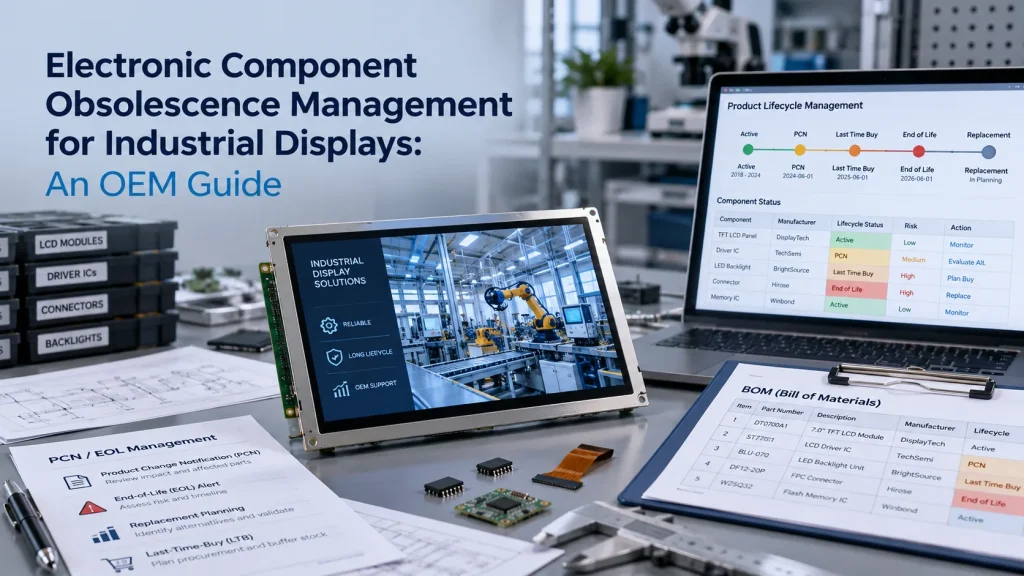 Electronic component obsolescence management helps an OEM identify parts that may become unavailable and prepare a response before production stops. For an industrial display program, the review should cover the LCD panel, driver and timing components, touch electronics, the backlight, connectors, cables, and interface hardware.
A useful plan gives engineering and purchasing teams time to choose between a last time buy, a qualified replacement, or a controlled redesign. It defines who monitors lifecycle notices, what data drives the decision, and which tests a replacement must pass.
Component obsolescence in industrial display programs
Industrial equipment often remains in service longer than the commercial electronics used inside it. A control terminal, medical instrument, laboratory device, or outdoor system may need support for years. During that period, a display panel or supporting component may reach product end of life as demand or manufacturing technology changes.
Obsolescence does not mean that a component has failed. It means the original part can no longer be obtained to its original specification through the expected supply route. The risk becomes operational when the OEM lacks an approved alternate or enough time to validate one.
The IEC 62402 obsolescence management standard treats obsolescence as a lifecycle responsibility. Design-in decisions therefore affect the difficulty of a later replacement.
Where display lifecycle risk enters the design
The LCD module is only one part of the display subsystem. A lifecycle review should cover each item that can interrupt assembly or change system behavior:
- The LCD cell or complete TFT module, including its active area, outline, mounting points, interface, timing, and optical characteristics.
- Driver ICs, timing controllers, power components, and backlight drivers that may be integrated into the module or controller board.
- LED backlights, touch controllers, touch sensors, cover glass, optical bonding materials, connectors, FPCs, and custom cables.
- Interface conversion hardware and software settings for LVDS, MIPI DSI, HDMI, DisplayPort, RGB, or other host connections.
- Mechanical parts that control fit, sealing, viewing area, grounding, thermal behavior, or service access.
A replacement with the same diagonal size may have a different outline, connector position, timing table, brightness curve, touch firmware, or power sequence. A compatibility claim should therefore begin an engineering review rather than replace one.
A proactive obsolescence management process
Establish the product baseline
Start with an accurate bill of materials and approved configuration. Record the display model, revision, supplier, drawings, interface specification, controller settings, cable details, touch configuration, and application conditions. Identify which characteristics are mandatory and which may change.
Criticality should reflect replacement effort as well as purchase value. A low-cost connector can stop production if its footprint is unique. A display module may require months of mechanical, electrical, optical, environmental, and software validation even when a candidate looks similar on paper.
Monitor lifecycle information
Assign responsibility for reviewing product change notifications, end of life notices, supplier advisories, and availability signals. The JEDEC J-STD-048 notification standard provides a useful reference for product discontinuance communication, but each display supplier may follow its own notice schedule and terminology.
Monitoring should connect each notice to the affected products, remaining demand, inventory, and approved alternatives. A notice stored in an inbox has little value if no one maps it to the active BOM and launch schedule.
Prepare responses before a notice arrives
An obsolescence management plan should define decision owners, escalation thresholds, forecast inputs, qualification requirements, and records needed for approval. It should also identify high-risk customizations, such as a unique FPC, bonded touch stack, special cover glass, or interface board.
Early planning makes more options available. The OEM may reserve material, approve a second configuration, redesign a cable, or evaluate a newer panel while the original product is still shipping.
What to do after an EOL notice
An EOL notice starts a controlled decision process. Confirm the exact affected part and revision, last order date, last shipment date, minimum order conditions, and whether the notice covers the complete module or one internal component. Then update demand through the intended end of service and compare that demand with usable inventory.
KADI Display generally uses a staged replacement process for affected industrial display products. An EOL pre-announcement may be issued about three months before the official notice so the customer and supplier can discuss a replacement. After the official notice, a last-buy window of about six months may be available while the new model is evaluated and approved. Final shipments may continue for roughly three to five months after the last-buy deadline, followed by a running change and mass production of the approved model. Actual timing depends on the product and project confirmation.
Last time buy or qualified replacement
A last time buy can be appropriate when demand is predictable, storage is manageable, and the product will retire before the stock expires. The calculation should include forecast uncertainty, yield loss, service inventory, carrying cost, and longer-than-planned demand.
A replacement may be better when the platform will remain active for years, demand is uncertain, or the last-buy quantity would tie up too much capital. Some programs use both approaches: a limited purchase protects production while the team qualifies the successor.
The decision should be documented. Record the assumptions, quantities, validation scope, approval authority, and trigger for moving to the alternate model.
How to qualify a replacement industrial display
A replacement must meet the form, fit, and function requirements of the host system. The validation plan should compare the original and candidate configurations and then test the new display in the actual equipment.
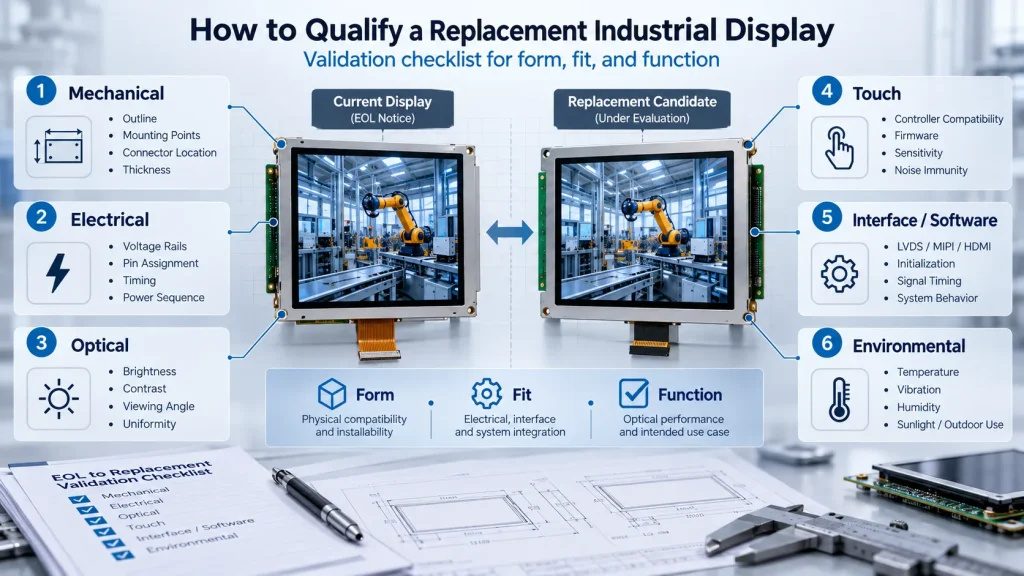
Mechanical checks cover the outline, active area, bezel opening, mounting points, connector location, cable routing, thickness, touch stack, and enclosure tolerances. Electrical checks cover voltage rails, logic levels, pin assignment, timing, initialization, backlight control, and power sequencing.
Optical evaluation should use agreed limits for brightness, contrast, viewing direction, color, uniformity, and appearance under the intended lighting. Touch testing should confirm controller compatibility, firmware settings, sensitivity through the cover glass, and noise immunity.
Interface conversion may change timing or software behavior even when the image looks correct. The KADI guide to display interface conversion limits explains why a bridge device cannot correct every incompatibility. Environmental testing should reflect the project’s temperature, vibration, humidity, sunlight, sealing, and service conditions.
Supplier checks for long lifecycle projects
Ask a display supplier how it monitors critical components, communicates PCN and EOL events, controls revisions, and supports replacement qualification. Request written confirmation of the current model, customized items, expected lifecycle, notice process, and documentation package. Also clarify forecast expectations, order constraints, sample availability, and who coordinates engineering changes.
KADI Display aims to provide long-term supply support for industrial display products for five to eight years. The exact commitment should be confirmed for the selected configuration, volume plan, and application. Its industrial display product range can be combined with project-specific support for touch and cover glass integration, optical bonding, FPC or cable customization, controller adaptation, mechanical coordination, and sample verification.
Conclusion
Electronic component obsolescence management works best as an ongoing engineering and supply process. OEMs should maintain an accurate baseline, monitor lifecycle notices, quantify demand, and preserve time for replacement testing. When EOL occurs, a documented decision between a last time buy and a qualified successor reduces emergency purchases and uncontrolled redesigns.
Frequently Asked Questions
What is electronic component obsolescence?
It is the loss or expected loss of a component from its original manufacturer or approved supply route. The part may still function, but its future availability no longer supports the product plan.
What should an OEM do first after receiving an EOL notice?
Confirm the affected part, notice dates, demand, inventory, and available alternatives. Engineering and purchasing should then agree on a decision deadline and validation plan.
Is a last time buy always the safest option?
No. It may protect near-term production, but forecast error, storage, cash commitment, and extended service demand create risk. Compare it with the cost and schedule of qualifying a replacement.
How long can an industrial display remain available?
Availability depends on the panel, supporting components, customization, demand, and supplier agreements. KADI Display aims to support industrial display products for five to eight years, subject to the selected product and project confirmation.
For a lifecycle review or replacement fit check, contact KADI’s technical team with the current display model, drawing, host interface, annual quantity, operating environment, and expected remaining program life.
PREVIOUS
No more
NEXT
How to Develop a Production Ready Custom Display Assembly TFT Module Touch Cover Glass FPC Bonding and Mounting
Leave A Comment

Latest Blog & News
- Electronic Component Obsolescence Management for Industrial Displays: An OEM Guide
- How to Develop a Production Ready Custom Display Assembly TFT Module Touch Cover Glass FPC Bonding and Mounting
- 15 Pin vs 22 Pin Raspberry Pi DSI Connectors Cable Pinout and Compatibility
- Native MIPI DSI vs LVDS or HDMI Bridge: An OEM Display Architecture Decision Guide
- MIPI DSI Display Driver Development for Embedded Linux What Hardware Buyers Need to Confirm