
Home
-
Blog & News
-
ESP32-S3 RGB Display with GT911 and LVGL: A Practical Guide for Kiosk and HMI Applications
ESP32-S3 RGB Display with GT911 and LVGL: A Practical Guide for Kiosk and HMI Applications
2026-07-18
15:20
ESP32-S3 RGB Display with GT911 and LVGL: A Practical Guide for Kiosk and HMI Applications
Matching the right 4.3, 5, or 7-inch panel to your kiosk or HMI use case first, then the development workflow that gets it running — a selection-led approach for teams choosing hardware before writing firmware.
By Kadi Display Technical Team | www.kadidisplay.com
Pick the Use Case First, the GPIO Pins Second
Most ESP32-S3 + GT911 + LVGL guides start with wiring diagrams. This one starts somewhere more useful for a team that hasn’t committed to hardware yet: which kiosk or HMI deployment scenario you’re actually building for, because that decision drives panel size, brightness, touch sensitivity, and enclosure design long before any GPIO gets assigned. The ESP32-S3’s RGB parallel LCD interface and the GT911 capacitive touch controller can drive panels from 4.3 to 7 inches with nearly identical firmware — the differences that matter are almost entirely on the hardware selection side, not the code.
This matters because the most expensive mistakes in kiosk and HMI projects happen at the spec stage, not the bring-up stage. A 5-inch panel ordered for a public-facing payment kiosk that turns out to need 800+ nits for outdoor installation. A 4.3-inch panel selected for a wall-mounted HVAC controller that’s actually too small once the real alarm and status UI is laid out. A 7-inch IPS panel sourced without confirming the GT911 configuration matches the panel’s active area, leading to weeks of touch calibration debugging that a properly documented module would have avoided entirely.
This guide is organized to prevent that: first match deployment scenario to panel size and specification, then walk through the development workflow efficiently once hardware is locked in, then cover the production reliability practices that separate a working demo from a shippable product.
Matching Panel Size and Spec to Your Deployment Scenario
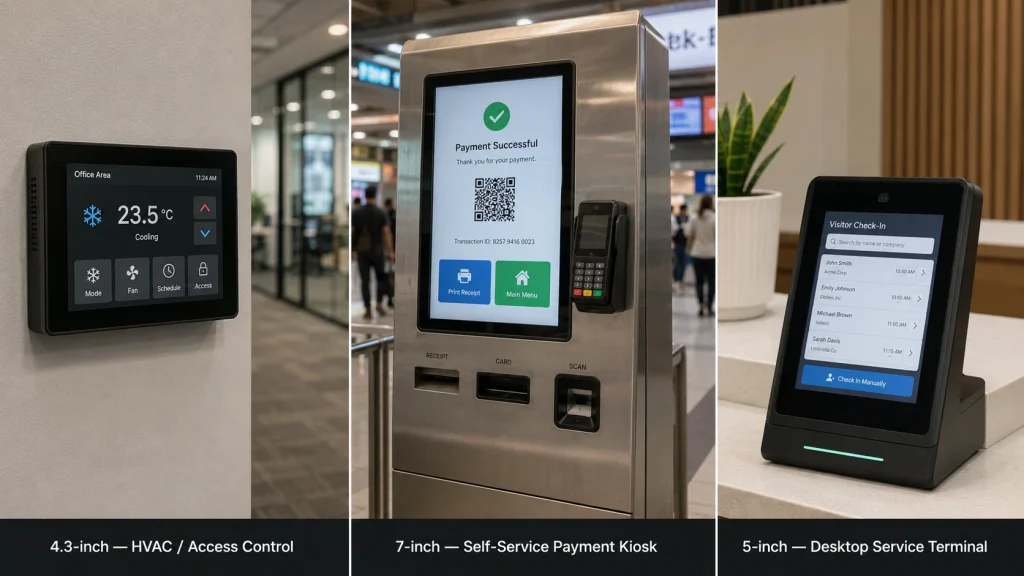
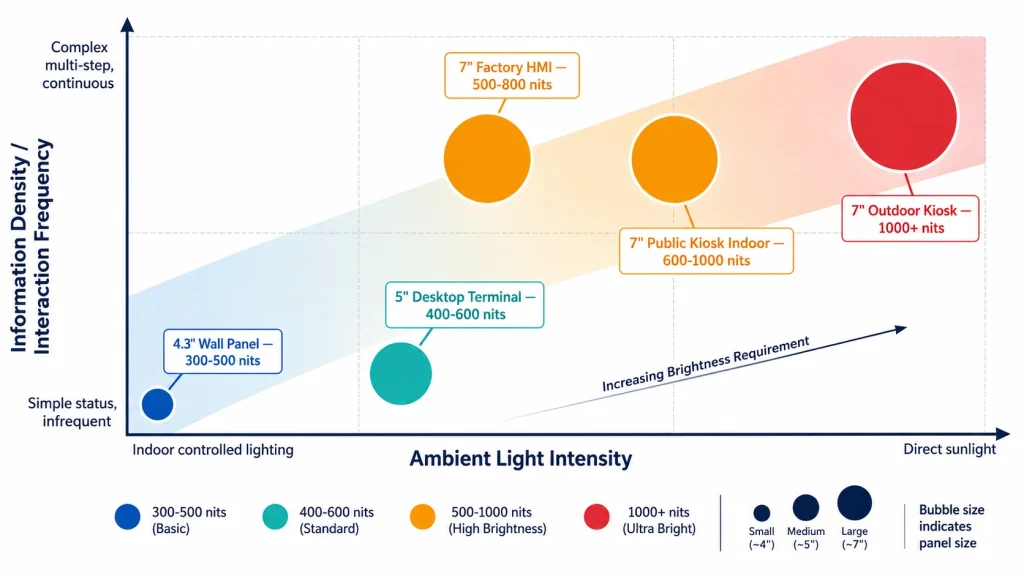
The 4.3, 5, and 7-inch sizes aren’t simply “small, medium, large” versions of the same product — each maps cleanly onto a different class of kiosk or HMI deployment with its own brightness, touch sensitivity, and enclosure requirements. The following five scenarios cover the large majority of ESP32-S3 + GT911 + LVGL projects in the field.
Wall-Mounted Status Panel or Access Controller
Deployment profile: Indoor corridor, lobby, or equipment room. Fixed mounting height, viewed from 30–80 cm, simple status and control UI — door access, HVAC zone control, basic alarm display. Low information density, infrequent interaction.
Recommended spec: 4.3-inch 480×272 or 800×480 IPS panel, 300–500 nits, standard-sensitivity GT911 PCAP touch, RGB565 framebuffer around 262 KB single-buffer at 480×272.
Why this combination: The smallest panel size keeps enclosure footprint minimal and BOM cost low, while still giving enough resolution for clear status icons and large touch targets at typical viewing distance. Brightness above 500 nits is unnecessary indoors and adds cost without benefit.
Desktop or Counter Service Terminal
Deployment profile: Reception desks, check-in counters, point-of-sale terminals, library or clinic self-service stations. Viewed from 40–60 cm, moderate information density — lists, forms, search fields — with frequent but not continuous interaction.
Recommended spec: 5-inch 800×480 IPS panel, 400–600 nits, standard or lightly-tuned GT911 sensitivity, optical bonding optional but recommended for glare reduction under indoor ceiling lighting.
Why this combination: 5-inch strikes the density/cost balance for UIs that need more than a few buttons — list views, multi-field forms — without requiring the larger enclosure and higher driving current that a 7-inch panel demands. This is the most commonly specified size across general-purpose service terminal projects.
Public Self-Service Kiosk — Indoor Bright Environment
Deployment profile: Retail, transit, or building-lobby kiosks in spaces with strong overhead lighting or partial daylight exposure near entrances and windows. High public visibility, continuous duty cycle, frequent touch interaction from varied users.
Recommended spec: 7-inch 800×480 or 1024×600 IPS panel, 600–1000 nits with anti-glare coating, high-sensitivity GT911 tuning to accommodate varied finger pressure and occasional glove use, sealed front bezel.
Why this combination: 7-inch gives enough screen area for multi-step transaction flows — selection, confirmation, payment, receipt — without forcing scroll navigation. The brightness step-up to 600+ nits is what actually separates an indoor kiosk near a window from one that becomes unreadable by midday.
Factory Floor HMI Panel
Deployment profile: Manufacturing floor, mounted in or near equipment, viewed by operators at 40–70 cm under industrial LED lighting, often with gloved interaction and exposure to dust or light moisture.
Recommended spec: 7-inch 800×480 IPS panel, wide operating temperature from −20°C to +70°C, 500–800 nits with AG coating, GT911 sensitivity tuned for thin-glove operation, IP54 minimum front sealing.
Why this combination: Factory HMI prioritizes durability and glove-compatible touch over raw brightness compared to an outdoor kiosk. Industrial overhead lighting is bright but not direct-sun bright, so the brightness requirement is more moderate than a semi-outdoor kiosk even though the panel size is the same.
Outdoor or Semi-Outdoor Kiosk
Deployment profile: Building exteriors, covered outdoor walkways, drive-through terminals, and parking payment stations. Direct or reflected sunlight exposure, wide ambient temperature swings, and weather sealing requirements.
Recommended spec: 7-inch 800×480 panel, 1000+ nits with optical bonding and anti-reflective coating, hydrophobic touch surface treatment, wide temperature rating from −30°C to +85°C, full IP65 enclosure integration.
Why this combination: This is the scenario where the ESP32-S3 + GT911 + LVGL stack is pushed hardest on the hardware side. Software remains nearly identical to a desktop terminal, but every hardware spec — brightness, sealing, temperature, and touch tuning — moves to its most demanding tier.
GT911 Touch Sensitivity Tuning — The Spec Most Buyers Skip
Brightness and panel size get specified carefully in most kiosk RFQs. GT911 touch sensitivity tuning almost never does, despite being the parameter that determines whether the finished kiosk feels responsive or frustrating to actual users. The GT911 sensitivity threshold, configuration register 0x8057, controls the minimum capacitance change required to register a touch event. Set too high, light or hesitant touches get missed; set too low, the panel becomes prone to false triggers from moisture, dust, or electrical noise.
The correct sensitivity setting depends directly on the use case identified above. A public kiosk used by an unpredictable mix of users — including occasional gloved or wet-fingered interaction in transit or outdoor settings — needs a more sensitive configuration than a desktop terminal used by trained staff with clean, dry hands. Panel suppliers who provide a factory-tuned GT911 configuration binary matched to the panel’s actual electrode geometry save significant integration time versus a generic default configuration that was not calibrated for the specific panel batch.
📌 Request the Configuration Binary, Don’t Guess the Register Value
The sensitivity values above are reference starting points — actual correct values depend on the panel’s specific electrode pitch and overlay glass thickness, which vary between suppliers. Request the factory GT911 configuration binary, typically 186 bytes, from your panel supplier rather than tuning register 0x8057 manually from scratch. This single document typically saves several days of touch-feel iteration during kiosk UI qualification.
Development Workflow — From Locked Hardware Spec to Running UI
Once the panel size, brightness, and touch tuning are locked in, the firmware path is largely identical across all five use cases. This section covers the workflow at a level appropriate for a team that has already chosen hardware and needs to get from unboxing to a working LVGL kiosk UI efficiently.
RGB Interface Bring-Up Sequence
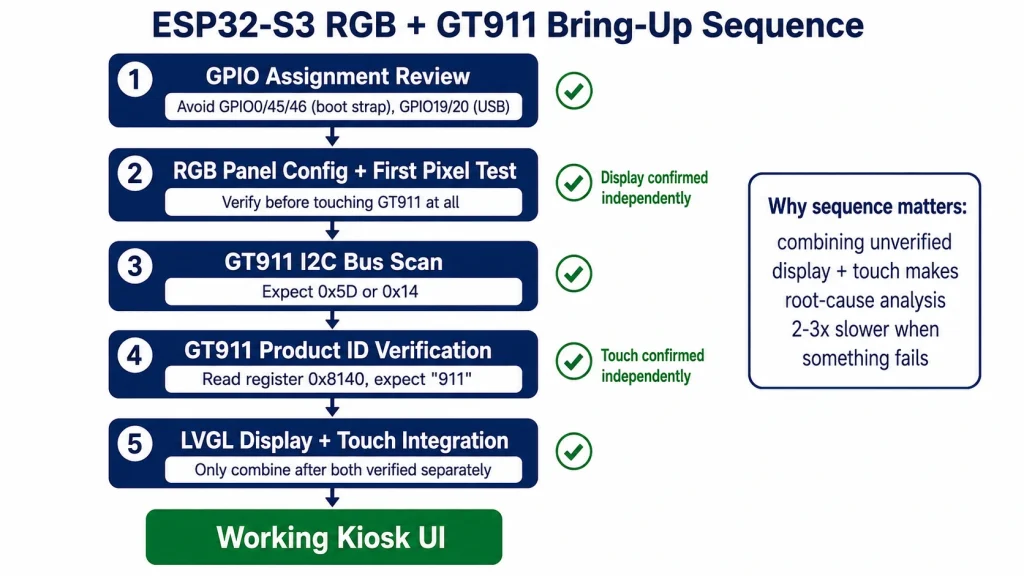
The ESP32-S3’s RGB LCD peripheral streams pixel data continuously to the panel using a 16-bit RGB565 parallel bus plus HSYNC, VSYNC, DE, and PCLK timing signals. Bring-up proceeds in a fixed order: confirm GPIO assignment against known conflict pins, avoid GPIO0, GPIO45, GPIO46 used for boot strapping, avoid GPIO19 and GPIO20 reserved for USB-OTG, configure the esp_lcd_rgb_panel_config_t structure with your panel’s exact timing parameters from its datasheet, then verify first-pixel output before connecting touch at all. Isolating display bring-up from touch bring-up avoids a common debugging trap where two simultaneous unknowns make root-cause analysis far slower than necessary.
GT911 Touch Bring-Up — Sequenced After Display, Not Parallel
With the display confirmed working, bring up GT911 touch as an independent step: verify I²C communication first via a bus scan, expect the controller at 0x5D or 0x14 depending on INT pin state during reset, confirm the product ID register returns the expected “911” string, then only after that succeeds, register the touch input device with LVGL. This sequencing — display first, then touch as a separate verified step — consistently resolves faster than attempting both simultaneously, since a touch problem cannot be mistaken for a display problem or vice versa.
LVGL Integration and Memory Planning
Frame buffer sizing follows directly from the panel resolution chosen earlier: a 4.3-inch 480×272 panel needs roughly 262 KB per buffer in RGB565, while a 7-inch 800×480 panel needs about 750 KB per buffer — both comfortably within the ESP32-S3’s available PSRAM, typically 8 MB, when double-buffered for tear-free rendering. The relevant sdkconfig entries, such as CONFIG_SPIRAM_MODE_OCT=y and CONFIG_SPIRAM_SPEED_80M=y, apply identically regardless of which panel size was selected.
From Working Prototype to Field-Reliable Kiosk
A kiosk or HMI product that must run unattended for months between maintenance visits needs reliability practices beyond what a bench prototype requires. These four practices consistently separate field-stable deployments from units that need unplanned service calls within the first quarter of operation.
- Watchdog coverage at three levels: hardware watchdog, RWDT, for complete firmware hangs; per-task watchdog, TWDT, for individual FreeRTOS task stalls; and an application-level display flush watchdog that triggers a controlled restart if the LVGL rendering callback has not fired within a defined timeout. This catches LVGL-layer deadlocks that lower-level watchdogs may not see.
- GT911 configuration checksum verification on every boot: validate register
0x80FFagainst the computed checksum of the configuration block, and automatically rewrite the known-good configuration if it does not match. This catches configuration corruption from unexpected power loss during a firmware update without requiring a service visit. - Network state handling for connected kiosks: run all network operations in a dedicated task with a timeout, post results to a queue the LVGL task reads non-blocking, and define an explicit offline-mode UI state. A kiosk that freezes whenever WiFi drops is a design defect, not a network problem.
- Backlight PWM frequency above 1 kHz: use at least 5 kHz PWM dimming to avoid visible flicker in peripheral vision, which is particularly noticeable on public kiosks where users frequently approach from an angle rather than walking up dead-center.
Sourcing Panels That Match These Use Cases Without Re-Engineering
The five use-case profiles in this guide are easiest to execute when the display module supplier provides documentation matched to that level of specification — not just a resolution and a brightness number, but confirmed GT911 active-area configuration, documented operating temperature range, and IP rating achieved at the assembled level rather than claimed from individual component datasheets.
Kadi Display’s industrial TFT-LCD touch screen range covers capacitive touch panels with brightness up to 1000 nits, RGB/LVDS interface options, and operating ranges from −30°C to +85°C — spanning the desktop terminal through outdoor kiosk scenarios covered in this guide. Their guide on choosing an industrial TFT LCD display module walks through the same size-brightness-interface-touch decision framework in more depth, including when a standard catalog module is sufficient versus when custom cover glass, optical bonding, or mechanical adjustment is justified for a specific kiosk enclosure. For broader panel technology selection across the full size range Kadi Display supports, their guide to choosing the best industrial TFT LCD for embedded devices maps IPS/TN/VA panel technology and interface options against factory automation, outdoor kiosk, and transportation deployment categories directly comparable to the five use cases in this guide.
Summary — Specification Discipline Pays Off Before the First Line of Firmware
The ESP32-S3 + GT911 + LVGL stack is flexible enough to run nearly identical firmware across a 4.3-inch wall panel and a 7-inch outdoor kiosk — which is exactly why the hardware specification step deserves more attention than it typically gets. Matching panel size, brightness tier, and touch sensitivity to the actual deployment scenario before any GPIO is assigned prevents the most expensive class of kiosk and HMI project mistakes: discovering mid-pilot that the display is unreadable in its installed location, or that touch response feels unreliable to real users in a way that a lab bench never revealed.
Once hardware is correctly matched to use case, the development workflow in this guide — display bring-up, then independently verified touch bring-up, then LVGL integration — applies consistently across all five scenarios, and the production reliability practices are what carry a working prototype through to a kiosk that survives unattended field operation.
Product Reference & Engineering Support
For 4.3″, 5″, and 7″ industrial touch display modules with factory-calibrated GT911, confirmed brightness and temperature specifications matched to kiosk and HMI deployment scenarios, contact Kadi Display at Sales@sz-kadi.com. OEM and ODM services available. Browse industrial TFT-LCD touch screen products →
Disclaimer: Specification values, register settings, and use-case recommendations in this guide are illustrative references for design planning and must be verified against your specific panel datasheet, GT911 module configuration, and SDK version. GT911 is a trademark of Shenzhen Goodix Technology Co., Ltd. ESP32-S3 is a trademark of Espressif Systems. LVGL is open-source software under MIT license. All other trademarks belong to their respective owners. No affiliation with any third party is implied.
PREVIOUS
Can Industrial LCD Screens Burn In? Myths and Facts About LCD Image Retention
NEXT
GT911 Touch Coordinate Offset in LVGL: Causes and Calibration Methods
Leave A Comment

Latest Blog & News
- Industrial LCD EOL: What Happens from Pre-Announcement to Replacement Mass Production?
- Electronic Component Obsolescence Management for Industrial Displays: An OEM Guide
- How to Develop a Production Ready Custom Display Assembly TFT Module Touch Cover Glass FPC Bonding and Mounting
- 15 Pin vs 22 Pin Raspberry Pi DSI Connectors Cable Pinout and Compatibility
- Native MIPI DSI vs LVDS or HDMI Bridge: An OEM Display Architecture Decision Guide