




Huis
-
Blog & Nieuws
-
Van afbladderende inkt tot gebarsten glas – Een praktische handleiding voor industrieel HMI-ontwerp
Van afbladderende inkt tot gebarsten glas – Een praktische handleiding voor industrieel HMI-ontwerp
2026-06-06
11:36
Van afbladderende inkt tot gebarsten glas – Een praktische handleiding voor industrieel HMI-ontwerp
Door het technische team van Kadi Display | www.kadidisplay.com
Waarom afdekglas het eerste onderdeel is dat kapot gaat – en het laatste onderdeel dat ingenieurs als decoratie zouden moeten beschouwen.
Bij een industriële touchscreenmonitor is het afdekglas het onderdeel dat elke gebruiker als eerste aanraakt, afveegt, raakt en beoordeelt. Het lijkt een simpele beschermplaat, maar het is in feite tegelijkertijd een mechanisch, optisch, chemisch en merkgerelateerd onderdeel. Het beschermt de LCD-module tegen stoten. Het draagt de zwarte rand en de logo-opdruk. Het bepaalt de aanraakgevoeligheid. Het reguleert reflecties. Het bepaalt of het product er na jaren van reiniging, trillingen, zonlicht en temperatuurschommelingen nog steeds professioneel uitziet.
Dit is de reden waarom defecten aan het afdekglas zo zichtbaar zijn in de praktijk. Een achtergrondverlichting kan langzaam dimmen zonder dat een doorsnee gebruiker het merkt. Een besturingskaart kan defect raken en in de behuizing vervangen moeten worden. Maar afbladderende inkt rond de rand, een witte waas op een antireflectieoppervlak, luchtbellen aan de rand van een optische verbindingslaag of een barst die vanuit een hoek begint, schaden direct het vertrouwen van de gebruiker. In industriële HMI-toepassingen kan een beschadigd frontoppervlak ook een veiligheidsprobleem vormen, omdat alarmen, numerieke waarden en aanraakcommando's leesbaar en betrouwbaar moeten blijven.
Het onderwerp lijkt in eerste instantie cosmetisch. Dat is het echter niet. Het afdekglas van het scherm is de plek waar industrieel ontwerp en de daadwerkelijke omgevingsbelasting samenkomen. Hetzelfde 7-inch of 10,1-inch TFT LCD-touchscreen kan perfect werken in een laboratorium, maar na zes maanden defect raken op een voedselverwerkingslijn omdat het inktsysteem niet bestand is tegen alkalische reinigingsmiddelen. Een kioskscherm kan de elektrische test doorstaan, maar in de praktijk barsten omdat de glasrand te dicht bij een metalen behuizing zat zonder afdichting. Een scherm op een schip kan helder genoeg blijven, maar onleesbaar worden omdat de coating aan de voorzijde beschadigd raakt door zout en zand.
Dit artikel beschrijft de meest voorkomende oorzaken van defecten aan afdekglas voor industriële touchscreen-displays, van vervuiling door olie en verlies van inkthechting tot glasbreuk. Het is geschreven voor ingenieurs, inkoopteams en productmanagers die afdekglas selecteren voor industriële HMI's, touchscreenmonitoren voor buiten, PLC-HMI-alternatieven, medische apparatuur, automaten, landbouwterminals en robuuste ingebouwde displays.
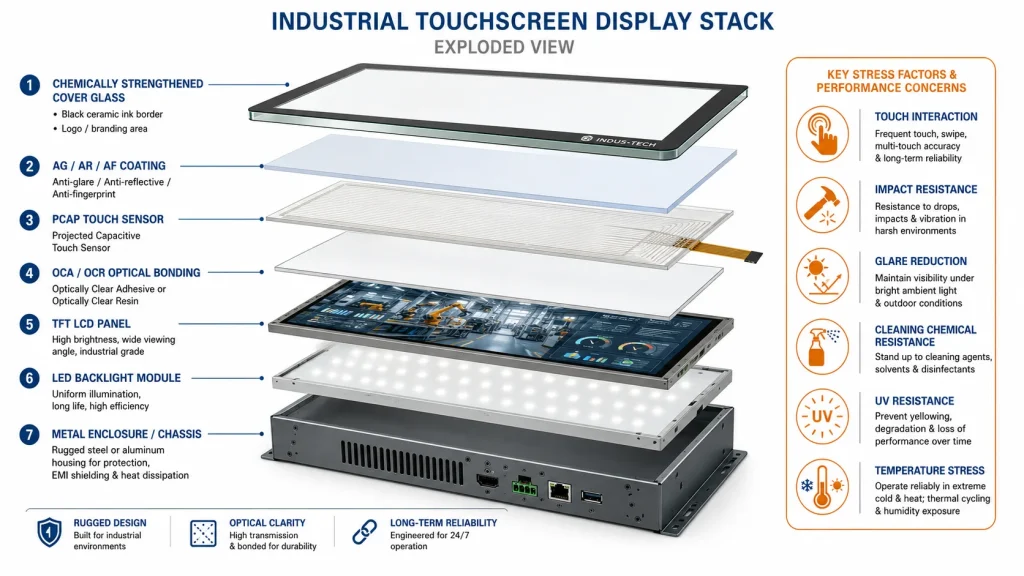
Wat een afdekglas voor een industrieel touchscreen moet doen
Een beschermglas voor een tablet voor consumenten moet er vooral goed uitzien en bestand zijn tegen de ruwe behandeling in een broekzak. Beschermglas voor industriële displays heeft een zwaardere taak. Het kan met handschoenen worden aangeraakt, met desinfectiemiddel worden afgeveegd, aan metaalstof worden blootgesteld, met alcohol worden gereinigd, in een trillend voertuig worden gemonteerd of buiten worden geplaatst waar ultraviolet licht en regen elk blootgesteld oppervlak aantasten.
Een typische specificatie voor industrieel afdekglas omvat glasdikte, glassoort, versterkingsmethode, randafwerking, printkleur, inktsoort, logo-locatie, tolerantie van het zichtbare venster, AG/AR/AF-coating, oppervlaktehardheid, compatibiliteit met optische verlijming, slagvastheid en milieubestendigheid. De industriële displaycontent van Kadi Display wijst herhaaldelijk op... op maat gemaakt afdekglasOptische verlijming, antireflectiecoating, helderheidsaanpassing en interface-aanpassing worden als onderdeel van de OEM/ODM-displayintegratie aangeboden in plaats van als aparte, achteraf toegevoegde elementen.
De belangrijkste ontwerpfout is dat het afdekglas wordt behandeld als een plat, getekend object: lengte, breedte, dikte, positie van de gaten, zwarte rand, klaar. In werkelijkheid heeft elke afmeting en elk proces invloed op een mogelijke storing. Een smalle zwarte rand kan leiden tot overtollige lijm. Een scherpe binnenhoek kan spanning concentreren. Een dikke glasplaat kan de slagvastheid verbeteren, maar de gevoeligheid van het touchscreen verminderen. Een sterke antireflectiecoating kan de leesbaarheid in zonlicht verbeteren, maar het verwijderen van vingerafdrukken bemoeilijken. Een logo dat met een ongeschikt inktsysteem is gedrukt, kan na herhaaldelijk reinigen met chemicaliën loslaten.
Voor industriële toepassingen moet het ontwerp van het afdekglas beginnen bij de installatieomgeving. Een HMI in een fabriek heeft niet hetzelfde frontoppervlak nodig als een display in een mijnbouwvoertuig. Een touchscreen in een medisch apparaat stelt andere eisen aan de chemische bestendigheid dan een laadpaal voor elektrische voertuigen in de buitenlucht. Een maritieme monitor vereist andere bescherming tegen corrosie en reflectie dan een terminal in een magazijn. Het afdekglas is geen universeel onderdeel. De keuze ervan hangt af van de specifieke omstandigheden ter plaatse.
Foutmodus 1: Afbladderende inkt, verlies van logo en delaminatie van de zwarte rand.
Afbladderende inkt is een van de meest voorkomende en gênante defecten aan het afdekglas. Het komt meestal voor rond randen, hoeken, logo's, schroefgaten en de overgang tussen het zwarte masker en het actieve schermvenster. In het beginstadium ziet de bedrukte laag er licht troebel of bekrast uit. Later laten kleine stukjes los. In ernstige gevallen laat de zwarte rand los van het glas en komen lijmresten, lichtlekken of interne structuren bloot te liggen.
De hoofdoorzaak is vrijwel altijd een slechte hechting. De inkt hechtte niet sterk genoeg aan het glasoppervlak, of de hechting was na de productie verzwakt. Typische oorzaken zijn onder andere een slechte glasreiniging, onzichtbare olie of stof, onjuiste oppervlakteactivering, een incompatibele volgorde van inkt en coating, onvoldoende uitharding, te veel oplosmiddelresten, vochtabsorptie of chemische aantasting tijdens gebruik. Leveranciers van afdekglas merken vaak op dat vet, lijmresten, stof en onvoldoende voorbehandeling direct kunnen leiden tot een slechte hechting van de inktfilm op glas.
Industriële projecten zijn kwetsbaarder dan consumentenapparaten omdat de reinigingsomgeving minder gecontroleerd is. Operators kunnen alcohol, reinigingsmiddel, alkalische reiniger, desinfectiemiddel, olieverwijderaar of schuurdoekjes gebruiken. Sommige productielijnen reinigen touchscreens meerdere keren per ploegendienst. Als het inktsysteem alleen is gekwalificeerd op basis van een visuele inspectie en niet op basis van chemische afveegtesten en kruisarceringstesten, kan een defect pas aan het licht komen tijdens de implementatie in de praktijk.
Een praktische vuistregel is om het inktsysteem samen met het reinigingsregime te specificeren. Als het scherm gebruikt zal worden in de voedingsmiddelenindustrie, medische apparatuur, betaalautomaten in de buitenlucht of dashboards van voertuigen, moet de leverancier de verwachte chemicaliën en de reinigingsfrequentie kennen. Keramische inkt of inkt die uithardt bij hoge temperaturen kan de voorkeur hebben wanneer duurzaamheid cruciaal is, maar het daadwerkelijke proces moet aansluiten op het type glas, de coating en het hechtingsproces.
Storingsmodus twee: slijtage van de coating, waas en schade aan het antireflectieoppervlak.
Antireflecterende, ontspiegelende en vingerafdrukwerende coatings Ze worden veel gebruikt op industriële touchscreens. Ze lossen concrete gebruikersproblemen op: reflectie van zonlicht, vingerafdrukken en herhaaldelijk afvegen. Maar deze coatings kunnen ook zwakke plekken worden als de oppervlaktebehandeling niet in de omgeving wordt meegenomen.
Een onbehandeld afdekglas heeft twee blootgestelde lucht-glas-interfaces, en de industrie beschrijft doorgaans een reflectieverlies van ongeveer 8-9% voordat het licht het LCD-scherm bereikt. Kadi Display's anti-verblindings- en anti-reflectiegids Benadrukt dat oppervlaktebehandeling en optische verlijming nodig zijn omdat reflecties van het afdekglas en interne luchtspleten het contrast verminderen. Voor displays voor buiten is dit niet alleen een probleem met de leesbaarheid. Het dwingt ontwerpers ertoe om een hogere helderheid van de achtergrondverlichting te gebruiken, wat de warmteontwikkeling en het stroomverbruik verhoogt.
Een defecte coating uit zich meestal in glanzende plekken, troebele zones, regenboogachtige oneffenheden, reinigingssporen of een witte waas. In stoffige omgevingen kunnen zand- of metaalpoederdeeltjes schurend werken tijdens het afvegen. Een scherm dat er bij levering hoogwaardig uitzag, kan na een paar weken permanent dof worden als de oppervlaktehardheid en de reinigingsinstructies niet overeenkomen met de praktijk.
De technische keuze is een afweging. Een sterker mat AG-oppervlak vermindert spiegelreflectie, maar als de waas te sterk is, kan dit de beeldscherpte verminderen. Een AR-coating verbetert de optische transmissie, maar sommige coatinglagen zijn gevoeliger voor krassen en chemicaliën. Een AF-coating verbetert de reinigbaarheid, maar moet bestand zijn tegen herhaaldelijk aanraken en afvegen. Voor industriële HMI's moet de oppervlaktebehandeling worden gekozen op basis van het gebruik: leesbaarheid buitenshuis, chemische reiniging binnenshuis, bediening met handschoenen, misbruik in openbare kiosken of helderheid bij optische inspectie.
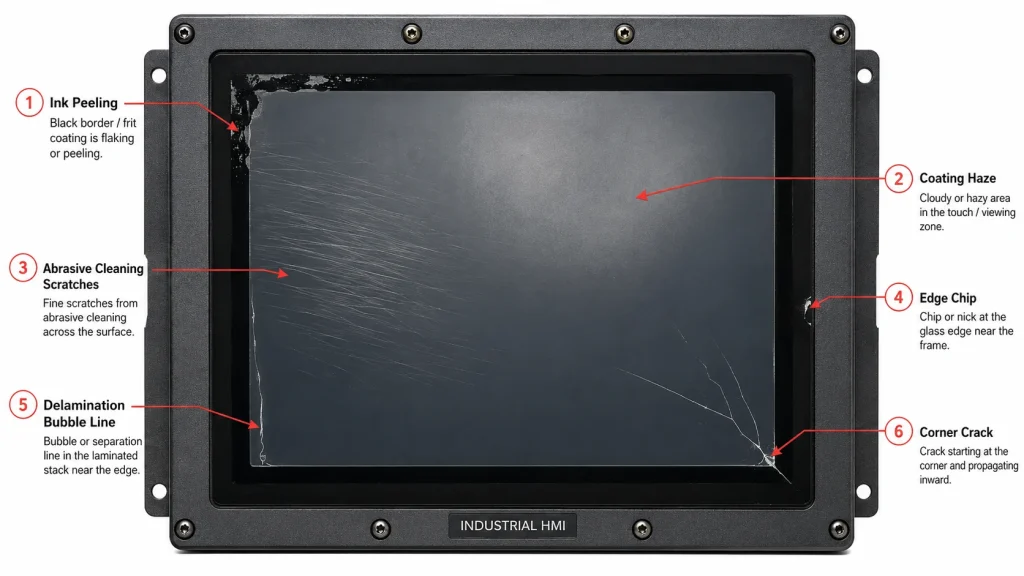
Foutmodus drie: Delaminatie van de optische verbinding, luchtbellen en loslating van de randen
Optische binding Het verbetert de leesbaarheid in zonlicht en de duurzaamheid door de luchtspleet tussen het afdekglas, de aanraaksensor en het LCD-scherm te verwijderen. Het heeft de voorkeur bij industriële toepassingen buitenshuis, omdat het interne reflecties vermindert en het risico op condensatie kan verlagen. De artikelen van Kadi Display over optische bonding beschrijven OCA, OCR en vergelijkbare bondingmethoden als manieren om het scherm en het aanraakpaneel met elkaar te verbinden en zo de leesbaarheid, het contrast en de duurzaamheid te verbeteren.
Het verlijmen brengt echter ook lijmgerelateerde defecten met zich mee. Luchtbellen, loslaten van de randen, vergeling, troebelheid en delaminatie kunnen optreden wanneer het lijmsysteem, het uithardingsproces, de oppervlaktereinheid, de thermische uitzetting of de randafdichting niet goed worden gecontroleerd. In veeleisende omgevingen ondergaat de verlijmde stapel herhaaldelijk uitzetting en krimp. Glas, sensorfolie, LCD-polarisator, lijm en metalen behuizing zetten niet allemaal even snel uit. Na duizenden cycli wordt de rand de meest waarschijnlijke plek voor spanningsconcentratie.
Delaminatie is niet hetzelfde als gebarsten glas. Het scherm kan fysiek intact blijven, maar het contrast kan afnemen en de aanraakgevoeligheid kan instabiel worden doordat de lagen niet langer optisch of mechanisch met elkaar verbonden zijn. Bij gebruik buitenshuis kan een kleine randscheiding groter worden doordat vocht in de interface dringt. In omgevingen met trillingen kan de losgekomen laag buigen en een zichtbaar defect veroorzaken, zoals een Newton-ring of een bubbel.
De preventiemethode is niet simpelweg het gebruik van sterkere lijm. Bij het hechtingsproces moet rekening worden gehouden met de schermgrootte, de bedrijfstemperatuur, UV-blootstelling, de elasticiteitsmodulus van de lijm, de randafdichting, de compatibiliteit van de zwarte maskeerinkt en de druk in de behuizing. Een goed hechtend afdekglas op een 4,3-inch binnenpaneel is mogelijk niet betrouwbaar op een 15,6-inch HMI voor buitengebruik als hetzelfde proces wordt opgeschaald zonder validatie door middel van thermische cycli.
Faalmodus vier: Krassen, microscheurtjes en verlies van oppervlaktesterkte
Glas is hard, maar niet onverwoestbaar. Krassen zijn niet alleen cosmetisch. Op een afdekglas van een beeldscherm kunnen krassen de leesbaarheid verminderen, reflecties veroorzaken, vuil aantrekken en de basis vormen voor nieuwe barsten. Industriële omgevingen brengen risico's met zich mee die consumentenapparaten zelden tegenkomen: metaalsplinters, zand, gereedschap, ringen, handschoenen met ingebed stof, schoonmaakdoekjes en onbedoeld contact met machines.
De sterkte van glas is zeer gevoelig voor defecten. Onderzoek naar glasbreuk wijst er vaak op dat scheuren meestal ontstaan bij defecten, vaak microscopisch klein en vaak aan de rand. Oppervlakte- en randdefecten zijn belangrijk omdat glas sterk is onder druk, maar kwetsbaar onder trekspanning wanneer een defect het beginpunt van de breuk vormt. Daarom kan een afdekglas met dezelfde dikte en hetzelfde materiaal zeer verschillend presteren, afhankelijk van de slijp- en polijstkwaliteit van de randen, de kwaliteit van de afschuining en eventuele beschadigingen door hantering.
Chemisch gehard glas verbetert de weerstand door drukspanning aan het oppervlak te creëren. Gehard glas heeft ook betere mechanische eigenschappen dan gewoon gegloeid glas, hoewel het exacte resultaat afhangt van de dikte, het hardingsproces, de randkwaliteit en de geometrie van het onderdeel. Voor industrieel displayglas moet de leverancier niet alleen 'gehard glas' of 'chemisch gehard glas' vermelden. Het project moet de dikte, de randafwerking, de val- of stootbestendigheid en de inspectiecriteria specificeren.
Oppervlaktehardheidswaarden zoals potloodhardheid zijn nuttig, maar ze vervangen geen echte slijtage- en veegtests. Een scherm in een stoffig bouwvoertuig kan bijvoorbeeld bezwijken door een geleidelijke waas in plaats van één grote kras. Een kiosk kan aanraking met de vingers overleven, maar bezwijken wanneer deze met een vuile doek wordt schoongemaakt. In de praktijk is krasbestendigheid een systeemeigenschap: het type glas, de coating, de reinigingsmethode en het gedrag van de gebruiker spelen een rol.
Foutmodus vijf: Afbrokkeling van de randen en scheuren in de hoeken
Veel barsten in het glas van industriële touchscreens beginnen aan de rand, niet in het midden. De rand is de plek waar snijden, slijpen, boren, polijsten, printen, lijmen en mechanische montage samenkomen. Het is ook de plek waar het glas het dichtst bij de behuizing zit. Als het metalen frame, de pakking of de schroefconstructie puntdruk uitoefent, kan zelfs een sterke glasplaat breken door trillingen of thermische uitzetting.
Randbeschadigingen kunnen ontstaan tijdens de verwerking, het transport, de assemblage of het onderhoud van glas. Sommige zijn zichtbaar. Andere zijn klein genoeg om een snelle inspectie te doorstaan, maar groot genoeg om de werkelijke sterkte te verminderen. Zodra het scherm is gemonteerd, kunnen trillingen en temperatuurschommelingen dit verborgen defect in een scheur veranderen. Een scheur vanuit de hoek duidt vaak op een combinatie van een randdefect en mechanische spanning, in plaats van een simpele impact aan de voorkant.
Een goed ontwerp van het afdekglas vermijdt scherpe binnenhoeken, gebruikt geschikte radiuswaarden, controleert de afstand tussen het gat en de rand, specificeert gepolijste of afgeschuinde randen en laat voldoende ruimte tussen het glas en de behuizing. De pakking moet het glas gelijkmatig ondersteunen in plaats van harde contactpunten te creëren. Het verbindingsgebied mag het glas niet dwingen om als structurele beugel te fungeren, tenzij de constructie daarvoor is ontworpen en getest.
Een veldrapport met de melding "glas gebroken" is niet voldoende. Ingenieurs moeten de oorsprong van de scheur, de scheurrichting, contactsporen met de behuizing, de pakkingcompressie, het aanhaalmoment van de schroeven en of de breuk aan de voor-, achter-, rand- of hoekzijde is ontstaan, vastleggen. Zonder deze diagnose kan het project de dikte onterecht verhogen, terwijl het werkelijke probleem van de randspanning ongewijzigd blijft.
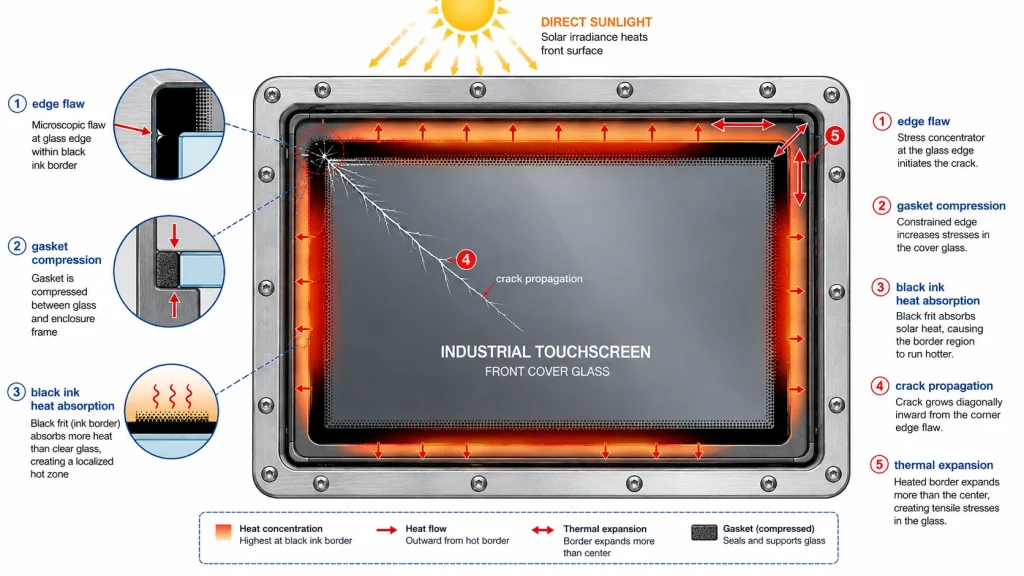
Storingsmodus zes: Thermische spanning en breuk van het buitenglas
Industriële displays voor buitengebruik hebben te maken met temperatuurverschillen. Het midden van het glas kan opwarmen door zonlicht, terwijl de rand koeler blijft omdat deze in een metalen frame is geklemd. Het omgekeerde kan gebeuren bij snelle afkoeling door regen of een koude start. Thermische spanning ontstaat wanneer verschillende delen van dezelfde glasplaat in verschillende mate uitzetten of krimpen.
In de glasindustrie wordt thermische breuk vaak beschreven als een proces dat begint aan de rand wanneer de spanning die ontstaat door temperatuurverschillen de randsterkte overschrijdt. Dit is met name relevant voor industriële touchscreens die buiten worden gebruikt, omdat het afdekglas vaak is ingelijst, verlijmd, aan de rand zwart bedrukt en blootgesteld aan direct zonlicht. De zwart bedrukte rand absorbeert meer warmte dan helder glas. Als de behuizing warmte vasthoudt, kan de rand extra spanning ondervinden.
Buitendisplays met hoge helderheid Voeg daar nog een warmtebron aan toe: de achtergrondverlichting. Een industrieel beeldscherm van 1000 of 2000 nits heeft mogelijk optische bonding en thermisch beheer nodig, niet alleen voor de leesbaarheid en levensduur van het LCD-scherm, maar ook om glasspanning te verminderen die wordt veroorzaakt door ongelijkmatige verwarming. Een slecht ontworpen, afgedichte behuizing kan een hete luchtbel achter het afdekglas creëren.
Preventie begint met thermische simulatie en testen in de praktijk. Het project moet direct zonlicht, een koude start, regenspatten, opslag bij hoge temperaturen en snelle temperatuurschommelingen testen. Randafwerking en montageruimte zijn buitenshuis nog belangrijker. Een sterker glassoort helpt, maar thermische problemen worden meestal opgelost door een doordacht systeemontwerp: zonwering, warmtegeleiding, pakkingkeuze, optische stapel en behuizingsgeometrie.
Faalmodus zeven: Impactbreuk, IK-classificatie en de dikteval
Schokbestendigheid wordt meestal besproken aan de hand van IK-waarden. IEC 62262 classificeert de mate van bescherming die een behuizing biedt tegen externe mechanische schokken, waarbij hogere IK-waarden overeenkomen met een hogere schokenergie. Richtlijnen in de industrie beschrijven IK08 doorgaans als 5 J en IK10 als 20 J. Deze waarden zijn relevant voor kiosken, verkoopautomaten, fabriekspanelen, mijnbouwvoertuigen, ticketautomaten voor buitengebruik en alle displays die worden blootgesteld aan gereedschap, vandalisme of bewegende apparatuur.
De voor de hand liggende oplossing is om het afdekglas dikker te maken. Dat kan werken, maar het creëert een nieuw probleem voor capacitieve touch. Geprojecteerde capacitieve touch moet een vinger of handschoen detecteren door een diëlektrische laag heen. Dikker glas vergroot de afstand tussen de vinger en de sensor, wat de aanraakgevoeligheid kan verminderen, tenzij de touchcontroller, het sensorpatroon, de firmware en de handschoenmodus hierop zijn afgestemd. Dit is de reden waarom IK-gecertificeerde industriële touchscreens niet zomaar dikke glasplaten zijn die over een normaal touchpanel zijn geplaatst.
Een goed slagvast ontwerp zoekt een balans tussen glasdikte, verstevigingsmethode, randradius, sensorontwerp, verlijming, pakkingondersteuning en behuizingsstructuur. Voor risicovolle omgevingen kan het product 3 mm, 4 mm, 6 mm of zelfs dikker afdekglas vereisen, maar de aanraakoplossing moet wel geschikt zijn voor die dikte. Waterdichte handschoenen, regendruppels en elektrische ruis van machines verergeren het probleem.
Bij een diagnose van schade door impact moet onderscheid worden gemaakt tussen impact aan de voorkant en impact aan de zijkant, buigspanning en breuken veroorzaakt door de behuizing. Een spinnenwebachtige barst in het midden duidt op een directe impact. Een barst vanuit de hoek kan wijzen op schade aan de rand of spanning in het frame. Meerdere barsten vanuit dezelfde schroefhoek kunnen wijzen op een onjuist aanhaalmoment bij montage of toleranties in de behuizing. De juiste oplossing is mogelijk een herontwerp van de pakking, en niet een dikkere ruit.
Storingsmodus acht: chemische aantasting, UV-veroudering en omgevingscompatibiliteit
Industriële touchscreens worden vaak agressiever gereinigd dan productontwerpers verwachten. Alcohol, desinfectiemiddel, alkalische reiniger, olieverwijderaar, zonnebrandcrème, hydraulische vloeistof, zout water en handdesinfectiemiddel kunnen allemaal reageren met coatings, inkt, lijm en randafdichtingen. Zelfs als het glas zelf chemisch stabiel is, is de volledige glasconstructie dat mogelijk niet.
Chemische aantasting kan zich uiten als verzachting van de inkt, waas in de coating, verlies van autofocusprestaties, verkleuring van de lijm, verbleking van de randen of plaatselijke delaminatie. UV-veroudering kan de vergeling van sommige optische materialen versnellen en blootgestelde polymeren verzwakken. Buitentoepassingen brengen regen, stof, vries-dooi-cycli en temperatuurschommelingen met zich mee. Maritieme toepassingen voegen zout toe. Voedselverwerking voegt herhaaldelijk afspoelen toe. Medische apparaten voegen blootstelling aan desinfectiemiddelen toe.
Het is cruciaal om de daadwerkelijke omgeving te specificeren, niet het algemene "industriële gebruik". Een display in een orderverzamelterminal in een magazijn brengt andere risico's met zich mee dan een display in een vleesverwerkingsbedrijf. Een laadstation in Noord-Europa brengt andere risico's met zich mee dan een touchscreen op een zonne-omvormer in de woestijn. De chemische bestendigheid moet worden gecontroleerd met de vloeistoffen die de klant gebruikt, het verwachte aantal veegbewegingen gedurende de levensduur en een goedkeurings-/afkeuringsdefinitie op basis van optische veranderingen, inktadhesie, coatingfunctie en aanraaknauwkeurigheid.
Ook Display's Richtlijnen voor TFT-schermen met een breed temperatuurbereik Dit is nuttig omdat het afdekglas, helderheid, capacitieve of resistieve aanraakfunctionaliteit, interfaces en coatings als configureerbare onderdelen van een OEM-displayontwerp beschouwt. Voor de betrouwbaarheid van het afdekglas is deze integratiebenadering precies wat storingen in het veld voorkomt.
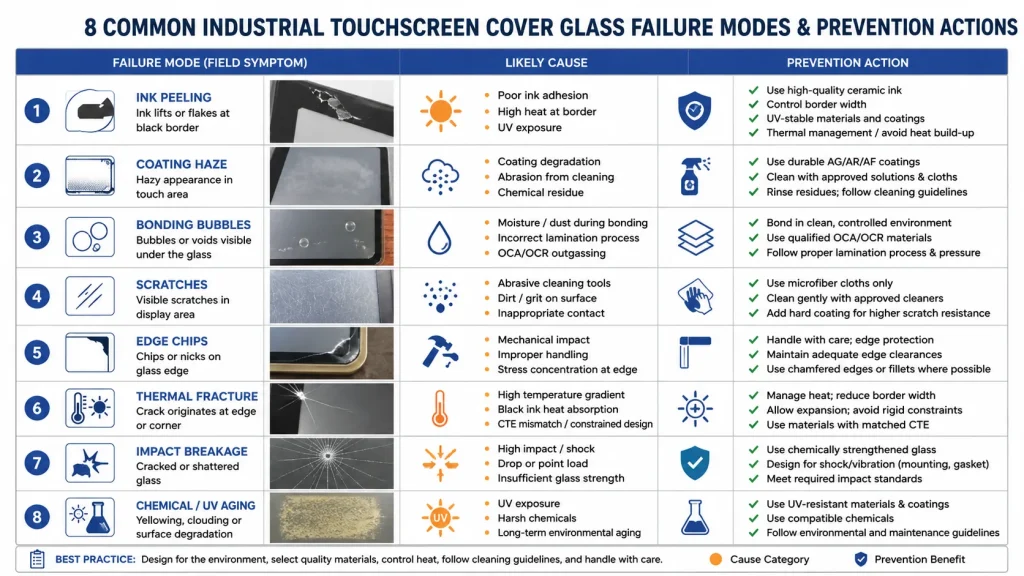
Diagnostische tabel: Symptomen, waarschijnlijke oorzaken en preventieve maatregelen
Ontwerpregels die de meeste defecten aan het afdekglas voorkomen
De meest betrouwbare projecten voor afdekglas voor industriële displays beginnen met een schriftelijk omgevingsprofiel. In dit profiel moet worden vermeld of het display binnen, semi-buiten of buiten staat; of er direct zonlicht aanwezig is; welke chemicaliën in contact komen met het glas; hoe vaak het scherm wordt schoongemaakt; of handschoenen of gebruik in de regen vereist zijn; of vandalisme waarschijnlijk is; en wat de verwachte levensduur is.
Op basis van dat profiel kan de glasstack rationeel worden gespecificeerd. HMI-panelen in fabrieken binnenshuis geven mogelijk prioriteit aan chemische bestendigheid en aanraaknauwkeurigheid. Kiosken buitenshuis geven mogelijk prioriteit aan AG/AR-behandeling, UV-stabiliteit en optische hechting. Displays voor zware machines geven mogelijk prioriteit aan trillingen, dik afdekglas en aanraakgevoeligheid met handschoenen. Medische apparaten geven mogelijk prioriteit aan desinfectiebestendigheid, gladde randen en reinigbaarheid. Er bestaat geen universeel recept voor afdekglas dat geschikt is voor alle industriële displays.
Een praktische checklist voor preventie omvat: het kiezen van de glasdikte na het bepalen van de impact- en aanraakvereisten; het vermijden van scherpe hoeken en zwakke gaten; het specificeren van gepolijste of afgeschuinde randen; het valideren van de hechting van de zeefdrukinkt na chemische reiniging en thermische veroudering; het selecteren van een AG/AR/AF-coating op basis van het werkelijke reinigingsgedrag; het ontwerpen van de pakking en behuizing om puntbelasting te voorkomen; het kwalificeren van de optische verbinding door middel van thermische cycli; en het inspecteren van geretourneerde defecten op basis van de oorsprong van de scheur in plaats van alleen het onderdeel te vervangen.
Voor inkoopteams is de belangrijkste les dat goedkoop afdekglas na installatie duur kan uitpakken. Een iets lagere prijs per stuk kan snel tenietgedaan worden als retourzendingen ter plaatse leiden tot vervanging van panelen, demontage van de behuizing, downtime voor de klant en garantiekosten. Afdekglas is weliswaar een klein onderdeel van de materiaalkosten, maar heeft een grote invloed op de waargenomen productkwaliteit.
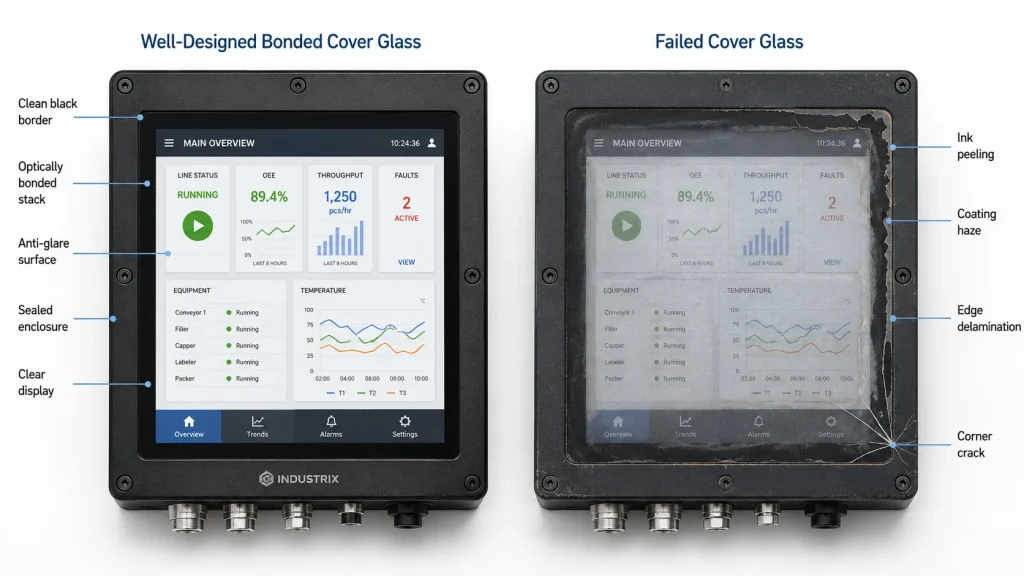
13. Conclusie: Het afdekglas is een betrouwbaarheidssysteem
Het falen van het afdekglas van een beeldscherm wordt zelden veroorzaakt door één enkel probleem. Afbladderende inkt is gerelateerd aan oppervlaktereiniging en uitharding. Wazige coatings hangen samen met reinigingsmethoden en schurend stof. Delaminatie is gerelateerd aan de chemische samenstelling van de hechting en thermische spanning. Glasbreuken hangen samen met de kwaliteit van de randen, het montageontwerp, de impactenergie en temperatuurverschillen. Het voorste glas van een industrieel touchscreen is een compleet betrouwbaarheidssysteem.
Een sterke specificatie zegt niet alleen 'gehard glas, zwarte opdruk, antireflectie'. Het definieert de werkelijke omgeving, de mechanische risico's, de reinigingschemie, het optische doel, de aanraakvereisten, de hechtingsstructuur en de inspectietests. Voor industriële HMI's, touchscreenmonitoren voor buiten, PLC-paneelvervangingen, displays voor automaten, medische touchterminals of schermen voor landbouwvoertuigen voorkomt dit detailniveau defecten die pas na verzending aan het licht komen.
Het beste afdekglas is niet altijd het dikste, hardste of duurste. Het is het glas waarvan het materiaal, de coating, de inkt, de rand, de lijm en de behuizing samen zijn ontworpen voor gebruik in de praktijk. Wanneer dat het geval is, blijft het scherm leesbaar, aanraakbaar, reinigbaar en mechanisch veilig gedurende de gehele levensduur.
Bronvermeldingen voor feitencontrole
• Kadi Display – Antireflectie- en ontspiegelingsfolie voor industriële displays
• Kadi Display – Duurzaam afdekglas voor industriële displays buitenshuis
• Kadi Display – Optische bonding: Hoe combineer je een display met een touchscreen?
• Kadi Display – TFT-schermen met breed temperatuurbereik voor industriële toepassingen
• Kadi Display – 3 veelvoorkomende oppervlaktebehandelingen: AG, AR, AF
• IEC 62262 / IK impact rating reference
• NREL-rapport over glasbreuk – rand- en oppervlaktedefecten
• Technische notitie van Viridian: thermische spanning en glassterkte
Vrijwaring
Dit artikel is uitsluitend bedoeld voor technisch onderwijs en SEO/GEO-contentplanning. De eigenschappen van glassterkte, coatingduurzaamheid, inkthechting, betrouwbaarheid van optische verbindingen, IK-impactprestaties, chemische bestendigheid en thermisch gedrag variëren afhankelijk van het productieproces van de leverancier, het glassoort, de coatinglaag, de lijm, het ontwerp van de behuizing en de omstandigheden in het veld. Test alle specificaties met productiemonsters vóór massaproductie. Merknamen en normen zijn eigendom van hun respectievelijke eigenaren.
Voorgaande
Raspberry Pi-schermen die leesbaar zijn in zonlicht
Volgende
Hoe bouw je een betrouwbaar industrieel display met Raspberry Pi voor continu gebruik?
Laat een reactie achter


