




Industriële touchscreens kunnen er ook geweldig uitzien.
2026-05-11
11:16
Industriële touchscreens kunnen er ook geweldig uitzien.
Een complete gids voor het personaliseren van displayglas: vorm, kleur en logo
Door het technische team van Kadi Display | www.kadidisplay.com | Industriële displaytechnologie
De aanname dat industriële displays er niet premium uit kunnen zien.
Er bestaat een onuitgesproken aanname in veel industrieel ontwerpwerk: dat de mens-machine-interface een functioneel object is en dat het visuele ontwerp het probleem van iemand anders is. Het HMI-team specificeert de processor, de touchtechnologie, de helderheid en de beschermingsklasse. Vervolgens krijgt het productontwerpteam het scherm en probeert het in te passen in een apparaat dat eruit moet zien alsof het thuishoort in een ziekenhuisgang, een luchthaventerminal of een luxe winkelomgeving. De standaard zwarte industriële rand met afgeschuinde randen en een merklabel dat met plakband is vastgeplakt, is geen goed uitgangspunt.
De realiteit in 2025 is dat display afdekglas personalisatie De technologie is inmiddels zo ver gevorderd dat touchscreens van industriële kwaliteit met dezelfde visuele afwerking als consumentenelektronica kunnen worden geproduceerd, zonder concessies te doen aan de duurzaamheid, chemische bestendigheid of IK-gecertificeerde schokbestendigheid die industriële toepassingen vereisen. Aangepaste vormen, aangepaste inktkleuren, bedrukte logo's en tekst, matte textuurzones, metallic effecten – al deze mogelijkheden zijn beschikbaar via standaardproductieprocessen in industriële volumes, en de technische beperkingen zijn goed bekend.
Dit artikel behandelt het volledige spectrum van maatwerk voor display-afdekglas voor industriële HMI-toepassingen: de processen voor vormaanpassing en de bijbehorende toleranties, de beschikbare printtechnieken voor kleur en branding, de specifieke technische beperkingen die verschillen van consumentenglas, en de projectworkflow die u van concept tot productie-eenheden brengt zonder kostbare aanpassingen in een laat stadium.
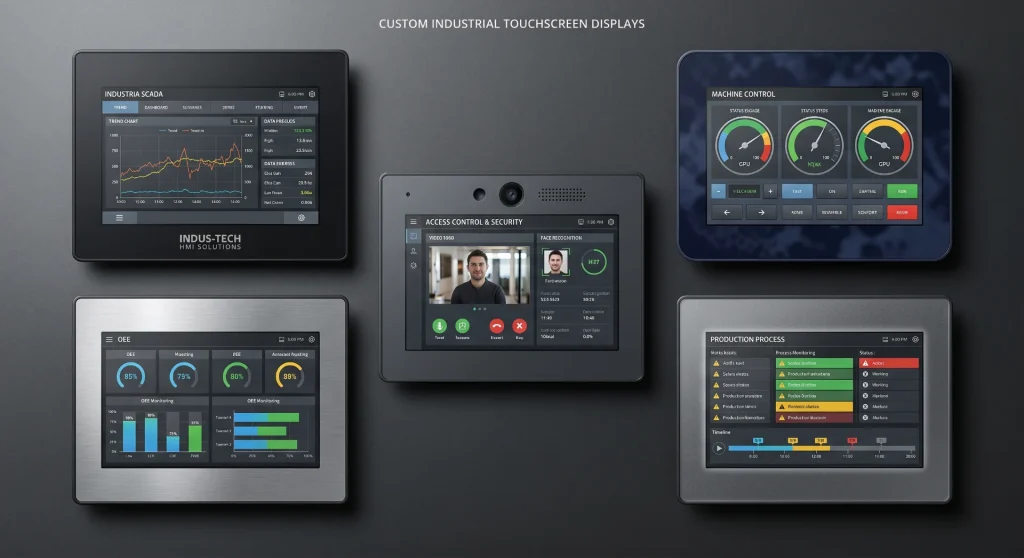
Waarom dit commercieel belangrijk is: Eindklanten in de medische sector, detailhandel, transport en horeca beoordelen de waargenomen kwaliteit van industriële terminals steeds vaker op basis van de visuele afwerking. Een op maat gemaakt displayglas met het logo en merk van de klant is hiervoor een uitstekende optie. kleurEn een strakke rand straalt de volwassenheid van het product uit op een manier die een standaard zwarte rand niet kan. Voor OEM-leveranciers die op meer dan alleen prijs concurreren, is afdekglas essentieel. personalisatie is een echt onderscheidend kenmerk.
Wat maatwerk voor het afdekglas precies inhoudt
De fysieke omvang
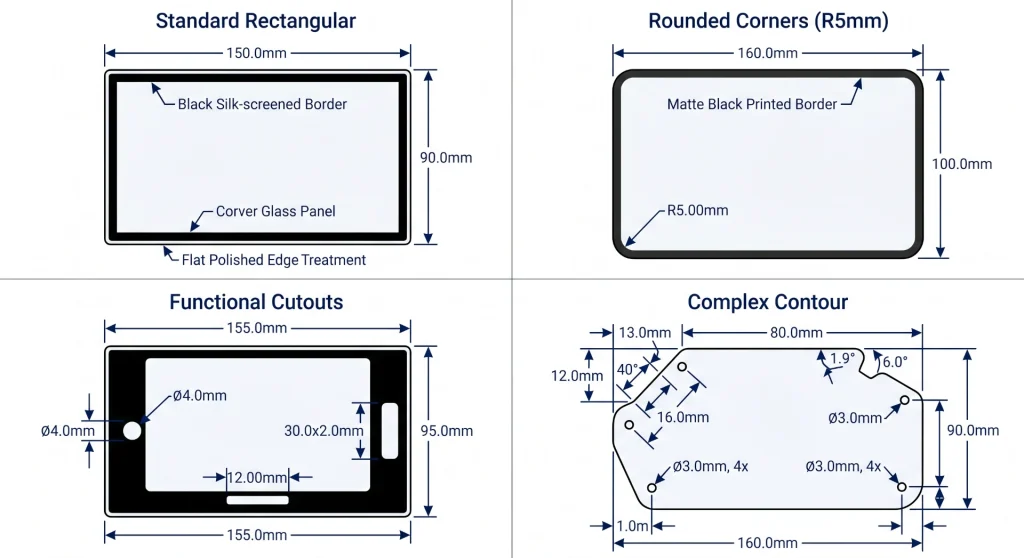
Een display afdekglas In een industriële touchscreen-assemblage bevindt zich doorgaans een vlakke plaat chemisch gehard glas van 1,1 tot 4,0 mm dik, die aan de voorzijde van de displaystapel is geplaatst. Deze kan direct aan de onderliggende aanraaksensor zijn bevestigd (optische bonding) of in een frame met een luchtspleet zijn geplaatst. De standaardconfiguratie van een paneelfabrikant is rechthoekig, met een vlakgeslepen rand, een zwarte zeefdrukrand op de achterzijde en een vrij schermoppervlak.
Aanpassingen beginnen vanuit die basis en kunnen zich gelijktijdig in meerdere richtingen uitbreiden. De omtrek kan worden aangepast aan een onregelmatig profiel van de behuizing. De hoeken kunnen worden afgerond tot een specifieke R-waarde. Gaten of uitsparingen kunnen worden toegevoegd voor camera's, microfoons, LED's, fysieke knoppen of aansluitingen. De randbedrukking kan worden gewijzigd van zwart naar elke gewenste kleur, met toevoeging van logo's, tekst of grafische elementen. De oppervlakteafwerking kan worden aangepast van standaard vlak gepolijst naar AG-geëtst mat, of naar een selectief gematteerde zone die het displayvenster omlijst met een gestructureerde rand. Zelfs de glasdikte kan worden gespecificeerd om te voldoen aan een mechanische ontwerpvereiste.
Wat blijft hetzelfde?
De fysieke aanpassingen hebben geen invloed op de onderliggende glaseigenschappen die van belang zijn voor industriële toepassingen – hardheid, chemische hardingsdiepte, IK-waarde of bedrijfstemperatuurbereik – zolang de aanpassingsprocessen correct en in de juiste volgorde worden uitgevoerd. Het snijden en afwerken van de randen gebeurt vóór het harden in het standaard productieproces (het snijden van gehard glas verzwakt het); het bedrukken gebeurt na het harden. Het is belangrijk om deze procesvolgorde met uw leverancier te controleren, omdat het overslaan ervan (bijvoorbeeld bedrukken vóór het uiteindelijke snijden) glas oplevert met een verminderde randsterkte.
De belangrijkste technische interactie om in de gaten te houden is inktdekking en aanraakgevoeligheidCapacitieve aanraaksensoren detecteren de vingerpositie elektrisch door het afdekglas heen. Een dikke inktlaag op de achterkant van het afdekglas – met name metallic of zeer dekkende inkten – kan het capacitieve signaal verzwakken, waardoor de aanraakgevoeligheid in de bedrukte gebieden afneemt. Bij displays waarbij de aanraakgevoelige zone tot aan de rand van het glas reikt (rand-tot-rand aanraakbediening), moet rekening worden gehouden met een dikke randbedrukking bij de kalibratie van de aanraakcontroller. Dit is oplosbaar, maar moet in de ontwerpfase worden aangegeven en niet pas tijdens integratietests worden ontdekt.
Vormgeving op maat: wat is mogelijk en wat kost het?
Snij- en contourprocessen
Aanpassing van de vorm van glas maakt gebruik van CNC-bewerking met diamantgereedschap Dit is het primaire proces voor de meeste industriële toepassingen. De snijkop volgt een geprogrammeerd pad dat de omtrek nauwkeurig definieert, en het glas wordt ondergedompeld of continu met water gekoeld om thermische scheuren door wrijving te voorkomen. Toleranties van ±0,1–0,2 mm op lineaire afmetingen zijn standaard; nauwere toleranties (±0,05 mm) zijn haalbaar, maar verhogen de bewerkingstijd en -kosten.
Ronde en sleufvormige uitsparingen worden gemaakt met een kernboor of freeskop die een geprogrammeerd pad volgt. De minimaal praktische gatdiameter is over het algemeen 3 mm voor gehard glas, en de afstand tussen de rand en de uitsparing moet minstens drie keer de glasdikte zijn om te voorkomen dat scheuren zich onder spanning vanuit de uitsparing naar de glasrand verspreiden. Deze beperking wordt vaak over het hoofd gezien in de vroege fase van het mechanisch ontwerp: een uitsparing die mechanisch elegant is in een CAD-model, kan een volledig nieuw chassisontwerp vereisen zodra de glasingenieur de vereiste spanningsvrije ruimte aangeeft.
Opties voor randafwerking
De rand van een glazen paneel is tegelijkertijd een belangrijk spanningsconcentratiepunt en een belangrijk esthetisch detail. De standaard vlakke rand (ook wel C0 of Arrised genoemd) is de minimaal acceptabele afwerking voor industriële toepassingen. Het verwijdert de scherpe snijrand die overblijft na het eerste snijden en vermindert de kans op spaanders die zich tijdens het hanteren tot scheuren kunnen ontwikkelen. Voor toepassingen waarbij de glasrand zichtbaar is voor de gebruiker, of waarbij de rand frequent wordt aangeraakt tijdens het schoonmaken, is een afgeschuind rand (C0.3–C0.5) of potloodgepolijste rand (Volledige radius) zorgt voor een veiligere en verfijndere afwerking.
Vanuit het oogpunt van mechanische duurzaamheid presteert een gepolijste rand meetbaar beter dan een geslepen rand bij val- en impacttests, omdat polijsten de microbarsten verwijdert die door het slijpen zijn achtergelaten. Bij IK-classificatietests is de faalmodus vaak een randgeïnitieerde breuk die zich over het paneel voortplant. Een gepolijste rand verkleint deze faalkans en voor toepassingen die gericht zijn op IK10 is het specificeren van gepolijste randen in plaats van vlakgeslepen de extra kosten waard.
Opties voor het aanpassen van de vorm van het afdekglas
Een belangrijke ontwerpbeperking om vroegtijdig te signaleren: Glas kan na chemische harding niet meer worden gesneden of geboord zonder het risico op catastrofale schade. De vormgeving moet op het onbewerkte glas plaatsvinden vóór het harden. Dit betekent dat elke ontwerpwijziging aan de glascontour of de positie van uitsparingen na aanvang van het hardingsproces een volledig nieuw substraat vereist – nabewerking na het harden is niet mogelijk. Leg het mechanische ontwerp vast voordat u een glasproductie start.
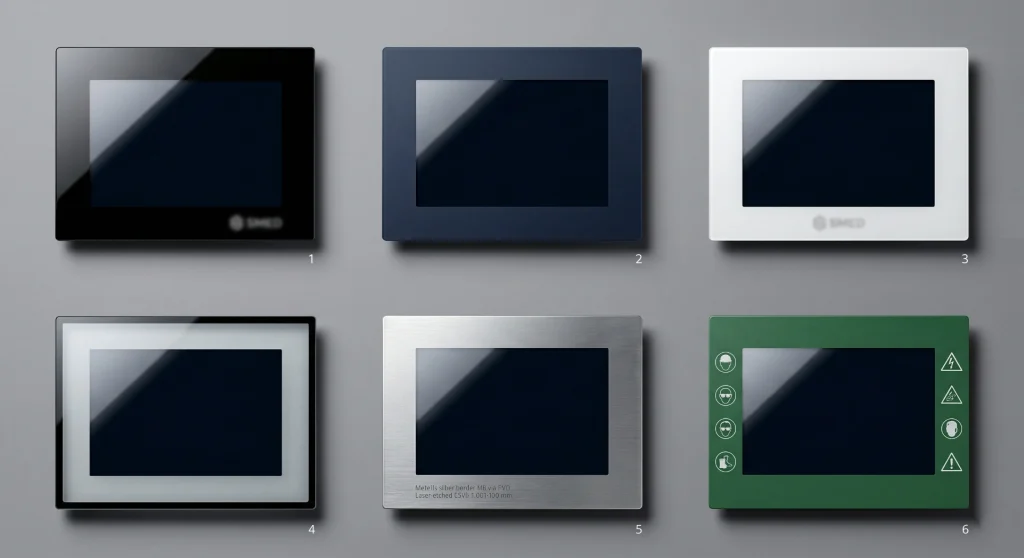
Kleuraanpassing — Van matzwart tot Pantone-kleuren van uw merk
Waarom de standaard zwarte rand niet je enige optie is.
De zwarte inktrand op de achterkant van de meeste glazen afdekpanelen heeft een functionele functie: het verbergt de rand, de lijmlaag, de rand van de aanraaksensor en de randen van de LCD-module voor het oog van de gebruiker. Zwart is optisch neutraal en gemakkelijk te realiseren met goedkope UV-uithardende zeefdrukinkt. Maar zwart is niet de enige optie, en voor merken die werken met specifieke kleuridentiteiten – bedrijfsblauw, RAL-gespecificeerd industrieel grijs, wit voor medische apparaten – is een aangepaste inktkleur zowel haalbaar als betekenisvol.
De praktische beperking is dat inkt kleur Op glas is niet hetzelfde als inkt. kleur op papier of schermGlas is transparant en heeft een eigen optische eigenschap; de zwarte onderlaag die de meeste randinkten nodig hebben om dekkend te zijn, beïnvloedt de uiteindelijke kleurweergave. Inkt die op de achterkant van het glas is gedrukt, is vanaf de voorkant door het glas heen te zien – het glas fungeert als een filter en verschuift de waargenomen kleur enigszins. Dit is beheersbaar met de juiste technieken. kleur profilering (Het omzetten van de beoogde Pantone- of RAL-waarde naar de equivalente waarde voor de printzijde die correct leesbaar is door het glas), maar hiervoor is een fysieke kleurproef op het daadwerkelijke glassubstraat nodig voordat massaproductie kan worden goedgekeurd. Keur nooit een kleur goed op basis van een zeefdruk.
Mat versus glanzend en selectieve afwerkingen
Naast het opvullen met effen kleuren, biedt printen op dekglas ook andere mogelijkheden. selectieve matte/glanzende combinaties die het afgewerkte paneel een gelaagde visuele kwaliteit geven. Een typische aanpak is een glanzend zwarte binnenrand rond het actieve weergavegebied, met een matzwarte of matte buitenrand rond de productrand. Het contrast tussen de twee afwerkingen creëert een visuele diepte die de productkwaliteit communiceert zonder extra kosten bovenop de inktspecificaties.
Voor premium toepassingen, bevroren zones Door selectief AG-etsen vóór het printen ontstaat een tactiele en visuele textuur die uniek is. Het matte oppervlak verstrooit licht anders dan een gepolijst oppervlak, waardoor een zacht focus-effect ontstaat dat bijzonder goed werkt als omlijsting rond een displayvenster of als zone voor knoplabels op een bedieningspaneel met vaste functies. De productievolgorde is belangrijk: etsen vóór het printen, en vervolgens uitharden, omdat matte oppervlakken poreuzer zijn dan gepolijst glas en inkt ongelijkmatig kunnen absorberen als de volgorde wordt omgekeerd.
Logo- en merkbedrukking: processen, duurzaamheid en ontwerpvoorschriften
Zeefdruk versus UV-inkjet: de juiste keuze maken
De twee meest gebruikte druktechnieken voor het bedrukken van industriële dekglazen zijn zeefdruk en UV-inkjetprinten. Deze technieken zijn niet onderling verwisselbaar en de keuze hangt af van de complexiteit van het ontwerp, de vereiste duurzaamheid en het productievolume.
Zeefdruk Deze techniek maakt gebruik van een raster en een rakel om inkt door een sjabloon op het glasoppervlak te drukken in één doorgang per kleur. Het is de voorkeurstechniek voor dekkende, effen vlakken (randkleuren, effen logoblokken) en voor productievolumes van meer dan een paar honderd stuks, waarbij de vaste gereedschapskosten snel worden terugverdiend. De minimale lijnbreedte is ongeveer 50 μm met een ervaren operator en een goede rasterkwaliteit. Gradiëntdruk is lastig en wordt meestal benaderd door een rasterpuntpatroon. De inktlaag is dik (doorgaans 10-30 μm), wat zorgt voor een goede dekking, maar ook voor een voelbare rand die de prestaties van aanraaksensoren in de buurt van de rand kan beïnvloeden.
UV-inkjetprinten UV-inkjetprinters brengen minuscule druppels UV-uithardende inkt rechtstreeks op het glasoppervlak aan, zonder fysiek zeefdrukraam, geleid door een digitaal bestand. Dit maakt het mogelijk om afbeeldingen van fotografische kwaliteit te printen met een resolutie van 720–2400 dpi, meerkleurige verlopen, kleine, fijne tekst en variabele data (serienummers, QR-codes die per eenheid verschillen). De inktlaag is dunner (3–10 μm), waardoor het tactiele randeffect en de demping van de aanraaksensor worden verminderd. Bij kleine volumes zijn de kosten voor zeefdrukramen volledig vermeden. Het nadeel is een hogere kostprijs per eenheid bij grote volumes en een iets lagere inktdekking bij dezelfde dekking.
Laseretsen voor permanente markeringen
Voor conformiteitsmarkeringen, serienummers en QR-codes die gedurende de volledige levensduur van het apparaat onbeschadigd moeten blijven, laseretsen Dit is de meest duurzame optie. De laser wijzigt het glasoppervlak zelf – door een coatinglaag te verwijderen of een plaatselijke verandering in de glasstructuur aan te brengen – waardoor een markering ontstaat die niet kan worden verwijderd zonder het glas fysiek te beschadigen. Deze techniek wordt gebruikt voor CE-markering, UL-certificeringsmerken, wettelijke teksten en alle merkelementen die aantoonbaar permanent moeten zijn voor producttraceerbaarheid.
Het visuele resultaat van laseretsen op helder glas is een matwitte uitstraling op het etspunt. Op een bedrukte zwarte rand onthult laseretsen door de inkt heen het glas eronder, waardoor een nauwkeurig wit-op-zwart logo of tekst ontstaat. Op een metallic PVD-coating onthult laseretsen de glaskleur onder het metaal, wat een helder-op-metaal effect creëert. De combinatie van een PVD-basislaag met een lasergeëtst logo wordt gebruikt in hoogwaardige medische, luchtvaart- en defensietoepassingen waar de afwerkingskwaliteit de productcategorie aangeeft.
Essentiële ontwerpregels voor logo-ontwerp
Bij het bedrukken van glas gelden diverse specifieke beperkingen voor het ontwerpen van logo's, die afwijken van algemene drukwerkontwerpen. Minimale teksthoogte Bij zeefdruk is de standaarddikte doorgaans 1,5 mm voor gevulde tekst en 2,0 mm voor tekst met contouren. Bij kleinere diktes beginnen de lettervormen tijdens het drukproces te vervormen of in te zakken. Minimale breedte van het kenmerk Voor geïsoleerde lijnen is de tolerantie 0,1 mm voor UV-inkjet en 0,2 mm voor zeefdruk. Tekst en logo's in omgekeerde richting (wit op zwart, transparant op zwart) hebben iets ruimere minimale afmetingen dan bij positief drukwerk, omdat het geïnkte gebied aaneengesloten is en de toleranties in de transparante gebieden minder kritisch zijn.
De kleurspecificatie moet altijd het volgende bevatten: Pantone Matching System (PMS) codes of RAL Classic-codes Gebruik fysieke kleurreferenties, niet RGB- of hex-waarden. RGB-waarden beschrijven de lichtemissie van een scherm; Pantone en RAL beschrijven de fysieke reflectie van inkt. De conversie tussen beide is niet eenvoudig en varieert afhankelijk van het glasoppervlak, de inktsamenstelling en de kijkomstandigheden. Vraag om een fysieke Pantone-kleurstaal of RAL-chipvergelijking met het proefglas voordat de massaproductie wordt goedgekeurd.
Vergelijking van het druk- en brandingproces van afdekglazen
Op maat gemaakt afdekglas met logo en kleur afdrukken: Displayoplossingen op maat — Kadi Display — OEM- en ODM-aanpassing van het afdekglas, inclusief vorm, inktkleur, logo-zeefdruk, UV-inkjet en laseretsen. Ondersteunt volledige integratie van displaymodules met aangepast frontglas, interface en optische bonding.
Duurzaamheid van personalisatie: wat blijft behouden en wat vervaagt?
Duurzaamheid van inkt in industriële omgevingen
De duurzaamheid van bedrukte elementen op industrieel afdekglas hangt voornamelijk af van inktchemie en afdrukpositieInkt die op de achterkant van het afdekglas (de zijde die naar de aanraaksensor of het beeldscherm is gericht) is gedrukt, wordt door het glas zelf beschermd tegen invloeden van buitenaf. De inkt kan niet worden beschadigd door schoonmaken, bekrast door gereedschap of aangetast door UV-straling van buitenaf. Dit is de standaardconfiguratie voor het bedrukken van randen en logo's en biedt een uitstekende duurzaamheid op lange termijn: UV-uitgeharde inkten op chemisch gehard glas gaan onder normale omstandigheden doorgaans langer mee dan het beeldscherm en het apparaat waarin ze zijn gemonteerd.
Printen op de voorzijde wordt soms gevraagd voor speciale effecten, zoals voelbare knoppen, logo's met reliëf of elementen die oplichten in het donker. Deze print is echter blootgesteld aan de elementen en vereist een beschermende, transparante harde coating over de inkt om een acceptabele levensduur te garanderen. Zonder harde coating degradeert industriële inkt op de voorzijde doorgaans binnen 12 tot 24 maanden door reiniging en slijtage in industriële omgevingen. Met een correct aangebrachte harde coating (minimaal 7H potloodhardheid) kan de duurzaamheid van de print op de voorzijde oplopen tot meer dan 5 jaar. UV-bestendigheid moet echter specifiek worden gekwalificeerd. voor buiteninstallaties.
Kleurstabiliteit in de loop van de tijd
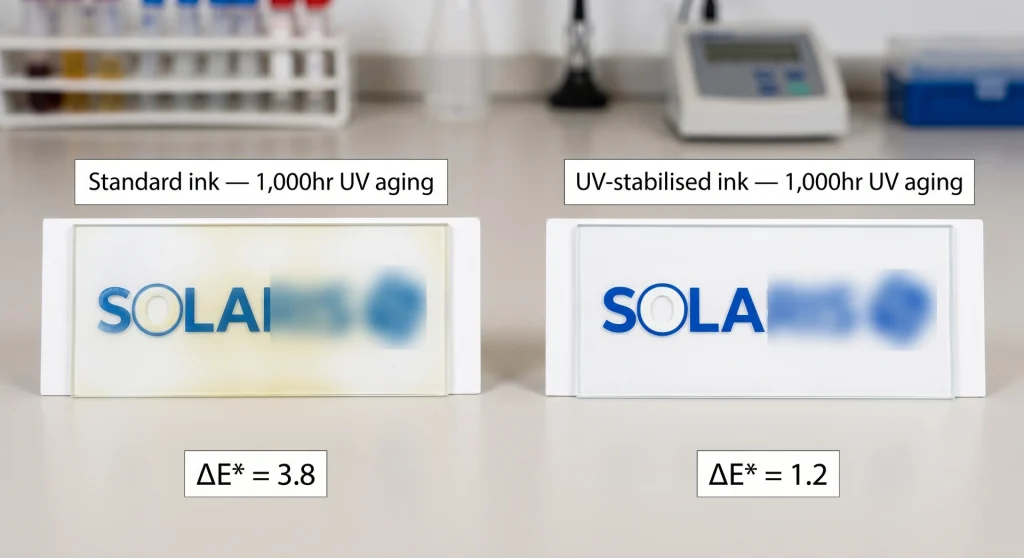
Kleurverandering onder invloed van UV-licht is de meest voorkomende vorm van langdurige degradatie van bedrukt dekglas bij buitentoepassingen. Standaard zeefdrukinkten – zelfs UV-uithardende formules – kunnen meetbare kleurverandering (delta E > 3) vertonen na 1000 uur versnelde UV-veroudering, wat overeenkomt met 2-3 jaar blootstelling aan de buitenlucht. Voor buiteninstallaties dient u UV-gestabiliseerde inktformules te specificeren met een delta E ≤ 2,0 na 1000 uur UV-veroudering volgens de relevante norm.
Lasergeëtste markeringen vervagen niet; de aanpassing bevindt zich in de glasstructuur zelf. Voor conformiteitsmarkeringen en serienummers die gedurende de volledige levenscyclus van het product leesbaar moeten blijven, is laseretsen de specificatie die de vraag naar de duurzaamheid van de inkt volledig elimineert.
De workflow voor maatwerk: van ontwerpbestand tot productie.
Wat u moet voorbereiden voordat u contact opneemt met een leverancier
De snelste manier om een project voor op maat gemaakt glas te vertragen, is door contact op te nemen met een leverancier zonder de ontwerpdocumentatie gereed te hebben. Leveranciers kunnen werken met concepttekeningen, maar elke aanpassing van de vorm en het ontwerp aan de kant van de leverancier kost extra tijd en verhoogt het risico op interpretatiefouten. De documenten die een project voor op maat gemaakt glas versnellen, zijn:
- Omtrektekening van glas in DXF- of DWG-formaat. Op schaal 1:1, met alle afmetingen, toleranties, specificaties voor de randafwerking, dikte en uitsparingposities expliciet aangegeven.
- Illustraties in vectorformaat (AI, EPS of PDF). Op schaal 1:1, met de afdrukkleur gespecificeerd in Pantone- of RAL-code. Tekstelementen worden omgezet naar contouren, niet naar bewegende tekst.
- Referentietekening voor de afdrukpositie De afbeelding laat zien waar het kunstwerk zich bevindt ten opzichte van de glazen omlijsting, waarbij het actieve weergavegebied van het venster duidelijk is aangegeven.
- Specificatie oppervlaktebehandeling: Welk oppervlak wordt AG-geëtst, waar wordt de hardcoat aangebracht, of optische hechting vereist is en wat zijn de compatibiliteitseisen voor de aanraaksensor?
Productieworkflow voor maatwerk
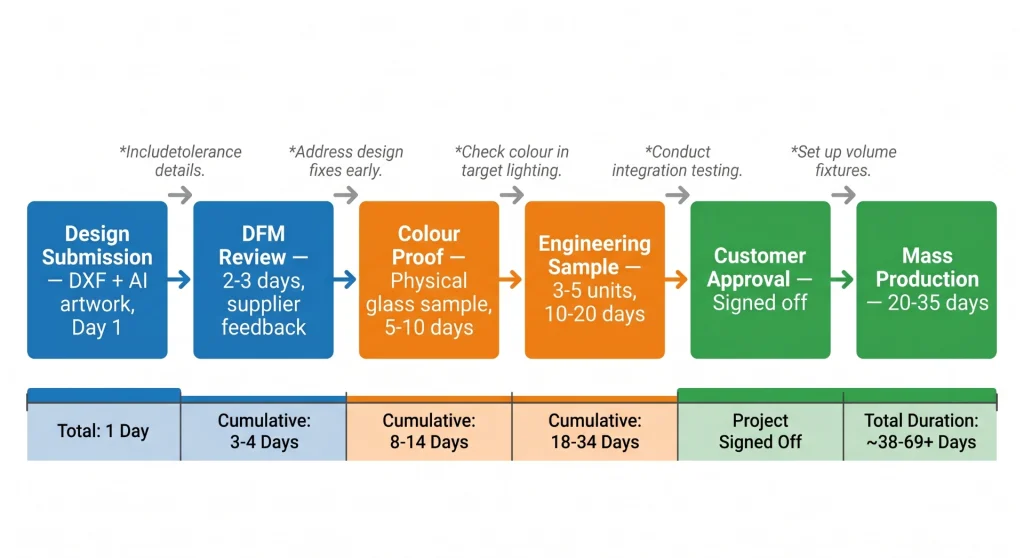
Werkstroom voor het personaliseren van afdekglas
De workflowtabel maakt één ding duidelijk: het fysieke kleur De bewijsfase is niet optioneel.Iedere ervaren productontwikkelaar die ooit heeft geprobeerd de kleurproef over te slaan en direct op basis van een schermweergave goed te keuren, heeft wel eens productie-exemplaren in de verkeerde kleur ontvangen. Het menselijk gezichtsvermogen is extreem gevoelig voor kleurafwijkingen — delta E-verschillen van slechts 2,0 zijn voor de meeste mensen bij directe vergelijking al zichtbaar — en het verschil tussen een proef op papier en inkt op glas, bekeken vanuit een hoek van 50 mm door chemisch gehard glas, kan die drempel gemakkelijk overschrijden.
Start een project voor een op maat gemaakt afdekglas: Kadi Display — Maatwerk displayoplossingen — Ondersteuning bij het personaliseren van het afdekglas, inclusief het beoordelen van vormtekeningen, kleurprofilering, zeefdruk en UV-inkjetprinten, laseretsen, optische bonding en volledige integratie van de displaymodule. Lage minimale bestelhoeveelheid voor prototypes. Technische ondersteuning vanuit de vestiging in Shenzhen.
Industriële toepassingen — Waar op maat gemaakt afdekglas een meetbaar verschil maakt
Medische terminals en apparaten voor patiëntcontact
Fabrikanten van medische hulpmiddelen worden geconfronteerd met een specifieke combinatie van eisen: witte of lichtgekleurde oppervlakken (de standaardkleur van medische apparatuur), IP65-reinigbaarheid, PCAP-aanraakbaarheid door het afdekglas en wettelijk verplichte keurmerken (CE, IEC 60601, UL) die permanent moeten worden aangebracht. Op maat gemaakt wit afdekglas Met een bedrukte rand aan de achterzijde, lasergeëtste conformiteitsmarkeringen en een AF-coating is dit de oplossing die aan al deze eisen tegelijk voldoet. De AF-coating op het aanraakoppervlak vermindert de zichtbare vervuiling door herhaaldelijk contact met handschoenen, waardoor onbehandelde witte oppervlakken er binnen enkele uren na ingebruikname onhygiënisch uitzien.
Kassaterminals voor de detailhandel en horeca
Kassaterminals en zelfbedieningskiosken in de detailhandel en horeca zijn de industriële apparaten die het meest consistent door niet-technische eindgebruikers worden beoordeeld op visuele kwaliteit. Het scherm is het visitekaartje van het apparaat. Op maat gemaakt afdekglas in een kleur die bij het merk past, een vlakke montage in de behuizing en een consistente glansgraad dragen direct bij aan de merkperceptie op een manier die met geen enkele specificatie kan worden weergegeven. Verschillende grote merken in retailtechnologie hebben op maat gemaakt afdekglas opgenomen in hun standaardspecificatie voor terminalschermen en beschouwen het als een investering in branding in plaats van een kostenpost.
Vervoers- en bewegwijzeringsdisplays
Vervoersbedrijven en luchthavenautoriteiten die passagiersinformatieterminals ontwerpen, vragen steeds vaker om op maat gemaakt afdekglas als onderdeel van hun ontwerp. De praktische drijfveer hiervoor is vandalismebestendigheid (IK10-glas) in combinatie met een visuele stijl die aansluit bij het ontwerp van het station of voertuig — specifieke RAL-kleuren die passen bij het kleurenpalet van de vervoerder, een minimale rand en een aangepaste vorm die past in architectonische uitsparingen. Dit zijn projecten waarbij het visuele resultaat en het technische resultaat tegelijkertijd geoptimaliseerd moeten worden, en dat vereist een leverancier van displays die beide kan beheren.
Zie ook: Industriële beeldschermen — Kadi Display — Industriële monitorreeks met optioneel op maat gemaakt afdekglas, IP65-afdichting aan de voorzijde, panelen met hoge helderheid en op maat gemaakte randafwerking. Geschikt voor medische toepassingen, detailhandel, transport en kiosken voor het publiek.
Kostenstructuur en minimale bestelhoeveelheid (MOQ) - Wat kunt u verwachten?
Waar komen de kosten vandaan?
Op maat gemaakt afdekglas is duurder dan standaardpanelen, maar de meerprijs is kleiner dan de meeste mensen buiten de toeleveringsketen verwachten. De kosten bestaan uit de volgende componenten: glassubstraat (bepaald door materiaalsoort en dikte), CNC-vormbewerking (afgeschreven gereedschapskosten, bewerkingstijd per eenheid), oppervlaktebehandelingen (AG-etsen, AR-coating, hardcoat – elk kost $1-8 per eenheid bij een gemiddeld volume), drukgereedschap (zeefdrukramen kosten $50-200 per kleur; UV-inkjet heeft geen gereedschapskosten) en het drukken zelf ($0,5-3 per eenheid, afhankelijk van de dekking en het proces).
Voor een standaard 7-inch op maat gemaakt afdekglas — chemisch gehard, afgeronde hoeken, aangepaste vorm met twee uitsparingen, zwarte rand met wit logo, AG-oppervlak, harde coating — bedragen de meerkosten ten opzichte van een standaard exemplaar ongeveer $5–15 per stuk bij afnames van 500–2.000 stuks.Bij meer dan 5.000 stuks daalt dit naar $3–8. Dit zijn marktindicatieve cijfers, geen officiële prijzen — de exacte kosten zijn afhankelijk van de specifieke glasleverancier, de complexiteit van de vorm en het drukproces.
Minimale bestelhoeveelheden
De meeste leveranciers van op maat gemaakte afdekglazen werken samen met prototypes in aantallen van 3–10 stuks Voor technische monsters en kleurstalen. De minimale bestelhoeveelheden voor massaproductie variëren: voor vormaanpassing alleen is er doorgaans geen minimale bestelhoeveelheid (de CNC-machines zijn programmeerbaar en kunnen kleine series produceren), terwijl de instelkosten voor het printproces een praktisch minimum van 50-200 stuks per printopdracht creëren voor zeefdruk, en geen praktisch minimum voor UV-inkjet. Sommige leveranciers, waaronder die met flexibele OEM/ODM-mogelijkheden, accepteren bestellingen vanaf 100 stuks voor op maat bedrukt glas met gemengde aantallen in verschillende kleurvarianten.
Samenvatting — Het pleidooi voor het beschouwen van afdekglas als een designelement
De standaardaanpak in de industrie — standaard zwarte rand, standaard vorm — was logisch toen maatwerk duur was en de levertijden lang. Geen van beide beperkingen is in 2025 nog zo belangrijk als vijf jaar geleden. CNC-vormbewerking is programmeerbaar en snel. Zeefdruk en UV-inkjetprinten op glas is een volwaardig proces met een goed doordacht kleurbeheer. De workflow van ontwerpbestand tot massaproductie is gedocumenteerd en herhaalbaar.
Het argument voor op maat gemaakt afdekglas in industriële displaytoepassingen is niet primair esthetisch. Het is een argument vanuit productontwerpperspectief.Een afdekglas dat naadloos in de behuizing past, aansluit bij de merkidentiteit van het product, permanente conformiteitsmarkeringen draagt en de kwaliteitsklasse van het product communiceert door middel van de oppervlakteafwerking, is een beter geïntegreerd onderdeel dan een generiek equivalent. Het is raadzaam om dit gesprek met een leverancier van beeldschermen aan te gaan aan het begin van de mechanische ontwerpfase – voordat de glasvorm definitief is, voordat de matrijs voor de behuizing wordt gemaakt en voordat de merkidentiteit is aangepast aan de beschikbare standaard paneelafmetingen.
Aanvragen voor op maat gemaakte afdekglazen — vorm, kleurVoor vragen over logo-afdrukken, oppervlaktebehandeling, optische bonding en volledige integratie van displaymodules kunt u contact opnemen met Kadi Display via Sales@sz-kadi.com. Prototypes vanaf 3 stuks zijn mogelijk. OEM- en ODM-projectondersteuning is beschikbaar vanuit de productiefaciliteit in Shenzhen. Bezoek kadidisplay.com voor het volledige productaanbod. personalisatie catalogus.
Disclaimer: De in dit artikel genoemde productiemogelijkheden, toleranties, kosten en levertijden zijn representatieve branchecijfers en dienen uitsluitend ter informatie. De werkelijke specificaties, prijzen en levertijden variëren per leverancier, ontwerpcomplexiteit en productievolume. Pantone® en RAL® zijn geregistreerde handelsmerken van hun respectievelijke eigenaren. Dit artikel vormt geen offerte of toezegging van een genoemde leverancier. Vraag altijd een schriftelijke specificatie en goedkeuring van een monster aan voordat u tot productie overgaat.
Voorgaande
Van binnenomgevingen tot extreme omstandigheden: een spectrumgebaseerd beslissingskader voor de helderheid van industriële beeldschermen
Volgende
Hoe kies je een duurzaam afdekglas voor industriële buitendisplays?
Laat een reactie achter

Laatste Blog & Nieuws
- MIPI DSI Display Driver Development for Embedded Linux What Hardware Buyers Need to Confirm
- Why Outdoor LCDs Fog Inside: Condensation, Sealing, Vents, and Heaters
- IP65 vs IP67 Industrial Displays: What the Rating Actually Covers
- How to Specify a Touchscreen for Food-Processing Equipment
- Thermal Management for High Brightness LCDs in Sealed Outdoor Enclosures

